CMS Migration Cost Breakdown: What You’re Really Paying For
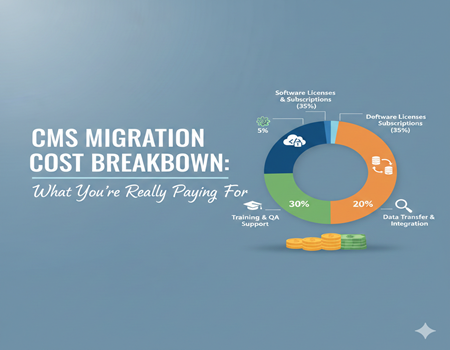
CMS migration is often seen as a simple technical task—move content from one platform to another and you’re done. In reality, it’s a complex process that involves much more than data transfer. Businesses usually underestimate the cost because many critical elements remain hidden until the migration begins. From content restructuring and design adjustments to SEO preservation and performance optimization, each step adds to the overall investment.
Another reason costs rise unexpectedly is customization. Websites rarely use a CMS “out of the box.” Custom themes, plugins, integrations, and workflows must be carefully recreated or replaced in the new system. If these elements aren’t handled properly, the result can be broken functionality or lost traffic.
Understanding what you’re truly paying for helps avoid surprises, budget overruns, and post-migration issues. This guide breaks down every major cost involved in CMS migration so you can plan realistically and make informed decisions.
What Is CMS Migration?
CMS migration is the process of moving a website from one content management system to another while preserving its content, structure, functionality, and performance. This could involve shifting from an outdated CMS to a modern platform, upgrading to a more scalable system, or moving to a CMS that offers better security and flexibility. Common examples include migrating from Joomla or Drupal to WordPress, or from a traditional CMS to a headless CMS.
For businesses, CMS migration is usually driven by growth needs, performance issues, security concerns, or limitations in the current platform. It’s not just a technical change—it directly affects user experience, SEO rankings, and day-to-day content management. That’s why many organizations rely on professional CMS Migration Services to ensure the transition is smooth, secure, and optimized for long-term business goals.
Key Factors That Influence CMS Migration Cost
CMS migration costs vary widely because no two websites are built the same. The final price depends on several technical and strategic factors that determine the scope of work involved. Understanding these elements helps businesses estimate budgets more accurately and avoid unexpected expenses during the migration process.
1. Type of CMS Being Migrated (From and To)
The platforms involved play a major role in cost. Migrating between two open-source CMS platforms is usually more affordable than moving from a proprietary or legacy system. Older or highly restricted CMS platforms often require custom scripts, data restructuring, or manual intervention, which increases development time and cost. Headless or enterprise CMS migrations also tend to be more expensive due to their advanced architecture.
2. Website Size and Structural Complexity
The number of pages, blog posts, products, media files, and databases directly affects migration cost. A small informational website is relatively simple, while a large ecommerce or multilingual website requires careful data handling and testing. Complex URL structures, multiple content types, or multi-site setups further increase effort and pricing.
3. Customization and Feature Requirements
Most websites rely on custom themes, plugins, or integrations. These features may not be compatible with the new CMS and often need to be rebuilt or replaced. Integrations with CRM systems, marketing tools, payment gateways, or third-party APIs add additional development and testing costs. The more customized the website, the higher the migration investment required.
Together, these factors determine how straightforward or complex a CMS migration will be—and what you’re really paying for behind the scenes.
Content Migration Costs: Beyond Copy-Paste
Content migration is one of the most time-consuming and underestimated parts of a CMS migration. Many businesses assume content can simply be copied and pasted into the new system, but in reality, content must be transferred in a structured, accurate, and CMS-compatible way to avoid data loss or formatting issues.
Automated vs. Manual Content Migration
Automated migration tools can speed up the process for large websites, but they come with limitations. While they handle basic pages and posts efficiently, they often struggle with complex layouts, custom fields, or dynamic content. Manual migration, on the other hand, offers higher accuracy and control but requires significantly more time and effort. In many projects, a hybrid approach is used, combining automation with manual checks to ensure data integrity.
Content Cleanup and Optimization
Migration is also an opportunity to improve content quality. Outdated pages, duplicate content, broken links, and poorly structured posts should be cleaned up before or during migration. URLs may need restructuring to align with the new CMS, and content formatting must be adjusted to fit updated templates. These optimization steps add to the overall cost but result in a cleaner, more efficient website that performs better after migration.
Proper content migration ensures your website remains usable, organized, and future-ready rather than simply “moved” to a new platform.
Design & UI Migration Costs
Design and user experience (UI) play a major role in CMS migration costs. When moving to a new CMS, your website’s design needs to be recreated or adapted to fit the new platform’s templates and functionality. This process is more than just copying the old look—it requires rebuilding layouts, ensuring responsiveness, and optimizing for speed and usability.
Theme Recreation or Redesign
If your current website uses a custom theme or complex design, the migration will require recreating those templates in the new CMS. Even small design changes can increase costs because developers must rebuild the structure and styling to match the old look or improve it. Some businesses choose to redesign during migration, which adds additional design and development time.
Performance & UX Enhancements
A migration is also a chance to improve website performance and user experience. This includes optimizing images, improving page load speed, and ensuring the site works smoothly on mobile devices. Modern CMS platforms may require different design techniques to achieve fast loading and better UX. These improvements can increase migration costs but lead to better rankings, higher engagement, and improved conversions.
Overall, design and UI migration costs are determined by how much customization, responsiveness, and performance enhancement your new website requires.
SEO Migration Costs (The Most Critical Cost Layer)
SEO is often the most crucial yet overlooked cost factor in CMS migration. A poorly managed migration can cause significant drops in organic traffic, ranking, and conversions. The reason is simple: search engines treat a CMS migration like a website change, and any mistake in URL structure, redirects, or metadata can disrupt indexing and ranking. That’s why SEO costs must be planned and budgeted as part of the migration process.
1. URL Mapping and Redirect Management
During migration, URLs often change due to new CMS structure or updated site architecture. Each old URL must be carefully mapped to its new version using 301 redirects. If redirects are missing or incorrect, users and search engines will land on broken pages, causing traffic loss and ranking decline. Redirect planning, testing, and implementation are time-consuming tasks that directly influence migration cost.
2. Metadata & On-Page SEO Preservation
Titles, meta descriptions, header tags, image alt tags, and schema markup must be preserved during migration. Many CMS migrations lose SEO data if the new platform doesn’t support the same fields or if the migration tool fails to transfer them correctly. Rebuilding or updating these elements after migration increases time and cost.
3. Post-Migration SEO Testing
SEO doesn’t stop once the site is live. Post-migration checks are essential to ensure proper indexing and performance. This includes crawling the website for errors, monitoring traffic and rankings, checking indexation status, and fixing issues like broken links or duplicate content. These tasks require SEO expertise and ongoing effort, which add to the overall migration cost.
Ignoring SEO in CMS migration is risky and expensive. Proper SEO planning and execution protect your organic visibility and prevent long-term losses.
Development & Functional Migration Costs
CMS migration is not just about moving content—it also involves recreating or updating the website’s functionality. Development and technical integration are major cost drivers, especially when a website relies on custom features or complex systems.
Plugin & Feature Compatibility
Most websites use plugins, extensions, or custom modules to add special features like contact forms, booking systems, membership access, or advanced page builders. When migrating to a new CMS, these plugins may not be available or compatible. In such cases, developers must rebuild the same features using new tools or custom code. This process requires careful planning and testing, which increases the migration cost.
Third-Party Integrations
Many businesses connect their website to external systems such as CRM tools, payment gateways, analytics, email marketing platforms, and inventory systems. During migration, these integrations must be reconnected and tested to ensure they work seamlessly. Any custom API connections or data synchronization needs additional development time, which further adds to the total cost.
In short, the more complex your website’s functionality, the higher the development cost will be. A successful migration requires technical expertise to ensure all features and integrations work smoothly on the new CMS without losing data or performance.
Testing & Quality Assurance Costs
Testing and quality assurance (QA) are essential steps in CMS migration, but they are often underestimated in the planning stage. Without proper testing, even a technically successful migration can result in broken pages, missing content, or poor user experience that damages your brand and SEO.
Cross-Browser and Device Testing
Your website must work smoothly across different browsers (Chrome, Safari, Firefox) and devices (mobile, tablet, desktop). QA teams check responsiveness, layout consistency, and functionality to ensure the site performs well for every user.
Performance and Security Testing
Migrated websites must maintain or improve speed and load time. QA includes checking for slow pages, broken links, and security vulnerabilities. If issues are found, they need to be fixed before the website goes live.
User Acceptance Testing (UAT)
UAT ensures the site meets business goals and works as expected for real users. This stage involves stakeholders reviewing the site and confirming everything functions correctly.
Overall, thorough testing adds to the cost, but it prevents major issues after launch and ensures a smooth, reliable migration.
Project Management & Support Costs
CMS migration requires careful planning and coordination, and that’s where project management costs come in. A successful migration involves multiple teams—developers, designers, SEO experts, and content managers—working together in a structured timeline. Project managers oversee the process, track progress, handle communication, and ensure deadlines are met. This coordination is essential to avoid delays, errors, and rework.
Post-migration support is another key cost factor. After the site goes live, minor issues often appear such as broken links, formatting errors, or performance problems. Support includes fixing these issues quickly, monitoring site performance, and making sure the new CMS functions smoothly for users and administrators.
While project management and support add to the total cost, they protect your website from delays and unexpected problems, ensuring a smooth transition without affecting business operations.
Hidden CMS Migration Costs Businesses Often Overlook
Many businesses focus only on obvious migration expenses like development and design. However, hidden costs often appear during and after migration, making the project more expensive than planned. Knowing these hidden costs helps businesses budget realistically and avoid surprises.
Downtime and Revenue Loss
Even a short downtime during migration can affect sales, lead generation, and user trust. If your website is unavailable or slow, users may leave, which impacts revenue and brand reputation.
Training Internal Teams
When the CMS changes, your team must learn how to use the new platform. Training staff on the new editor, publishing process, and new workflows takes time and can temporarily reduce productivity.
Hosting or Server Upgrades
Some CMS platforms require stronger hosting or higher server resources to run smoothly. Upgrading hosting, increasing storage, or improving security measures can add ongoing costs.
Ongoing Maintenance Costs
Post-migration maintenance includes updates, security patches, plugin compatibility checks, and performance monitoring. These recurring tasks add to the long-term cost of migration.
By planning for these hidden expenses, businesses can avoid surprises and ensure a smooth migration without compromising performance or user experience.
CMS Migration Cost Ranges (Realistic Estimates)
CMS migration costs can vary widely depending on the website’s size, complexity, and business requirements. While exact pricing depends on each project, understanding realistic cost ranges helps you plan better and avoid unexpected expenses.
Small Websites (Informational Sites)
For small businesses with simple websites (under 20 pages), CMS migration can cost between $1,000 to $3,000. These projects usually involve basic content transfer, simple design adjustments, and minimal integrations.
Medium Websites (Business or Portfolio Sites)
For websites with 20–100 pages, blogs, or small ecommerce setups, migration costs typically range from $3,000 to $8,000. This includes content migration, design replication, SEO preservation, and moderate customization.
Large Websites (Ecommerce or Multi-site Platforms)
Large websites with complex structures, multiple integrations, or ecommerce capabilities can cost $8,000 to $20,000+. These projects require advanced planning, custom development, extensive testing, and SEO management.
These cost ranges are estimates and can change based on your website’s unique requirements, custom features, and integrations. The more complex your website, the higher the migration cost. Proper planning and a detailed audit are essential for accurate pricing.
How to Estimate Your CMS Migration Cost Accurately
Estimating CMS migration cost accurately begins with a detailed audit of your existing website. A proper audit helps identify the number of pages, content types, custom features, plugins, integrations, and SEO elements that must be migrated. Without this information, cost estimates often fall short, leading to budget overruns and delays.
A key step is to list every website component that needs migration: content, design, functionality, SEO, and integrations. Then, classify each component by complexity—simple, moderate, or advanced. This helps in understanding the time and effort required for each task.
Another important factor is planning for testing and post-launch support. These tasks are essential to ensure the website works correctly after migration, and they contribute to the final cost.
To get a quick estimate, use a CMS Migration Cost Calculator, which considers factors like website size, custom features, and SEO requirements. This tool provides a clearer budget outlook and helps you plan a smooth migration without surprises.
Is CMS Migration Worth the Investment?
Yes, CMS migration is worth the investment when it aligns with your long-term business goals. While the upfront cost may seem high, a successful migration improves website performance, scalability, and security. It also creates a better user experience, which can increase conversions, engagement, and customer trust.
Migrating to a modern CMS allows your team to manage content more efficiently, saving time and reducing operational costs. It also supports advanced features like better SEO tools, faster page speed, and improved integrations with marketing and sales systems.
In many cases, migration can also help you avoid hidden costs associated with outdated platforms, such as security vulnerabilities, compatibility issues, and limited customization options. If your current CMS is slowing down your business growth or creating frequent technical problems, migration becomes a strategic investment rather than an expense.
Ultimately, CMS migration is worth it when the benefits—such as improved performance, better SEO, and increased scalability—outweigh the migration cost and lead to long-term growth.
How Professional CMS Migration Services Reduce Risk & Cost
Professional CMS migration services help businesses avoid common mistakes that lead to delays, broken functionality, and loss of traffic. Experts handle every step of the migration process, from planning and data transfer to testing and post-launch support, ensuring a smooth transition without disrupting your website performance or user experience.
A professional team brings experience in handling complex migrations, including custom themes, plugins, and third-party integrations. They can identify compatibility issues early and provide solutions that save time and reduce rework. This also minimizes the risk of broken pages or lost data after the migration.
Experts also ensure SEO is preserved by managing redirects, metadata, and indexing properly. This prevents ranking drops and protects your organic traffic during the transition.
Using professional CMS migration services may cost more initially, but it reduces long-term risks and hidden expenses. It ensures your migration is completed efficiently, securely, and correctly, saving your business from costly mistakes and downtime.
Final Thoughts: Paying for the Right Things in CMS Migration
CMS migration is more than a technical move—it’s an investment in your website’s future performance, security, and scalability. The cost of migration reflects the effort needed to protect your content, preserve SEO, rebuild design and functionality, and ensure a smooth user experience. Cutting corners can lead to broken pages, lost traffic, and long-term damage to your brand.
The most successful migrations are planned carefully, with clear audits, realistic budgets, and proper testing. By understanding what you’re really paying for, you can avoid surprises and choose the right migration approach for your business. Whether you need basic content transfer or a complete website upgrade, a strategic migration delivers long-term value and growth.
If you want an accurate estimate, start with a detailed audit and use a reliable CMS Migration Cost Calculator to plan your budget effectively.