Moving MODX Multi-Site Installations to WordPress
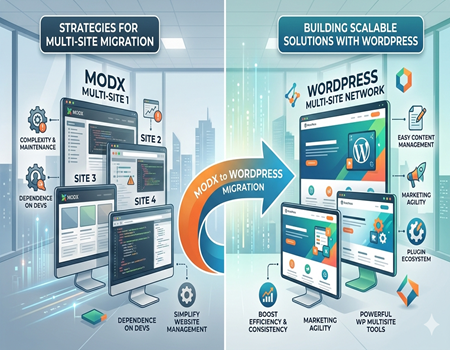
Managing multiple websites has become common for many businesses today. Companies often run different websites for multiple brands, regions, or services. A multi-site setup allows organizations to control several websites from a centralized system.
This approach helps businesses maintain consistency across websites while simplifying management. Instead of maintaining completely separate systems, teams can manage content, updates, and configurations from one platform.
MODX is one of the content management systems that supports flexible website development. Many developers appreciate MODX because it allows them to build customized websites with full control over templates, design, and functionality.
Because of this flexibility, some businesses use MODX to manage multiple websites through a single installation. Developers can create different site structures, templates, and configurations for each website while maintaining centralized control.
However, managing multiple websites in MODX can become complicated over time. As businesses grow, the number of pages, templates, and content assets also increases. This makes the system harder to maintain and manage efficiently.
Marketing teams and content managers may also face difficulties when working with MODX multi-site setups. Tasks like updating content across multiple websites, managing SEO settings, or launching new pages can require technical involvement.
When marketing teams depend heavily on developers, it slows down website updates and campaign launches. In fast-moving digital environments, businesses need systems that allow teams to work quickly and independently.
Another challenge is scaling the system as the number of websites grows. Managing performance, updates, and integrations across multiple MODX websites may require ongoing technical effort.
Because of these challenges, many organizations begin exploring alternative platforms that provide simpler multi-site management. Businesses often look for systems that support marketing teams while still allowing scalable website management.
For this reason, many companies eventually decide to Migrate website from MODX to WordPress, where multi-site management, content updates, and marketing tools are often easier to handle.
Understanding MODX Multi-Site Installations
MODX multi-site installations allow businesses to manage multiple websites from a single CMS setup. Instead of installing a separate system for each website, developers can configure several sites within one MODX environment.
This setup helps organizations maintain centralized control over their websites. Developers can manage templates, content structures, and system configurations from a single installation.
In many cases, MODX multi-site setups are used by businesses that manage several brands or services. Each website may have its own design, domain, and content while still operating within the same CMS environment.
For example, a company with multiple regional branches may create separate websites for different locations. Each site may target a different audience but still share common resources and system management.
Franchise businesses also use multi-site systems to manage multiple locations. Each location can have its own website pages while the company maintains centralized control over templates and design.
One reason developers prefer MODX for multi-site projects is its flexibility. The platform allows them to create custom templates and structures for each site without strict limitations.
Developers can control how each website behaves while still managing everything from the same system. This flexibility makes MODX suitable for complex website architectures.
However, this level of flexibility also adds complexity. Multi-site setups in MODX often require careful configuration and technical expertise.
Managing templates, content structures, and site configurations across multiple websites can become difficult over time. As the number of websites increases, maintaining the system may require continuous technical support.
Marketing teams may also find it challenging to work within this structure. Updating content across several websites or maintaining consistent messaging may require developer assistance.
Another challenge is training new team members. Because MODX multi-site setups are highly customized, each system may work differently depending on how developers built it.
Over time, these complexities can slow down website management. Businesses often begin looking for CMS platforms that offer simpler multi-site solutions.
As a result, many organizations eventually decide to Migrate website from MODX to WordPress to simplify multi-site management and improve content workflows.
Why Businesses Use Multi-Site Website Architectures
Many businesses manage more than one website. Companies may operate multiple brands, services, or regional branches. Instead of managing separate systems for each site, they often use a multi-site architecture.
A multi-site system allows organizations to control several websites from a centralized platform. This approach simplifies website management and reduces the need to maintain multiple CMS installations.
One common reason businesses use multi-site setups is brand management. Large companies often run different brands under the same organization. Each brand may require its own website, design, and content strategy.
With a multi-site architecture, companies can manage these brand websites more efficiently. Shared resources such as templates, media files, and design elements can be reused across multiple sites.
Regional website management is another important reason for using multi-site systems. Businesses that operate in different cities or countries may create separate websites for each region.
These websites can provide localized content, language support, and region-specific services. At the same time, the company can maintain centralized control over the system.
Franchise businesses also benefit from multi-site architectures. Each franchise location may have its own pages for contact details, local promotions, and services.
Using a centralized CMS makes it easier for the main organization to maintain consistent branding and website structure across all franchise sites.
Another advantage of multi-site systems is simplified maintenance. Instead of updating each website separately, administrators can manage system updates and security from one platform.
This reduces the time and effort required to maintain multiple websites. It also helps ensure consistency across the entire network of websites.
However, the CMS used for multi-site management must be easy to handle for both developers and marketing teams.
When the system becomes too technical or complex, managing multiple websites can become difficult.
Because of this, many businesses eventually decide to Migrate website from MODX to WordPress to make multi-site management easier and more efficient.
Common Challenges with MODX Multi-Site Management
Managing multiple websites through a MODX multi-site setup can become complex over time. While the platform offers flexibility for developers, maintaining several websites within one system often requires careful technical management.
As the number of websites grows, the complexity of managing templates, content structures, and configurations also increases. Each website may have unique layouts, pages, and settings that need continuous monitoring.
Developers often need to manage multiple templates and components for different websites. When updates are required, they must ensure that changes do not affect other sites in the system.
This level of technical management can make the system difficult to maintain. Even small modifications may require careful testing to avoid issues across multiple websites.
Another challenge is the technical setup required for MODX multi-site installations. Creating and configuring multiple websites within one installation often requires advanced knowledge of the platform.
Businesses without dedicated technical teams may struggle to manage this environment effectively. Even routine updates may require developer involvement.
Content management across multiple websites can also become difficult. Marketing teams may need to update pages, blogs, or announcements across several websites at the same time.
If the CMS interface is complex, performing these updates quickly becomes challenging. Marketing teams may need developer assistance to manage certain tasks.
Consistency across websites is another concern. Businesses usually want all their websites to follow consistent branding, design, and messaging.
When managing multiple MODX websites, maintaining this consistency can require extra coordination between developers and marketing teams.
Performance management can also become a challenge as the system grows. Multiple websites running on the same installation may increase server load and require optimization.
Without proper monitoring and technical maintenance, performance issues can affect the user experience on multiple sites.
Scaling the system is another difficulty businesses often face. As companies launch new websites, managing them within an existing MODX multi-site setup can become increasingly complicated.
Because of these challenges, businesses often begin evaluating CMS platforms that offer easier multi-site management.
Many organizations eventually decide to Migrate website from MODX to WordPress to simplify system management and make it easier for both developers and marketing teams to manage multiple websites.
Content Management Difficulties Across Multiple Sites
Managing content across multiple websites can be challenging in any CMS. In a MODX multi-site setup, these challenges can become more noticeable as the number of websites grows.
Marketing teams often need to update content on several websites at the same time. This may include blog posts, product updates, service pages, or company announcements.
When the CMS interface is complex, performing these updates across multiple sites can take more time. Marketing teams may struggle to quickly locate and edit the correct pages.
Content duplication is another common issue. Businesses sometimes need similar content across different websites, especially when managing regional or brand-specific sites.
In MODX, duplicating and updating similar content across multiple websites may require manual work. Without proper content sharing tools, marketers may need to recreate or copy content several times.
This process increases the risk of inconsistencies. Small differences in content, formatting, or messaging can appear across different websites.
Maintaining consistent branding is also important for businesses managing multiple websites. Companies usually want all websites to follow the same tone, design style, and messaging.
However, when content is managed separately across several MODX sites, maintaining this consistency becomes more difficult. Marketing teams must carefully monitor updates across all websites.
Managing large content libraries can also create difficulties. Over time, each website may accumulate many pages, media files, and blog posts.
Finding specific content within a complex system may become time-consuming. Marketing teams may spend extra time searching for pages that need updates.
Content publishing workflows may also be affected. Teams that include writers, editors, and marketing managers need a system that allows smooth collaboration.
If the CMS structure is complicated, collaboration between team members may become less efficient. Content approval and updates may take longer.
Another challenge is launching campaigns across multiple websites. Marketing teams often need to update banners, landing pages, or promotions across several sites at once.
If these changes require technical support, campaign execution can slow down.
Because of these difficulties, many businesses begin searching for CMS platforms that simplify multi-site content management.
As a result, many organizations eventually decide to Migrate website from MODX to WordPress to improve content workflows and make website management easier for marketing teams.
SEO and Performance Challenges in MODX Multi-Site Environments
Search engine optimization becomes more complex when businesses manage multiple websites. Each site may target different keywords, audiences, and regions. Marketing teams must ensure that every website follows proper SEO practices.
In a MODX multi-site environment, managing SEO across several websites can require technical knowledge. Tasks such as configuring metadata, managing page URLs, and setting structured data may involve developer assistance.
Marketing teams usually prefer CMS platforms that provide simple SEO tools. Easy access to meta titles, descriptions, and image alt tags helps marketers optimize pages quickly.
In MODX, these elements may depend on how developers configured templates and content fields. If the setup is technical, marketers may find it difficult to manage SEO settings independently.
Internal linking between multiple websites can also become complicated. Businesses often want to connect related sites to improve user navigation and SEO performance.
Without simple internal linking tools, marketers may need to update links manually across several websites. This process can be time-consuming and prone to errors.
Redirect management is another important SEO task. When businesses update URLs or move pages, proper redirects must be created to avoid broken links.
In MODX multi-site setups, redirect configuration may require technical adjustments. Marketing teams may depend on developers to handle these changes.
Performance management can also become challenging as the number of websites grows. When several websites run on the same installation, server load and system resources may increase.
If the system is not optimized properly, page loading speed may be affected. Slow websites can negatively impact both user experience and search engine rankings.
Scaling the system can also introduce performance issues. As new websites are added, maintaining fast loading speeds and stable performance may require additional optimization.
Monitoring performance across multiple sites can become difficult for teams without strong technical resources.
Because SEO and performance are critical for online visibility, businesses often prefer CMS platforms that simplify these tasks.
For this reason, many companies eventually decide to Migrate website from MODX to WordPress to gain access to easier SEO tools and more scalable website performance management.
Why WordPress is a Popular Alternative for Multi-Site Management
Many businesses look for a CMS that simplifies the management of multiple websites. While MODX offers flexibility for developers, marketing teams often prefer platforms that provide easier content control and management tools.
WordPress has become one of the most popular CMS platforms for this reason. It provides a user-friendly interface that allows teams to manage websites without needing advanced technical knowledge.
One of the biggest advantages of WordPress is its built-in WordPress Multisite feature. This feature allows businesses to manage multiple websites from a single WordPress installation.
Administrators can control themes, plugins, and user permissions across all websites from one dashboard. This centralized system makes it easier to manage several websites efficiently.
Marketing teams also benefit from WordPress because of its simple content editing tools. Creating pages, publishing blog posts, and updating website content can be done quickly.
Visual editors and page builders make it possible to design pages without coding. This allows marketing teams to launch campaigns and update content without waiting for developers.
Another major advantage is the large plugin ecosystem. WordPress offers thousands of plugins that help businesses add new functionality to their websites.
These plugins support SEO optimization, lead generation, analytics, security, and marketing automation. Marketing teams can easily install and configure these tools to improve website performance.
SEO management is also easier in WordPress. Many popular SEO plugins guide marketers while creating content and help optimize pages for search engines.
These tools make it easier to manage metadata, internal links, and site structure across multiple websites.
Collaboration between team members is another area where WordPress performs well. Content creators, editors, and administrators can work together through clear user roles and permissions.
This helps marketing teams manage content workflows more efficiently.
WordPress also integrates easily with many marketing platforms such as email marketing tools, CRM systems, and analytics software.
These integrations allow businesses to track performance and manage campaigns more effectively.
Because of these advantages, many organizations choose WordPress when managing multiple websites.
As a result, businesses often decide to Migrate website from MODX to WordPress to simplify multi-site management and give marketing teams more control over website operations.
Key Steps to Move MODX Multi-Site Installations to WordPress
Moving a MODX multi-site installation to WordPress requires proper planning. Since multiple websites are involved, businesses must carefully organize the migration process to avoid data loss or technical issues.
The first step is analyzing the existing MODX setup. Developers need to review how the multi-site system is structured, including domains, templates, content types, and media files.
Understanding the structure helps teams plan how each website will be rebuilt in WordPress. It also ensures that important features and content are not missed during migration.
The next step is creating a clear migration strategy. Businesses must decide whether all websites will move to a WordPress Multisite network or separate WordPress installations.
This decision depends on the number of websites, their complexity, and how they are managed. Planning this structure early helps avoid confusion later.
Content migration is another important step. All pages, blog posts, media files, and metadata must be transferred from MODX to WordPress.
This process may involve exporting content from the MODX database and importing it into WordPress. Careful handling is necessary to maintain content formatting and page structure.
Design and template migration must also be considered. MODX templates control how each website looks and functions.
When moving to WordPress, developers often recreate these designs using WordPress themes or page builders. This ensures the new websites maintain a consistent visual appearance.
Another important step is setting up SEO elements. Meta titles, descriptions, URLs, and internal links should be preserved during migration.
Maintaining these SEO settings helps protect search engine rankings after the websites move to the new platform.
Testing is a critical part of the migration process. Before launching the new websites, teams must check all pages, links, forms, and integrations.
This helps identify technical errors and ensures that each website functions properly.
After testing is complete, the websites can be launched on the new system. Teams should monitor performance and fix any issues that appear after launch.
With proper planning and careful execution, businesses can successfully Migrate website from MODX to WordPress and create a more efficient multi-site management system.
Best Practices for a Smooth Multi-Site Migration
Migrating multiple websites from MODX to WordPress requires careful planning and execution. Without proper preparation, businesses may face data loss, broken links, or SEO issues.
Following best practices helps ensure that the migration process runs smoothly and that all websites continue to perform well after the move.
The first important step is creating a complete backup of all websites. This includes databases, content files, images, and system configurations.
A backup ensures that data can be restored if any problem occurs during the migration process.
Another important practice is carefully reviewing the website structure before migration. Businesses should analyze page hierarchies, URLs, templates, and navigation systems.
This helps developers rebuild the websites correctly in WordPress without losing important content or functionality.
Maintaining SEO during migration is also critical. Search engine rankings can be affected if URLs, metadata, or internal links are changed incorrectly.
Teams should document existing SEO elements such as page titles, descriptions, and keyword-focused URLs before starting the migration.
Redirect management is another key step. When page URLs change during migration, proper 301 redirects must be created.
Redirects help search engines and visitors reach the correct pages instead of encountering broken links.
Testing all websites before launch is essential. Developers should review page layouts, navigation menus, forms, and internal links across every site.
This ensures that each website works properly within the new WordPress environment.
Businesses should also test mobile responsiveness and page loading speed. Performance improvements are often one of the goals when moving to a new CMS.
Monitoring website performance after launch is equally important. Teams should check analytics data, search rankings, and user behavior during the first few weeks.
Clear communication between developers, marketing teams, and project managers also helps ensure a successful migration.
When the migration is planned carefully and executed properly, businesses can safely Migrate website from MODX to WordPress and enjoy a more flexible and easier multi-site management system.
Conclusion – Building a Scalable Multi-Site System with WordPress
Managing multiple websites is an important part of digital strategy for many businesses. Companies often operate different websites for brands, locations, or services. A well-structured multi-site system helps organizations manage these websites more efficiently.
MODX offers flexibility and customization that developers often appreciate. It allows businesses to build unique website structures and manage multiple sites within one system.
However, as the number of websites grows, managing a MODX multi-site environment can become more complex. Tasks like updating content, managing SEO settings, and maintaining consistent design across sites may require technical support.
Marketing teams usually prefer systems that allow them to work independently. They need tools that make it easy to publish content, update pages, and launch campaigns quickly.
When a CMS requires frequent developer involvement, it can slow down marketing operations. This is why many businesses start exploring platforms that provide easier multi-site management.
WordPress has become a popular solution because it offers a user-friendly interface and strong multi-site capabilities. WordPress Multisite allows administrators to manage multiple websites from one dashboard.
Marketing teams can easily create pages, publish blog posts, and manage content without technical complications.
Another advantage is the large plugin ecosystem. Businesses can add SEO tools, marketing automation, analytics integrations, and security features without custom development.
These tools help companies scale their websites while improving efficiency.
Because of these benefits, many organizations eventually decide to Migrate website from MODX to WordPress to simplify website management and create a scalable multi-site system that supports both developers and marketing teams.