Migrating Liferay Portlets to WordPress
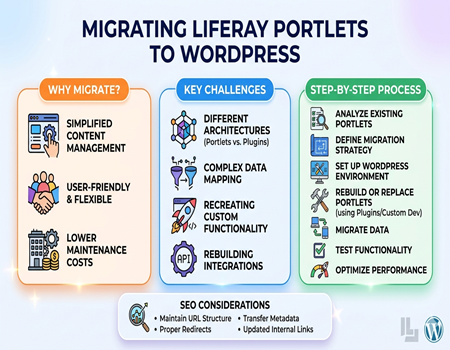
Migrating Liferay portlets to WordPress is becoming a common requirement for businesses that want a simpler and more flexible content management system. Liferay is a powerful platform, but it often feels complex and requires strong technical expertise. WordPress, on the other hand, offers ease of use and faster content management.
Portlets in Liferay are like small functional blocks that handle specific tasks such as dashboards, forms, or user interactions. When migrating, you are not just moving content but also recreating these functionalities in WordPress. This makes the process slightly more technical than a normal CMS migration.
Many businesses face challenges during this transition because Liferay and WordPress work very differently. Without proper planning, functionality can break, and user experience can suffer. In this guide, you will learn how to migrate Liferay portlets to WordPress in a simple and practical way while maintaining functionality and performance.
What Are Liferay Portlets?
Liferay portlets are modular components used to build pages within the Liferay portal. Each portlet performs a specific function, such as displaying content, handling user input, or integrating external data. These portlets work together to create a complete web page.
You can think of portlets as building blocks. For example, a page may include a login portlet, a news portlet, and a search portlet. Each one operates independently but contributes to the overall functionality of the page.
Portlets are highly customizable and can be developed based on business requirements. This flexibility makes Liferay powerful, but it also adds complexity when it comes to migration.
Understanding how portlets work is important before moving to WordPress. Since WordPress does not use portlets, you need to find equivalent solutions such as plugins or custom development to recreate the same functionality.
Why Migrate from Liferay to WordPress?
Many businesses choose to migrate from Liferay to WordPress due to its complexity and high maintenance cost. Liferay often requires dedicated developers for managing and updating the system, which increases operational expenses over time.
WordPress provides a more user-friendly experience. It allows non-technical users to manage content easily, reducing dependency on developers. This makes it ideal for marketing teams that need quick updates and flexibility.
Another reason is the availability of plugins and themes. WordPress offers thousands of ready-to-use solutions that can replace many Liferay portlets without custom development. This saves time and cost during migration.
If you want a smooth transition, using a Liferay To WordPress Migration Service can help ensure that your functionality and data are transferred correctly. This reduces risk and ensures better results.
Overall, WordPress offers simplicity, cost-effectiveness, and flexibility, making it a preferred choice for many businesses.
Key Challenges in Migrating Liferay Portlets
One of the biggest challenges in migrating Liferay portlets is the difference in architecture. Liferay uses portlets, while WordPress relies on plugins and themes. This means you cannot directly move portlets and must recreate their functionality.
Another challenge is data migration. Portlets often handle dynamic data, which needs to be mapped correctly into WordPress. If this is not done properly, data can be lost or displayed incorrectly.
Custom functionality is also difficult to handle. Many portlets are built specifically for a business, so finding an exact replacement in WordPress may not always be possible. This may require custom plugin development.
User interface differences can also create issues. Liferay layouts and WordPress themes work differently, so maintaining the same design and user experience can be challenging.
Integration with external systems is another concern. Portlets often connect with APIs or enterprise tools, and these integrations need to be rebuilt in WordPress.
Pre-Migration Planning Checklist
Before starting the migration, proper planning is essential to avoid errors and delays. The first step is to audit all existing portlets and understand their functionality. Identify which ones are important and which can be removed.
Next, decide how each portlet will be replaced in WordPress. Some can be replaced with plugins, while others may require custom development. This step is crucial for maintaining functionality.
Take a complete backup of your Liferay system. This ensures that your data is safe and can be restored if something goes wrong during migration.
Plan your WordPress structure in advance. Decide how pages, categories, and features will be organized. This makes the migration smoother.
SEO planning is also important. List all URLs and prepare redirects to avoid losing search rankings. A well-prepared checklist ensures a smooth migration process.
Mapping Liferay Portlets to WordPress Features
Mapping is an important step in migration because it helps you decide how each portlet will be recreated in WordPress. Since WordPress does not support portlets, you need to use alternative solutions.
Simple portlets can often be replaced with WordPress plugins. For example, a contact form portlet can be replaced with a form plugin. This makes the process easier and faster.
More complex portlets may require custom development. In such cases, developers create custom plugins or features in WordPress to match the functionality.
Content-related portlets can be mapped to WordPress pages or posts. This helps maintain structure and improves content management.
A clear mapping strategy ensures that all functionalities are handled properly and that the new website works smoothly.
Step-by-Step Process to Migrate Liferay Portlets
Analyze Existing Portlets
Start by analyzing all portlets used in your Liferay system. Understand their purpose, functionality, and importance. This helps you decide how each portlet will be handled during migration.
Define Migration Strategy
Create a clear plan for migration. Decide which portlets will be replaced with plugins and which will require custom development. This ensures a structured approach.
Set Up WordPress Environment
Prepare your WordPress setup by installing themes, plugins, and necessary configurations. This creates a strong foundation for migration.
Rebuild or Replace Portlets
Recreate portlet functionality using WordPress plugins or custom development. Ensure that each feature works as expected.
Migrate Data
Transfer content and data from Liferay to WordPress. Make sure everything is mapped correctly and displayed properly.
Test Functionality
Test all features, forms, and integrations. Fix any issues before launching the website.
Optimize Performance
Finally, optimize your WordPress website for speed and performance. This improves user experience and SEO.
SEO Considerations During Migration
SEO is a critical part of migration. One of the most important steps is maintaining URL structure. If URLs change, proper redirects should be implemented to avoid broken links.
Meta titles and descriptions should be transferred carefully. These elements are important for search rankings and should not be lost.
Internal links should be updated to ensure smooth navigation. Broken links can harm user experience and SEO performance.
Create and submit a sitemap after migration. This helps search engines index your new website quickly.
Proper SEO handling ensures that your rankings and traffic are maintained after migration.
Tools and Methods for Migration
There are different methods available for migrating Liferay portlets to WordPress. Manual migration is suitable for small projects but can be time-consuming.
Automated methods use scripts or tools to transfer data more efficiently. These methods reduce errors and save time.
APIs can also be used to extract and transfer data programmatically. This is useful for complex migrations.
Custom development is often required for recreating advanced portlets. This ensures that functionality is not lost.
Choosing the right method depends on your project size and requirements.
Common Mistakes to Avoid
One common mistake is not planning properly. Without a clear strategy, migration can become confusing and lead to errors.
Ignoring functionality mapping can result in missing features. Always ensure that every portlet is accounted for.
Skipping testing is another major issue. Without proper testing, problems may appear after launch.
Not considering SEO can lead to traffic loss. Always plan redirects and preserve metadata.
Avoiding these mistakes helps ensure a smooth and successful migration.
When to Use Professional Migration Services
If your website has complex portlets and integrations, it is better to use professional help. Experts understand how to handle technical challenges and ensure smooth migration.
Businesses with limited technical knowledge can also benefit from professional services. It saves time and reduces errors.
If you have a tight deadline, professional services can speed up the process. They use tools and experience to complete migration efficiently.
Using a reliable Liferay To WordPress Migration Service ensures that your content, functionality, and SEO are handled properly. It also gives you peace of mind during the process.
Conclusion
Migrating Liferay portlets to WordPress may seem complex, but with proper planning and execution, it becomes manageable. Understanding portlets and mapping them correctly is the key to success.
WordPress offers simplicity, flexibility, and cost-effectiveness, making it a popular choice for businesses.
By following the right approach and avoiding common mistakes, you can ensure a smooth migration without losing functionality or SEO value.