Rebuilding Liferay Workflows in WordPress
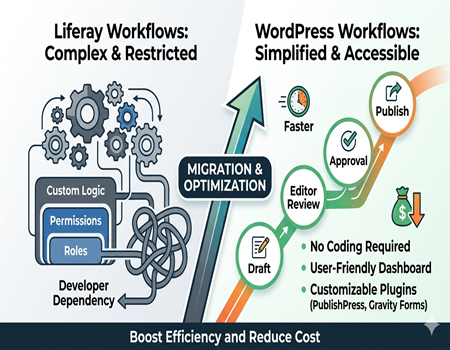
Workflows are an important part of any business website, especially when multiple people are involved in content creation, approvals, and publishing. A workflow simply defines how tasks move from one step to another, ensuring that everything is organized and completed in the right order without confusion or delays.
In platforms like Liferay, workflows are often used for managing content approvals, user permissions, and publishing processes. While they are powerful and flexible, they can also become complex and difficult to manage. Many businesses face challenges because even small changes in workflows may require technical support or developer involvement.
This complexity can slow down daily operations, especially for marketing and content teams who need to publish updates quickly. As businesses grow, managing these workflows becomes even more time-consuming and expensive, making it harder to maintain efficiency and speed.
This is where WordPress comes in as a simpler and more flexible alternative. It allows businesses to create and manage workflows with less technical effort while maintaining control over processes. With the help of plugins and built-in features, workflows can be customized based on business needs without heavy development.
In this blog, we will explain how Liferay workflows work, the challenges involved, and how you can rebuild them in WordPress in a simple and effective way. This will help you understand how to improve efficiency and reduce complexity.
What are Liferay Workflows?
Liferay workflows are structured processes that control how tasks move from one stage to another within a system. They are mainly used to manage content approval, publishing, and user actions in an organized way. These workflows ensure that every task follows a predefined path before it is completed or published.
For example, when a content writer creates a blog in Liferay, it may not get published immediately. The workflow can require approval from an editor or manager before going live. This helps maintain quality and ensures that only approved content is visible to users on the website.
Liferay workflows also support role-based actions. Different users can have different permissions, such as creating content, reviewing it, or approving it. This makes the system useful for large organizations where multiple teams are involved in managing content and processes.
Another important feature of Liferay workflows is customization. Businesses can design workflows based on their specific needs. They can add multiple approval levels, conditions, and automated actions to match their internal processes. This flexibility makes Liferay suitable for complex enterprise environments.
However, this level of customization also adds complexity. Creating and managing workflows in Liferay often requires technical knowledge and developer support. Even small changes may involve configuration updates or coding, which can slow down operations.
Overall, Liferay workflows are powerful tools designed for managing complex processes. They provide control and structure but can become difficult to handle for teams that need speed and simplicity in their daily operations.
Challenges with Liferay Workflows
Complexity
Liferay workflows are highly customizable, but this flexibility often leads to complexity. Setting up workflows with multiple steps, conditions, and approvals can become difficult to manage. For non-technical teams, understanding how the workflow functions is not easy, which creates confusion and slows down daily operations.
As workflows grow, they become harder to track and maintain. Even small updates may require analyzing the entire process. This makes it challenging for businesses that need quick changes or frequent updates in their workflow systems.
Developer Dependency
One of the biggest challenges with Liferay workflows is the dependency on developers. Most workflow configurations and changes require technical knowledge. Marketing or content teams cannot easily make updates on their own, which creates delays and reduces productivity.
This dependency also increases cost, as businesses need skilled developers to manage workflows. Even minor changes like modifying approval steps or adding conditions may involve development effort, making the system less efficient for fast-moving teams.
High Maintenance
Maintaining Liferay workflows requires continuous effort. As business processes evolve, workflows need to be updated regularly. This includes testing, debugging, and ensuring everything works smoothly after changes. Without proper maintenance, workflows can break or cause errors in the system.
Regular updates and platform upgrades also impact workflows. Custom workflows may need adjustments after updates, which adds to the maintenance workload and increases long-term costs.
Slow Execution
Due to complexity and dependency on technical teams, workflows in Liferay can slow down execution. Tasks like content approval or publishing may take longer than expected, especially when multiple steps and approvals are involved.
This delay affects business operations, particularly for teams that rely on speed, such as marketing and content management. In today’s fast digital environment, slow workflows can reduce efficiency and impact overall performance.
What are WordPress Workflows?
WordPress workflows are simple processes that control how content moves from creation to publishing. Unlike complex enterprise systems, WordPress focuses on ease of use and flexibility. It allows users to manage tasks like writing, editing, and publishing content without needing deep technical knowledge or complicated configurations.
The basic workflow in WordPress is straightforward. A user can create a post, save it as a draft, edit it, and then publish it when ready. This simple structure works well for most websites, especially those focused on content, blogs, or marketing. It ensures that content is managed efficiently without unnecessary steps.
WordPress also supports role-based permissions. Different users can be assigned roles such as author, editor, or administrator. Each role has specific capabilities, which helps control who can create, edit, or publish content. This is useful for teams where multiple people are involved in managing the website.
For more advanced needs, WordPress offers plugins that extend workflow functionality. Tools like PublishPress or workflow automation plugins allow businesses to create approval processes, notifications, and custom content flows. These features can be added without complex coding, making it easier to adapt workflows based on requirements.
Another advantage of WordPress workflows is speed. Since the system is simple and user-friendly, teams can quickly create and publish content. Changes can be made instantly without waiting for developer support, which improves productivity and efficiency.
Overall, WordPress workflows provide a balance between simplicity and flexibility. They are easy to manage, customizable through plugins, and suitable for businesses that need fast and efficient content management without complexity.
Key Differences: Liferay vs WordPress Workflows
Complexity
Liferay workflows are designed for complex enterprise processes, which makes them detailed but difficult to manage. They often include multiple approval levels, conditions, and custom logic. While this is useful for large organizations, it becomes overwhelming for teams that need simple and fast workflows.
WordPress workflows, on the other hand, are simple and easy to understand. Even when using plugins for advanced workflows, the structure remains user-friendly. This makes it easier for non-technical users to manage and update processes without confusion.
Flexibility
Liferay offers deep customization, allowing businesses to create highly specific workflows. However, this flexibility comes with technical complexity and longer setup time. Making changes later can also be challenging, as it often requires developer involvement and careful configuration.
WordPress provides flexibility in a more accessible way. With plugins and built-in features, users can customize workflows without coding. This allows businesses to adapt quickly to changing needs while keeping the process simple and efficient.
Cost
Cost is another major difference between the two platforms. Liferay workflows require development, maintenance, and technical support, which increases overall expenses. Businesses often need dedicated resources to manage workflows, adding to long-term costs.
WordPress workflows are more cost-effective. Most workflow features can be implemented using affordable or free plugins. Since it requires less developer dependency, businesses can save money while still achieving efficient workflow management.
Ease of Management
Managing workflows in Liferay can be time-consuming due to its complexity. Teams often rely on developers for updates, which slows down operations. Tracking and modifying workflows also requires a deeper understanding of the system.
In contrast, WordPress workflows are easy to manage. Users can make changes quickly through the dashboard, and most updates do not require technical expertise. This makes WordPress a better choice for businesses that prioritize speed, simplicity, and control.
Can You Rebuild Liferay Workflows in WordPress?
Yes, you can rebuild Liferay workflows in WordPress, but the approach depends on the complexity of your existing processes. WordPress may not replicate every advanced enterprise feature exactly, but it can handle most workflow requirements effectively with the right setup and tools.
For simple workflows like content creation, approval, and publishing, WordPress provides built-in features that work smoothly. You can assign roles, manage drafts, and control publishing without any technical complexity. This makes it easy for teams to manage workflows without depending on developers.
For more advanced workflows, WordPress offers plugins that allow you to create custom approval processes, notifications, and task automation. These tools can replicate many Liferay workflow functions in a simpler and more flexible way. The key is to choose the right combination of plugins based on your needs.
However, it is important to set realistic expectations. Extremely complex workflows with deep integrations or multiple conditions may need to be simplified when moving to WordPress. Instead of copying everything exactly, businesses often benefit from redesigning workflows to make them more efficient and easier to manage.
The biggest advantage of rebuilding workflows in WordPress is improved speed and usability. Teams can make changes quickly, manage processes independently, and reduce technical dependency. This leads to better productivity and faster execution.
Overall, rebuilding Liferay workflows in WordPress is not only possible but often beneficial. With proper planning and the right tools, businesses can create efficient workflows that are easier to manage and more aligned with modern needs.
Tools to Rebuild Workflows in WordPress
WPForms
WPForms is a user-friendly plugin that helps create forms with built-in workflow logic. It allows you to collect data, trigger actions, and manage submissions easily. You can set up conditional logic, notifications, and approval flows without coding, making it useful for lead management and simple workflow automation.
It is especially helpful for businesses that want to automate form-based processes like approvals or inquiries. With its drag-and-drop builder, even non-technical users can design workflows quickly and manage them efficiently without relying on developers.
Gravity Forms
Gravity Forms is a more advanced form plugin that supports complex workflows. It allows businesses to create multi-step forms, conditional logic, and automated actions. You can integrate it with third-party tools, making it suitable for handling detailed workflow processes like approvals and data processing.
This tool is ideal for businesses that need more control and flexibility. While it may require some learning, it offers powerful features that can replace many workflow functions used in Liferay.
PublishPress
PublishPress is a dedicated workflow management plugin for WordPress. It helps manage content workflows by adding features like editorial calendars, content approvals, and notifications. Teams can track progress, assign tasks, and control publishing in a structured way.
This plugin is perfect for content-driven websites where multiple people are involved. It simplifies approval workflows and ensures that content moves smoothly from creation to publication.
Zapier / Make
Zapier and Make are automation tools that connect WordPress with other applications. They allow you to automate workflows across different platforms, such as sending notifications, updating CRM systems, or triggering actions based on events.
These tools are useful for businesses that need integration-based workflows. They reduce manual work and help create seamless processes between WordPress and external systems without complex development.
Step-by-Step: Rebuilding Liferay Workflows in WordPress
Step 1: Audit Existing Workflows
The first step is to carefully analyze your current Liferay workflows. Identify how tasks move, who is involved, and what approvals are required. This helps you understand the logic behind each workflow. Without proper auditing, you may miss important steps or recreate unnecessary complexity in WordPress.
Step 2: Simplify the Logic
Once you understand the workflows, the next step is to simplify them. Liferay workflows are often over-engineered with multiple layers of approvals and conditions. In WordPress, the goal should be to reduce complexity while maintaining efficiency. Simplifying workflows makes them easier to manage and faster to execute.
Step 3: Choose the Right Tools
After simplifying the workflow structure, select the appropriate WordPress plugins and tools. For content workflows, tools like PublishPress work well, while form-based workflows can be handled with WPForms or Gravity Forms. Integration tools like Zapier can help automate actions across platforms if needed.
Step 4: Build and Configure
Now start building your workflows in WordPress using the selected tools. Set up user roles, permissions, approval steps, and notifications based on your requirements. Ensure that each step is clearly defined and easy to follow. This phase may involve some testing to make sure everything works correctly.
Step 5: Test and Optimize
Testing is a crucial step before going live. Run different scenarios to check if workflows are functioning as expected. Identify any gaps or delays and make necessary adjustments. Continuous optimization helps improve efficiency and ensures that workflows remain effective as your business grows.
Rebuilding workflows is not just about copying the old system but improving it. WordPress allows businesses to create simpler and more efficient workflows that save time and reduce dependency on technical teams.
Common Workflow Use Cases
Workflows are used in many areas of a business website to ensure tasks are completed in a structured and efficient way. One of the most common use cases is content approval. A writer creates content, an editor reviews it, and then it gets published after approval. This ensures quality and consistency across the website.
Another important use case is lead management. When a user fills out a form, the workflow can automatically assign the lead to a sales team member, send notifications, and store the data in a CRM. This helps businesses respond quickly and manage leads more effectively without manual effort.
User role management is also a key workflow function. Different users have different responsibilities, such as creating content, reviewing it, or managing the website. Workflows help define these roles and ensure that each user performs only the tasks assigned to them, improving control and security.
Notifications and alerts are another essential part of workflows. Teams can receive updates when a task is completed, approved, or requires action. This keeps everyone informed and ensures that no step is missed in the process, improving overall efficiency.
Workflows can also be used for task automation. For example, publishing content at a scheduled time or sending automatic emails after a specific action. This reduces manual work and helps businesses save time while maintaining consistency.
Overall, these common workflow use cases show how businesses can streamline operations. By implementing efficient workflows, companies can improve productivity, reduce errors, and ensure smooth coordination across teams.
Benefits of Moving Workflows to WordPress
Moving workflows from Liferay to WordPress offers several practical benefits, especially for businesses that want speed and simplicity. One of the biggest advantages is faster execution. WordPress workflows are easier to manage, allowing teams to create, edit, and publish content quickly without waiting for developer support.
Another key benefit is cost reduction. Liferay workflows often require technical resources for setup and maintenance, which increases expenses over time. In contrast, WordPress allows businesses to manage workflows using plugins and built-in features, reducing dependency on developers and lowering overall operational costs.
Ease of use is another major advantage. WordPress provides a user-friendly interface where even non-technical users can manage workflows efficiently. Teams can make changes, update processes, and monitor tasks directly from the dashboard, improving productivity and reducing delays in daily operations.
Flexibility also plays an important role. WordPress allows businesses to customize workflows according to their needs without complex configurations. With the help of plugins, companies can add new features, automate tasks, and integrate with other tools easily, making the system more adaptable to changing requirements.
Another benefit is better collaboration. Since workflows are simple and accessible, teams can work together more effectively. Clear roles, notifications, and approval processes ensure smooth coordination and reduce the chances of errors or miscommunication.
Overall, moving workflows to WordPress helps businesses improve efficiency, reduce costs, and gain better control over their processes. It provides a practical solution for modern teams that need speed, flexibility, and simplicity in managing their workflows.
Limitations to Consider
While WordPress workflows are flexible and easy to manage, there are some limitations that businesses should understand before making a decision. WordPress may not fully replicate highly complex enterprise workflows that exist in Liferay. Advanced logic, deep integrations, or multi-level conditional processes may require additional customization or simplification.
Another limitation is plugin dependency. Most advanced workflows in WordPress rely on third-party plugins. While these plugins are powerful, using too many can affect performance and increase maintenance efforts. Businesses need to choose reliable plugins and keep them updated to avoid security or compatibility issues.
There is also a need for proper planning during migration. Simply copying Liferay workflows into WordPress without optimization can create confusion and inefficiency. Workflows should be redesigned based on actual business needs rather than replicating unnecessary complexity from the old system.
Scalability can be a concern in very large enterprise environments. While WordPress can handle high traffic and workflows with the right setup, extremely complex systems may still require custom development or integration with external tools to match enterprise-level requirements.
Despite these limitations, most businesses find WordPress workflows sufficient for their needs. By understanding these challenges in advance, companies can plan better and build efficient workflows that balance simplicity and functionality without unnecessary complications.
Why Businesses Are Migrating Workflows from Liferay
Many businesses are now moving their workflows from Liferay to WordPress due to increasing complexity and cost. Liferay workflows, while powerful, often require technical expertise for setup and management. This makes it difficult for non-technical teams to handle daily tasks, leading to delays and reduced efficiency in content and process management.
Cost is another major reason behind this shift. Managing Liferay workflows involves expenses related to development, maintenance, and infrastructure. Businesses need dedicated resources to keep workflows running smoothly, which increases long-term operational costs. In comparison, WordPress offers a more affordable and manageable solution.
Speed and flexibility are also important factors. In today’s fast-paced digital environment, businesses need to make quick updates and respond to changes efficiently. WordPress allows teams to create, modify, and manage workflows without depending heavily on developers, improving productivity and execution speed.
Another key reason is ease of use. WordPress provides a simple interface where teams can manage workflows directly. This reduces the learning curve and allows marketing and content teams to work independently without technical barriers.
Many organizations simplify their workflow systems by using a professional Liferay To WordPress Migration Service, ensuring a smooth transition and better efficiency. This approach helps businesses reduce complexity while maintaining control over their processes.
Overall, the shift from Liferay to WordPress is driven by the need for simplicity, cost efficiency, and faster execution. Businesses are choosing platforms that support modern workflows without unnecessary complexity and technical dependency.
Best Practices for Workflow Migration
When migrating workflows from Liferay to WordPress, it is important not to copy everything exactly as it is. Liferay workflows are often complex, and directly replicating them can create unnecessary complications. Instead, businesses should focus on simplifying processes and keeping only what is truly needed for daily operations.
Start by identifying the core purpose of each workflow. Understand what the workflow is trying to achieve and remove any redundant steps. This helps in creating a cleaner and more efficient system in WordPress. Simplified workflows are easier to manage and improve overall productivity.
Another important practice is choosing the right tools. WordPress offers multiple plugins for workflow management, but selecting the right combination is crucial. Avoid using too many plugins, as it can affect performance and create maintenance challenges. Focus on reliable tools that match your business requirements.
Testing is a critical step in workflow migration. Before going live, run different scenarios to ensure that each workflow works correctly. Check approvals, notifications, and role-based actions carefully. This helps in identifying issues early and prevents disruptions after implementation.
Training your team is also essential. Even though WordPress is user-friendly, teams should understand how the new workflows function. Proper training ensures smooth adoption and reduces errors in daily operations.
Overall, a successful workflow migration depends on planning, simplification, and testing. By following these best practices, businesses can create efficient workflows that are easy to manage and aligned with their goals.
Conclusion
Rebuilding Liferay workflows in WordPress is a practical step for businesses that want to simplify operations and improve efficiency. While Liferay offers powerful workflow capabilities, its complexity and high dependency on technical resources can slow down processes and increase overall costs over time.
WordPress provides a more flexible and user-friendly approach to workflow management. With built-in features and the support of plugins, businesses can create effective workflows without heavy development. This allows teams to work faster, manage tasks easily, and adapt quickly to changing requirements.
The key to success is not just migration but optimization. Instead of copying old workflows, businesses should focus on simplifying and improving them. This leads to better productivity, reduced errors, and smoother collaboration across teams.
For most organizations, especially those managing public websites or content-driven platforms, WordPress offers a better balance of simplicity, flexibility, and cost efficiency. It empowers teams to take control of workflows without technical barriers.
In the end, choosing the right platform depends on your business needs. But for modern workflows that require speed and ease of use, WordPress stands out as a strong and practical solution.