How to Avoid Losing Leads During CMS Migration
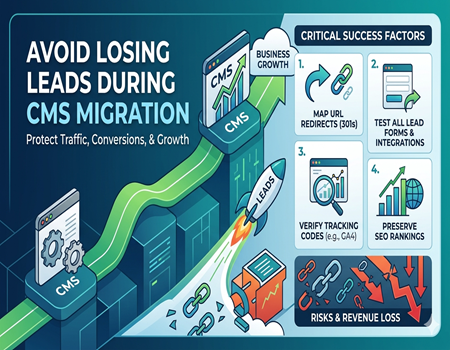
CMS migration means moving your website from one platform to another. Businesses usually do this to improve design, speed, security, or scalability. It can be a great step forward, but it also comes with risks. If not handled properly, it can directly affect your leads and overall business growth.
One of the biggest hidden problems during migration is losing leads. Your website may look better after migration, but if forms stop working, pages break, or traffic drops, your lead flow can suffer. Many businesses realize this only after launch, when the damage is already done.
This guide will help you understand how to avoid losing leads during CMS migration. You will learn practical steps, common mistakes, and proven strategies to protect your traffic, conversions, and revenue. If done right, migration can improve your results instead of hurting them.
Understanding Why Leads Are Lost During CMS Migration
During CMS migration, many technical elements change behind the scenes. One common issue is broken tracking codes. If tools like analytics or pixels stop working, you lose visibility on user actions. Without proper tracking, it becomes difficult to measure leads and conversions accurately.
Another major reason is URL changes. When page URLs are modified without proper redirects, users land on error pages. This leads to lost traffic, especially on high-converting landing pages. Even a small mistake in URL mapping can result in a significant drop in leads.
Form integrations also often break during migration. Your forms might look fine on the front end but may not send data to your CRM or email system. This means users are submitting forms, but you are not receiving the leads, which directly impacts your business.
Lastly, website downtime or slow loading speed can reduce user engagement. If your website is not accessible or takes too long to load, users will leave before taking action. All these factors combined show that migration is not just technical work, it directly affects your revenue.
Pre-Migration Planning: The Most Important Step
Proper planning is the foundation of a successful CMS migration. Before making any changes, you should take a complete backup of your website. This ensures that you have a safety net if something goes wrong during the process and helps you recover quickly.
You should also audit your current website carefully. Identify your top-performing pages, lead-generating landing pages, and important conversion paths. Understanding what is already working well helps you protect those elements during migration and avoid unnecessary risks.
Document everything in detail, including URLs, forms, CTAs, and user journeys. This documentation will act as a roadmap during migration. It ensures that nothing important is missed and helps your team stay aligned throughout the process.
If you are not confident about handling this stage, working with a CMS Migration Agency can help reduce risks significantly. Experts can guide you through planning, execution, and testing, ensuring that your leads and performance remain stable during migration.
Maintain URL Structure or Plan Proper Redirects
Maintaining your URL structure is one of the most important factors during CMS migration. Search engines and users are already familiar with your existing URLs. Changing them without proper planning can lead to traffic loss and negatively impact your rankings and lead generation.
If changing URLs is necessary, you must implement 301 redirects. These redirects guide users and search engines from old URLs to new ones. Without proper redirects, users will land on broken pages, which can lead to frustration and lost opportunities.
You should create a detailed redirect map that connects every old URL to its new version. This process may take time, but it is crucial for preserving traffic. Even missing a few important pages can result in noticeable drops in leads.
For example, if a high-converting landing page is not redirected properly, all its traffic will be lost. This directly affects your conversions. Proper redirect planning ensures that your users reach the right pages and your lead flow continues without disruption.
Preserve All Lead Capture Forms & Integrations
Your forms are the most important part of your lead generation process. During CMS migration, these forms can break or stop functioning properly. Even if your website looks perfect, broken forms can result in zero leads, which is a major issue for any business.
You should test all forms carefully after migration. Check whether form submissions are working and whether data is being sent to your CRM or email system. Also, verify that thank-you pages are loading correctly after form submissions.
It is also important to check all integrations connected to your forms. This includes email automation tools, CRM systems, and third-party applications. If any integration fails, your lead data may not be captured properly, which can create gaps in your sales process.
Always perform real-time testing by submitting forms yourself. This helps you confirm that everything is working correctly. By focusing on form functionality, you ensure that your lead generation process remains smooth and uninterrupted after migration.
Keep Tracking & Analytics Intact
Tracking tools play a crucial role in measuring your website performance. During CMS migration, these tools can be removed or incorrectly installed. This leads to data loss and makes it difficult to track leads, conversions, and user behavior.
You should ensure that all tracking codes are properly installed on the new website. This includes tools like Google Analytics, Google Tag Manager, and any marketing pixels you are using. Missing or duplicate codes can create inaccurate data.
It is also important to verify your goals and conversion tracking. Check whether form submissions, button clicks, and other important actions are being tracked correctly. Without proper tracking, you will not know whether your migration was successful.
Testing real-time data is a good way to confirm that everything is working. Visit your website and perform actions to see if they are being recorded. Maintaining accurate tracking ensures that you can monitor your leads and make informed decisions.
Protect SEO Rankings to Maintain Lead Flow
SEO is one of the biggest sources of consistent leads for most websites. During CMS migration, there is always a risk of losing rankings. This can lead to a drop in organic traffic, which directly affects your lead generation.
To protect your SEO, you should maintain your existing meta tags, headings, and content as much as possible. Avoid making unnecessary changes during migration. Keeping your content structure consistent helps search engines understand your website better.
You should also submit your updated sitemap to search engines after migration. This helps them crawl and index your new website quickly. Fixing crawl errors and broken links is also important to maintain your website’s performance.
Before starting the migration, you can use a CMS Migration Calculator to estimate risks and effort. This helps you plan better and avoid unexpected issues. By protecting your SEO, you ensure that your traffic and leads remain stable.
Test Everything Before and After Launch
Testing is one of the most critical steps in CMS migration. Before launching your new website, you should test everything in a staging environment. This allows you to identify and fix issues without affecting your live website.
You should test all important elements such as forms, pages, navigation, and website speed. Make sure that your website works properly on both desktop and mobile devices. A smooth user experience is essential for maintaining leads.
After launch, you should perform another round of testing. Check for broken links, missing pages, and incorrect redirects. Even small issues can impact user experience and reduce conversions if not fixed quickly.
Continuous testing ensures that your website performs well after migration. It helps you identify problems early and take corrective action. A well-tested website provides a better experience to users and helps maintain your lead flow.
Monitor Leads Closely After Migration
After your website goes live, you should closely monitor your performance. Compare your current data with pre-migration data to identify any changes in traffic, conversions, and leads. This helps you understand the impact of migration.
Use tools like analytics and CRM systems to track user behavior and lead activity. Pay attention to any sudden drops in performance. Early detection allows you to fix issues before they become bigger problems.
If you notice a decline in leads, investigate the cause immediately. It could be related to tracking issues, broken forms, or SEO problems. Fixing these issues quickly helps you recover your performance and avoid long-term losses.
Common Mistakes That Cause Lead Loss
Many businesses make simple mistakes during CMS migration that lead to major losses. One common mistake is skipping proper planning. Without a clear strategy, important elements like forms and landing pages can be overlooked.
Ignoring SEO is another major issue. Not setting up redirects or changing URLs unnecessarily can lead to traffic loss. This directly affects your lead generation and reduces your website’s visibility.
Another mistake is not testing forms and integrations. Businesses often assume everything is working, but in reality, forms may not be capturing data. This results in lost leads without even realizing it.
Launching without proper tracking is also a big problem. Without data, you cannot measure performance or identify issues. Avoiding these mistakes ensures a smooth migration and helps protect your leads.
Conclusion
CMS migration can be a challenging process, but it does not have to result in lost leads. With proper planning, careful execution, and thorough testing, you can protect your traffic and conversions effectively.
Focus on key areas such as SEO, forms, tracking, and redirects. These elements play a major role in maintaining your lead flow. Ignoring them can lead to serious losses, but managing them well ensures success.
By following the strategies shared in this guide, you can complete your CMS migration smoothly. Instead of losing leads, you can create a better, faster, and more effective website that supports your business growth.