How to Handle MODX Custom Snippets During Migration
MODX is known for its flexibility and developer-friendly structure. Many businesses choose MODX because it allows developers to build highly customized websites. One of the most important elements behind this flexibility is the use of custom snippets. These snippets allow developers to create unique functionality that standard CMS tools may not provide easily.
A snippet in MODX is a small piece of PHP code that performs a specific task on a website. It can display dynamic content, process forms, or integrate external services. Developers use snippets to control many advanced features on a MODX website and make the system behave exactly as required.
Because snippets handle important functionality, they become critical during migration. When a website moves to another CMS, developers must carefully review these snippets. Without proper analysis, the migration may cause features to stop working. This can affect user experience, website performance, and even business operations.
Many companies eventually decide to Migrate website from MODX to WordPress to gain easier content management and access to thousands of plugins. WordPress offers powerful tools that simplify website management and marketing tasks compared to many developer-focused CMS platforms.
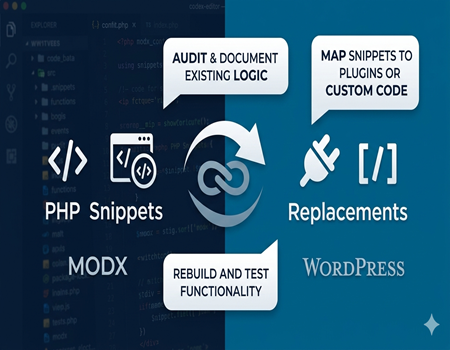
However, the migration process must be handled carefully. Developers need to review every custom snippet, understand its purpose, and recreate its functionality in the new system. Proper planning ensures that the website continues working smoothly while benefiting from the improved flexibility and ecosystem that WordPress offers.
Understanding MODX Custom Snippets
MODX snippets are small pieces of PHP code used to add dynamic functionality to a website. Developers use them to create custom features that are not available in the default CMS tools. These snippets can control how data is retrieved, processed, and displayed on web pages, giving developers complete control over website behavior.
Snippets are usually inserted into templates, chunks, or page content. When a page loads, the snippet runs its code and generates output that appears on the website. This output may include dynamic lists of content, form processing results, or data pulled from the database or external systems.
Many MODX websites rely heavily on custom snippets. Developers often use them for tasks like displaying blog posts, filtering product listings, processing contact forms, or connecting APIs. Because snippets are written in PHP, they allow developers to build almost any feature required by the website.
MODX also includes other elements such as templates, chunks, and plugins. Templates control the overall layout of a page, while chunks store reusable HTML sections. Plugins respond to system events and modify CMS behavior behind the scenes when certain actions occur.
Snippets focus mainly on executing custom logic to generate content or perform tasks when called. Because they are tightly connected to MODX architecture, they cannot be transferred directly to another CMS platform. Their logic must be reviewed and rebuilt using the tools provided by the new system.
When businesses plan to Migrate website from MODX to WordPress, understanding how snippets work becomes extremely important. Developers must identify what each snippet does so they can recreate the same functionality using WordPress plugins, custom functions, or shortcodes during the migration process.
Why Custom Snippets Create Challenges During Migration
Custom snippets can make migration difficult because they are designed specifically for the MODX environment. Many snippets rely on MODX APIs, database structures, and system variables that exist only inside the MODX framework. When a website moves to another CMS, these dependencies prevent the snippet code from working directly.
Developers cannot simply copy the snippet code into WordPress or another platform. Instead, they must review the logic used inside the snippet and recreate that functionality using the tools available in the new CMS. This process requires careful analysis to ensure the website continues to function correctly.
Another challenge is the complexity of some snippets. While some snippets perform simple tasks such as displaying lists of content, others may handle advanced features like API integrations, data processing, or user authentication. Rebuilding these features may require custom development in the new system.
Dependencies between snippets can also create complications. Some snippets interact with templates, chunks, or other snippets to generate the final output on a page. If developers overlook these dependencies during migration, certain features may stop working or display incorrect information.
Older MODX websites often contain many snippets created over several years. Some of these snippets may still be active, while others may no longer be used. Without a detailed audit, developers might spend time migrating unnecessary code that no longer contributes to the website functionality.
For companies planning to Migrate website from MODX to WordPress, identifying these challenges early helps create a smoother migration process. By analyzing snippet dependencies and complexity before migration begins, developers can rebuild only the necessary functionality while simplifying the overall website structure.
Auditing Existing Snippets Before Migration
Before starting the migration process, developers must perform a complete audit of all snippets in the MODX system. Many websites contain dozens of custom snippets created over time. Without reviewing them properly, developers may miss important functionality that affects how the website works and interacts with users.
The first step in the audit process is identifying every snippet inside the MODX manager. Developers should create a complete list of all snippets stored in the system. This includes both active snippets and older ones that might still exist in the database but are no longer used directly on pages.
After listing all snippets, the next step is identifying where each snippet is used. Some snippets are called inside templates, while others appear directly in page content or chunks. Developers should carefully check templates, components, and content fields to locate every place where snippet code is executed.
Categorizing snippets by function helps simplify migration planning. Some snippets may handle form processing, while others generate dynamic lists of content or connect external services. Grouping snippets by purpose allows developers to quickly understand which ones are critical and which can be replaced with plugins.
During the audit, developers should also identify unused or outdated snippets. Older websites often contain code from previous features that are no longer active. Migrating unnecessary snippets only increases system complexity and development time.
A proper snippet audit creates a clear understanding of how the website functions internally. When businesses decide to Migrate website from MODX to WordPress, this analysis helps developers rebuild important features while eliminating unnecessary code and improving the overall structure of the website.
Understanding What Each Snippet Actually Does
After identifying all snippets during the audit, the next step is understanding what each snippet actually does. Many MODX websites have been developed by multiple developers over time, which means some snippets may not have clear documentation. Reviewing the code carefully helps developers understand the purpose of each snippet.
Developers should read the PHP code inside every snippet and analyze the logic used. Some snippets retrieve data from the database and display it on pages, while others process user input or trigger background processes. Understanding the purpose of each snippet ensures that important functionality is not lost during migration.
Many snippets also contain database queries. These queries may retrieve blog posts, product listings, or custom content types stored in the MODX database. Developers must identify these queries and determine how the same data will be accessed and displayed after the migration.
Some snippets also integrate external services such as email marketing tools, payment systems, or CRM platforms. If these integrations are not properly documented, they may break after migration. Developers must carefully review these connections to ensure they can be recreated in the new CMS environment.
Understanding front-end behavior is also important. Some snippets generate visible content such as lists or widgets, while others control background functionality that users may not notice directly. Developers should check how each snippet affects page layout, navigation, or user interaction.
When businesses plan to Migrate website from MODX to WordPress, documenting each snippet’s behavior becomes essential. Clear documentation helps developers recreate the same functionality using WordPress plugins, custom functions, or shortcodes while maintaining a smooth user experience on the website.
Mapping MODX Snippets to WordPress Alternatives
Once developers understand how each snippet works, the next step is mapping those snippets to suitable alternatives in WordPress. Since MODX snippets are written specifically for the MODX environment, they cannot be directly reused in WordPress. Developers must identify the best method to recreate the same functionality in the new system.
Many features previously handled by snippets can be replaced using WordPress plugins. WordPress offers a large ecosystem of plugins that provide ready-made solutions for tasks like form management, SEO optimization, search filters, and content display. Using plugins can reduce development time and simplify website maintenance.
Some functionality may already exist within WordPress core features. WordPress includes built-in tools for managing dynamic content, taxonomies, and queries. Developers should evaluate whether these built-in capabilities can replace the functionality originally created through MODX snippets.
In cases where no plugin or built-in feature exists, developers may need to create custom functionality. WordPress allows developers to write custom PHP functions or build small plugins that replicate the logic previously handled by MODX snippets.
Shortcodes are another useful option when replacing snippets. WordPress shortcodes allow developers to insert dynamic functionality directly inside page content, similar to how snippets were used in MODX templates and pages.
Carefully mapping snippet functionality helps ensure that the website maintains its features after migration. For businesses planning to Migrate website from MODX to WordPress, this step ensures the migration process remains organized and prevents the loss of important functionality during the transition.
Rebuilding Custom Functionality in WordPress
After identifying the correct alternatives for each snippet, developers must rebuild the required functionality in WordPress. Since snippets often contain custom logic, this process usually involves rewriting the code using WordPress development methods.
Developers can recreate many snippet features by writing custom PHP functions within WordPress. These functions can be placed inside the theme’s functions file or within a custom plugin created specifically for the website.
Creating a custom plugin is often the best approach for complex functionality. Custom plugins keep the code separate from the theme and make it easier to maintain in the future. This also ensures the functionality remains active even if the website design changes later.
WordPress hooks and filters provide powerful tools for modifying system behavior. Developers can use hooks to insert custom logic at specific points in the WordPress execution process. Filters allow developers to modify content before it appears on the website.
Shortcodes can also replicate many snippet features. Developers can create custom shortcodes that generate dynamic content when placed inside posts or pages. This approach works well when snippets previously generated lists, widgets, or content blocks.
During this stage, developers must ensure the new functionality matches the original behavior. When companies Migrate website from MODX to WordPress, rebuilding features properly ensures that users experience the same functionality while benefiting from WordPress flexibility and scalability.
Testing Snippet Replacements After Migration
Testing is one of the most important stages after rebuilding snippet functionality. Developers must verify that every feature works correctly within the new WordPress environment before launching the website.
The first step is testing dynamic content generated by the replaced snippets. Developers should check whether lists, widgets, and filtered content display correctly on all relevant pages.
Forms and user input features should also be tested carefully. If snippets previously handled form submissions, developers must ensure the new WordPress solution processes data correctly and sends notifications to the appropriate systems.
External integrations must also be verified during testing. This includes checking connections with marketing tools, payment systems, CRM platforms, or APIs used by the website.
Front-end behavior should also be reviewed across different pages. Some snippet replacements may influence page layout or navigation, so developers must confirm that the design remains consistent.
Performance testing is also necessary. Developers should monitor page speed and server performance to ensure the new implementation does not slow down the website.
Security testing should not be ignored either. Custom code created during migration must follow WordPress security best practices.
For businesses planning to Migrate website from MODX to WordPress, thorough testing ensures that rebuilt functionality works correctly and provides users with a smooth browsing experience.
Best Practices for Handling Snippets During Migration
Following best practices can significantly improve the success of a migration project. Developers should begin by maintaining detailed documentation for every snippet discovered during the audit phase.
Documentation should describe what each snippet does, where it is used, and how it interacts with other parts of the website. This information helps developers rebuild functionality accurately during migration.
Another best practice is simplifying the system wherever possible. Some snippets may exist because features were custom-built years ago when simpler solutions were not available.
In WordPress, many of these features can be replaced with reliable plugins. Using plugins instead of complex custom code improves maintainability and reduces development time.
Developers should also remove unnecessary snippets during migration. Old or unused code only adds complexity to the system and increases maintenance costs.
Working with experienced developers is another important factor. Developers familiar with both MODX and WordPress can identify the best strategies for rebuilding functionality.
Careful planning, documentation, and code simplification help businesses successfully Migrate website from MODX to WordPress while ensuring that the new system remains stable, efficient, and easier to maintain in the long term.
Conclusion – Ensuring a Smooth Migration of Custom Functionality
Custom snippets play a major role in how MODX websites function. They control dynamic content, integrations, and many advanced features that make the website unique.
Because of their importance, snippets require careful handling during migration. Developers must first audit all snippets, analyze their functionality, and document how they interact with other system components.
Understanding snippet behavior helps developers decide whether each feature should be rebuilt, replaced with a plugin, or removed completely.
Mapping snippet functionality to WordPress alternatives is an essential step. Plugins, custom functions, and shortcodes provide flexible tools for recreating the same features in WordPress.
Rebuilding functionality correctly ensures the website continues to operate smoothly after migration. Testing these features carefully helps identify any issues before the website goes live.
When companies plan to Migrate website from MODX to WordPress, careful handling of custom snippets ensures a successful transition.
With proper planning, documentation, and testing, businesses can preserve important functionality while gaining the advantages of a more flexible and widely supported CMS platform.