Liferay Hosting & Infrastructure Costs
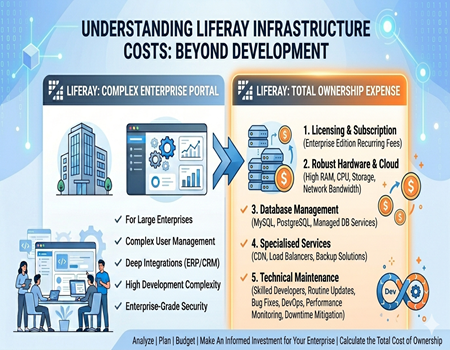
Understanding hosting and infrastructure cost is very important when planning a website on Liferay. Many businesses focus only on development cost but ignore the backend expenses. In reality, hosting, servers, and infrastructure play a major role in the total investment and long-term sustainability of the platform.
Liferay is not a simple CMS like basic website builders. It is an enterprise-level platform that requires strong infrastructure to run smoothly. This includes powerful servers, database systems, security layers, and continuous monitoring. Because of this, the overall cost can increase quickly, especially as your website grows.
Businesses may start with a small setup, but as traffic, features, and integrations increase, infrastructure needs also expand. This leads to higher monthly expenses, making it important to plan everything in advance.
This blog is helpful for business owners, marketers, and technical decision-makers who want to understand the real cost behind Liferay hosting. Whether you are planning a new project or already using Liferay, knowing these costs can help you make better decisions.
In the following sections, we will break down Liferay hosting and infrastructure costs in a simple and clear way. You will learn about different cost components, hosting options, and how they impact your budget over time.
What is Liferay Hosting & Infrastructure?
Liferay hosting and infrastructure refer to the complete backend setup required to run a Liferay-based website or portal smoothly. Unlike simple website platforms, Liferay needs a structured environment that includes servers, databases, networking, and security systems. These components work together to ensure performance, stability, and scalability for enterprise-level applications.
In a basic CMS, hosting usually means a single server where your website files are stored. However, in Liferay, the setup is more complex. It often involves multiple servers, application layers, and database systems working in coordination. This is because Liferay is designed to handle large-scale applications, user management, and integrations with other enterprise tools.
The infrastructure typically includes application servers to run the platform, database servers to store data, and web servers to manage incoming traffic. Along with this, businesses may also use load balancers to distribute traffic and improve performance.
Security is another important part of Liferay infrastructure. Since it is widely used in enterprise environments, it requires strong security measures such as firewalls, SSL certificates, access control, and monitoring systems. These elements help protect sensitive data and ensure compliance with industry standards.
Overall, Liferay hosting and infrastructure are more advanced and resource-intensive compared to regular website hosting. This is why the cost is higher and requires proper planning. Understanding these components helps businesses estimate their budget and choose the right setup based on their needs.
Key Components of Liferay Infrastructure Cost
Server Cost (Cloud or On-Premise)
One of the biggest cost components in Liferay infrastructure is the server. Liferay requires powerful servers with high RAM and CPU to handle its operations smoothly. Businesses can choose between on-premise servers or cloud platforms like AWS or Azure, but both involve significant investment depending on scale and traffic requirements.
Database Cost
Liferay relies heavily on databases to manage content, users, and workflows. Enterprise-grade databases like MySQL, PostgreSQL, or Oracle are commonly used. While some options are free, advanced setups and managed database services can increase costs, especially when high availability and performance optimization are required for large applications.
Load Balancer & CDN
To manage high traffic and ensure fast performance, businesses often use load balancers and content delivery networks (CDN). A load balancer distributes traffic across multiple servers, while a CDN helps deliver content faster to users globally. These services improve user experience but also add to the monthly infrastructure cost.
Storage & Backup
Storage is another important cost factor, as Liferay websites often handle large amounts of data, media files, and documents. Businesses need reliable storage solutions along with regular backup systems to prevent data loss. Cloud storage services and backup tools usually come with recurring charges based on usage and data size.
Security Layers
Security is critical in Liferay infrastructure, especially for enterprise and government use cases. This includes firewalls, SSL certificates, access control systems, and monitoring tools. While these features are necessary to protect data and ensure compliance, they also increase the overall infrastructure cost.
DevOps & Monitoring Tools
Managing Liferay infrastructure requires DevOps support and monitoring tools. These tools help track performance, detect issues, and ensure smooth operations. Businesses may need to invest in tools for logging, automation, and performance monitoring, along with skilled professionals to manage the system efficiently.
Liferay Hosting Options Explained
On-Premise Hosting
On-premise hosting means setting up Liferay on your own physical servers within your organization. This option gives full control over infrastructure, security, and data management. Businesses that have strict compliance requirements or sensitive data often prefer this setup. However, it requires a high upfront investment in hardware, setup, and maintenance.
In addition to hardware costs, companies need a dedicated IT team to manage servers, updates, and security. Scaling also becomes difficult, as increasing capacity requires purchasing new hardware. While on-premise hosting offers control, it can be expensive and less flexible for growing businesses.
Cloud Hosting (AWS, Azure, GCP)
Cloud hosting is one of the most popular options for running Liferay today. Platforms like AWS, Azure, and Google Cloud provide scalable infrastructure where businesses can pay based on usage. This flexibility allows companies to start small and scale resources as their traffic and requirements grow over time.
Cloud hosting reduces the need for physical infrastructure and offers better reliability with features like auto-scaling and backups. However, costs can increase quickly if resources are not managed properly. Continuous monitoring and optimization are required to keep expenses under control while maintaining performance.
Managed Hosting
Managed hosting is a service where a third-party provider takes care of the entire Liferay infrastructure. This includes server management, updates, security, and performance optimization. It is a good option for businesses that do not have an in-house technical team or want to reduce operational complexity.
While managed hosting simplifies operations, it usually comes at a higher cost compared to self-managed cloud hosting. Businesses pay for convenience and expertise, which can be beneficial but may not be suitable for those with tight budgets. Choosing the right hosting option depends on your business needs, budget, and technical capabilities.
Server Requirements for Liferay
Liferay requires strong server resources to run smoothly, which makes it different from lightweight CMS platforms. Since it handles complex operations, user management, and integrations, it needs higher RAM, CPU power, and storage. A basic setup may work for small projects, but performance can quickly drop if resources are limited.
For a small Liferay setup, businesses may start with a server having around 8–16 GB RAM and a multi-core CPU. However, as traffic increases or more features are added, the requirement grows significantly. Medium to large projects often need 32 GB or more RAM along with dedicated database servers to maintain stability and speed.
Another important factor is scalability. Liferay environments often require multiple servers, such as application servers, database servers, and load balancers. This setup helps distribute traffic and improve performance but also increases infrastructure complexity and cost. Planning for future growth is essential to avoid performance issues later.
Unlike simpler platforms, Liferay cannot run efficiently on basic shared hosting. It needs either dedicated servers or cloud infrastructure to handle its workload. This is one of the main reasons why hosting costs are higher compared to platforms like WordPress.
Overall, Liferay’s server requirements are designed for enterprise-level performance, not minimal setups. Businesses must carefully plan their infrastructure based on expected traffic and usage. Choosing the right server configuration ensures better performance, but it also directly impacts the total hosting and infrastructure cost.
Liferay Licensing Cost Impact
Liferay licensing is an important factor that directly affects overall hosting and infrastructure decisions. Liferay offers two main versions: Community Edition and Enterprise Edition. The Community version is free to use, but it lacks official support and advanced features, which can create challenges for businesses that need stability and reliability.
Most organizations prefer the Enterprise Edition because it provides support, updates, and enterprise-grade features. However, this comes with a significant licensing cost, which can vary depending on the size of the deployment and the number of users. This added expense increases the total cost of running a Liferay-based platform.
Licensing also impacts infrastructure planning. Since businesses are already investing in the Enterprise version, they tend to choose high-performance infrastructure to match the platform’s capabilities. This often leads to higher spending on servers, cloud resources, and security systems to ensure smooth operation and performance.
Another important aspect is long-term commitment. Licensing is usually a recurring cost, which means businesses must allocate a fixed budget every year. This makes it essential to evaluate whether the platform is delivering enough value compared to its total cost, including infrastructure and maintenance.
Overall, Liferay licensing adds an extra layer of expense that goes beyond basic hosting. While it provides strong support and features, it also increases the financial burden. Businesses must consider both licensing and infrastructure costs together before choosing Liferay as their long-term solution.
Development & Maintenance Cost
Development and maintenance are major cost factors in a Liferay-based project. Unlike simple platforms, Liferay requires experienced developers who understand its architecture and customization process. This increases the initial development cost, as businesses often need a dedicated team to build and manage the platform effectively.
During the development phase, tasks like custom module creation, integrations, and workflow setup take significant time and effort. These are not plug-and-play features, which means most functionalities need to be built from scratch. This makes the development process longer and more expensive compared to simpler CMS platforms.
Maintenance is another ongoing cost that businesses must consider. Liferay requires regular updates, performance monitoring, and bug fixes to keep the system running smoothly. Since it is a complex platform, even small changes may require developer involvement, increasing dependency on technical teams.
Deployment and version upgrades also add to the cost. Liferay releases updates that may require testing, configuration, and adjustments to existing customizations. This process can be time-consuming and may involve downtime if not handled properly, adding both technical and operational costs.
Another hidden cost is the need for DevOps support. Managing servers, deployments, and monitoring tools requires skilled professionals who can ensure system stability and performance. This adds an additional layer of expense, especially for businesses without an in-house technical team.
Overall, development and maintenance costs in Liferay are higher due to its complexity and customization needs. While it offers powerful capabilities, businesses must be prepared for continuous investment in technical resources to keep the platform efficient and up to date.
Cost Comparison: Liferay vs WordPress Hosting
Hosting Cost Difference
When comparing hosting costs, Liferay is significantly more expensive than WordPress. Liferay requires dedicated servers or cloud infrastructure with high resources, which increases monthly expenses. In contrast, WordPress can run efficiently on shared or managed hosting, making it much more affordable for small and medium-sized businesses.
WordPress hosting plans are widely available at lower prices, and businesses can scale gradually as their traffic grows. Liferay, on the other hand, often requires a strong infrastructure from the beginning, leading to higher upfront and ongoing hosting costs even for smaller projects.
Maintenance Cost Difference
Maintenance costs also differ greatly between the two platforms. Liferay requires continuous developer involvement for updates, monitoring, and troubleshooting. This increases operational expenses over time. WordPress is easier to manage, and many updates can be handled without technical expertise, reducing dependency on developers.
In addition, WordPress offers a wide range of plugins for performance, security, and backups, which simplifies maintenance. Liferay lacks such plug-and-play flexibility, making maintenance more time-consuming and costly in comparison.
Infrastructure Complexity
Infrastructure complexity is another key difference. Liferay environments often involve multiple servers, databases, and load balancing systems. Managing this setup requires technical expertise and proper planning. WordPress infrastructure is much simpler and can be managed easily with standard hosting solutions.
Because of this complexity, Liferay not only increases cost but also slows down implementation and scaling. Businesses need to invest in skilled professionals and tools to manage the system effectively.
Overall, WordPress offers a more cost-efficient and manageable hosting solution, while Liferay is suited for complex enterprise needs with a higher budget. For most public websites, WordPress provides better value with lower infrastructure and maintenance costs.
Hidden Costs of Liferay Infrastructure
When planning a Liferay project, many businesses focus only on visible costs like hosting and licensing. However, there are several hidden costs that can significantly increase the overall budget over time. These costs are often overlooked in the initial planning stage but become noticeable as the system grows.
One major hidden cost is scaling. As your website traffic increases or new features are added, infrastructure needs to expand. This may require upgrading servers, increasing storage, or adding load balancers. These changes are not one-time expenses and can lead to higher recurring costs, especially in cloud environments.
Another important factor is technical dependency. Liferay requires skilled developers for most tasks, including updates, bug fixes, and performance improvements. This creates ongoing costs in the form of developer salaries or external support. Even minor changes may involve time and expense, making daily operations more costly.
Downtime and performance issues can also add hidden costs. If the infrastructure is not optimized properly, it may lead to slow loading times or system failures. This can affect user experience, reduce conversions, and impact business revenue. Fixing such issues often requires additional resources and emergency support.
Upgrade costs are another area to consider. Liferay updates may require testing, reconfiguration, and adjustments to custom features. This process can take time and involve extra development work, adding to the overall cost.
Overall, hidden costs in Liferay infrastructure can make the platform more expensive than expected. Businesses should plan carefully and consider these factors to avoid budget overruns and ensure long-term sustainability.
Real-World Cost Estimate (Small vs Enterprise Setup)
The cost of running Liferay can vary significantly depending on the size of the business and the complexity of the project. For a small setup, businesses may start with limited features and lower traffic. In such cases, basic cloud infrastructure, minimal integrations, and a small development team can keep costs relatively controlled.
A small business setup may require one or two application servers, a database server, and basic security configurations. Even then, monthly hosting and infrastructure costs can be moderate to high compared to simpler platforms. As usage grows, these costs can increase quickly due to higher resource consumption and scaling requirements.
For mid-size companies, the setup becomes more advanced. Multiple servers, load balancing, and better performance optimization are required to handle increased traffic and functionality. This also includes higher storage needs, stronger security layers, and continuous monitoring tools, all of which add to the overall cost.
In enterprise-level setups, Liferay infrastructure becomes highly complex and resource-intensive. Large organizations often use multiple environments such as development, staging, and production. Each environment requires separate infrastructure, increasing both hosting and operational costs. High availability systems and disaster recovery solutions further add to the investment.
Additionally, enterprise setups require dedicated teams for DevOps, monitoring, and maintenance. This increases both infrastructure and human resource costs. The overall monthly and yearly expenses can be substantial, especially for businesses with large-scale operations.
Overall, Liferay costs scale with business size and complexity. While small setups may be manageable, enterprise implementations require significant investment in infrastructure, making cost planning essential for long-term success.
How to Reduce Liferay Hosting Costs
Reducing Liferay hosting costs is possible with proper planning and smart resource management. Many businesses overspend due to poor infrastructure decisions or lack of optimization. By focusing on efficiency, companies can control expenses without compromising performance or user experience.
One effective way to reduce costs is by choosing the right cloud setup. Instead of over-provisioning servers, businesses should start with required resources and scale gradually based on actual usage. Cloud platforms offer flexible pricing models, so monitoring usage regularly helps avoid unnecessary spending.
Optimization of server performance also plays a key role. Using caching mechanisms, optimizing database queries, and compressing files can reduce server load. This allows the system to perform better with fewer resources, ultimately lowering infrastructure costs over time.
Another important strategy is proper monitoring. By tracking performance metrics and identifying unused resources, businesses can eliminate waste. Automated scaling and load management tools can further help in maintaining cost efficiency while handling traffic spikes effectively.
Reducing dependency on complex customizations can also save money. The more customized your Liferay setup is, the higher the maintenance and upgrade costs. Keeping the system simple and using standard features where possible can reduce both development and operational expenses.
Overall, managing Liferay costs requires a balance between performance and efficiency. With the right approach, businesses can optimize their infrastructure, reduce unnecessary expenses, and maintain a stable system without overspending.
Why Many Businesses Are Moving Away from Liferay
In recent years, many businesses have started moving away from Liferay, especially for public-facing websites. One of the biggest reasons is the high infrastructure and hosting cost. As discussed earlier, Liferay requires powerful servers, complex setups, and continuous monitoring, which increases both initial and ongoing expenses.
Another major factor is complexity. Liferay is designed for enterprise-level systems, which makes it difficult to manage for everyday website needs. Even simple updates or content changes often require technical support. This slows down marketing activities and reduces the flexibility businesses need to grow quickly in a competitive digital environment.
Return on investment is also a concern for many companies. When businesses invest heavily in infrastructure, licensing, and development, they expect faster growth and better performance. However, due to complexity and slower execution, achieving desired results can take more time, affecting overall ROI.
In contrast, businesses today prefer platforms that are easy to manage, cost-effective, and scalable. They want solutions that allow quick updates, better SEO performance, and faster deployment. This shift in priorities is one of the main reasons why companies are exploring alternatives to Liferay.
Many organizations are now reducing costs and improving efficiency by switching through a professional Liferay To WordPress Migration Service, which offers a simpler and more flexible solution. This transition helps businesses lower infrastructure expenses and gain better control over their website.
Overall, the move away from Liferay is driven by the need for simplicity, faster execution, and cost efficiency. Businesses are choosing platforms that align better with modern digital and marketing requirements.
Is Liferay Worth the Cost?
Liferay can be worth the cost, but only for specific use cases. It is designed for large enterprises that need complex systems, advanced workflows, and strong security. If your business requires multiple user roles, integrations with enterprise tools, and high-level customization, Liferay can provide the capabilities needed to manage such environments effectively.
However, for public websites focused on marketing, SEO, and user experience, Liferay may not be the most practical choice. The high infrastructure, licensing, and maintenance costs can become a burden, especially for small and mid-sized businesses. In such cases, the return on investment may not justify the overall expense.
Another important factor is ease of use. Since Liferay requires technical expertise, businesses may face delays in updates and content management. This can slow down growth and reduce flexibility, which is critical in today’s fast-moving digital landscape.
Overall, Liferay is worth the cost only when your project truly demands enterprise-level capabilities. For most public websites, businesses often find better value in simpler and more cost-effective platforms that offer faster execution and easier management.
Conclusion
Understanding Liferay hosting and infrastructure costs is essential before choosing it as your platform. While Liferay offers strong enterprise capabilities, it also comes with high expenses related to servers, licensing, development, and ongoing maintenance. These costs can increase significantly as your website grows and requires more resources.
For businesses with complex requirements, strict security needs, and large-scale operations, Liferay can be a suitable option. However, it demands proper planning, technical expertise, and a strong budget to manage it effectively over time. Without these, the platform can become difficult to sustain.
On the other hand, many businesses today prefer simpler and more cost-efficient solutions for public websites. They look for platforms that are easy to manage, scalable, and supportive of marketing and SEO efforts without heavy infrastructure investment.
The key is to align your platform choice with your business goals and resources. If your focus is on flexibility, faster growth, and lower costs, exploring alternatives may be a better approach. But if your needs are enterprise-driven, Liferay can still deliver value when used correctly.