Migrating Legacy or Hand-Coded Websites to WordPress
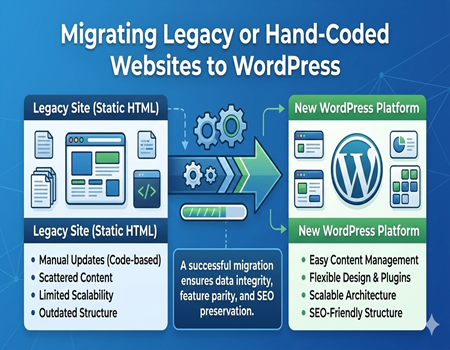
Many businesses still operate websites that were built years ago using static HTML or hand-coded systems. These legacy websites may have worked well when they were first created, but over time they become harder to manage and update. As technology evolves, businesses need more flexible and scalable solutions to maintain a strong online presence.
Legacy websites often require manual coding for even small changes such as updating text, adding images, or creating new pages. This makes website management time-consuming and dependent on developers. For businesses that regularly update content, this process becomes inefficient and slows down digital growth.
WordPress has become one of the most popular content management systems because it makes website management much easier. It allows businesses to update pages, publish blog posts, and manage media without needing advanced technical knowledge. This flexibility is one of the main reasons companies choose to migrate their older websites to WordPress.
Another important advantage of WordPress is its large ecosystem of plugins, themes, and integrations. These tools help businesses improve website functionality, enhance design, and support marketing efforts such as SEO and analytics. Compared to legacy websites, WordPress offers a more modern and scalable environment.
However, migrating a legacy or hand-coded website to WordPress requires careful planning. Content must be properly transferred, functionality may need to be rebuilt, and SEO elements should be preserved during the process. This is why many businesses rely on professional CMS Migration Services to ensure the migration is smooth, secure, and successful.
What Are Legacy or Hand-Coded Websites?
Legacy websites are websites built using older technologies or development practices that are no longer widely used today. Many of these websites were created years ago when modern content management systems were not as common. While they may still function properly, maintaining and updating them often becomes increasingly difficult over time.
Hand-coded websites are usually developed using static HTML, CSS, and sometimes basic JavaScript. In these websites, each page is manually written and uploaded to the server. This means that even small updates, such as changing text or adding a new page, require editing the source code directly.
Because of this structure, managing large websites becomes complicated. Businesses cannot easily add new content, publish blog posts, or update product pages without technical help. As a result, website updates may be delayed or avoided altogether, which can negatively affect user experience and online visibility.
Another challenge with legacy or hand-coded websites is their limited flexibility. These websites often lack built-in features such as content management dashboards, plugin support, and automated updates. This makes it harder for businesses to expand functionality or integrate modern tools like analytics platforms, marketing software, or advanced SEO features.
Security and performance can also become concerns with older websites. Legacy systems may not receive regular updates or security improvements, leaving them more vulnerable to potential issues. Additionally, outdated coding structures can make websites slower and less compatible with modern browsers and mobile devices.
For many businesses, these limitations eventually create the need for migration. Moving from a legacy or hand-coded website to a modern platform allows companies to manage content more easily, improve performance, and support future growth with better technology.
Why WordPress Is a Popular Platform for Migration
WordPress is one of the most widely used content management systems in the world. Millions of websites use WordPress because it provides a flexible and user-friendly environment for managing website content. For businesses running legacy or hand-coded websites, migrating to WordPress can significantly simplify website management and improve long-term scalability.
One of the biggest advantages of WordPress is its easy content management system. Website owners can update pages, publish blog posts, upload images, and manage content through a simple dashboard. This means businesses no longer need to rely on developers for every small update, saving both time and operational costs.
Flexible Design and Plugin Ecosystem
WordPress offers thousands of themes and plugins that allow businesses to customize their websites according to their needs. Themes control the visual appearance of the website, while plugins add additional functionality such as contact forms, SEO tools, security systems, and eCommerce capabilities.
This flexibility allows businesses to expand their websites easily as their needs grow. Instead of building features from scratch, many functionalities can be implemented quickly using trusted plugins. This makes WordPress a scalable solution for companies that want to continuously improve their websites.
SEO-Friendly and Scalable Platform
Another reason WordPress is popular for migration is its strong SEO capabilities. The platform supports clean URL structures, customizable metadata, and SEO plugins that help improve search engine visibility. Businesses migrating from legacy websites often benefit from improved search performance after moving to WordPress.
WordPress is also highly scalable, meaning it can support small business websites as well as large enterprise platforms. With proper hosting and optimization, WordPress websites can handle growing traffic and expanding content libraries without major structural limitations.
Because of these advantages, many organizations choose WordPress when modernizing their legacy websites. With proper planning and the support of professional CMS Migration Services, businesses can transition from outdated systems to a more flexible and future-ready platform.
When Should You Migrate a Legacy Website to WordPress?
Many businesses continue using legacy websites simply because they still function. However, just because a website works does not mean it is efficient or future-ready. Over time, outdated systems can create limitations that affect website management, performance, and growth. Recognizing the right time to migrate is important for maintaining a competitive online presence.
One common sign that a website needs migration is difficulty in updating content. If adding a new page, editing text, or uploading images requires manual coding, it slows down the content management process. Businesses that frequently update information often struggle with this limitation on hand-coded websites.
Another clear indicator is outdated design and poor user experience. Legacy websites may not follow modern design standards or mobile-friendly layouts. Since a large portion of website traffic now comes from mobile devices, older websites that are not optimized for responsive design can negatively affect user engagement and conversion rates.
Website performance can also signal the need for migration. Older coding structures and outdated hosting environments may cause slow loading times or compatibility issues with modern browsers. These problems not only frustrate users but can also impact search engine rankings and overall website visibility.
Security is another important factor to consider. Legacy systems often lack regular updates and modern security protections. Without proper updates or patches, websites become more vulnerable to potential security risks. Migrating to a platform like WordPress allows businesses to benefit from frequent updates and a large ecosystem of security tools.
If a website shows several of these signs, it may be the right time to migrate to WordPress. A modern CMS allows businesses to manage content easily, improve performance, and support long-term digital growth.
Common Challenges When Migrating Legacy Websites
Migrating a legacy or hand-coded website to WordPress can bring many long-term benefits, but the process is not always simple. Older websites often contain outdated code structures, scattered content, and unique functionality that must be carefully handled during migration. Understanding these challenges helps businesses prepare for a smoother and more controlled transition.
Complex or Unstructured Code
Many legacy websites were built using older development methods that do not follow modern coding standards. Pages may contain large amounts of inline code, repeated structures, or outdated scripts. This makes it difficult to directly transfer the website into WordPress without first reviewing and cleaning the existing codebase.
Developers often need to analyze the original structure of the website and rebuild parts of it within a WordPress theme. This ensures that the website maintains its design and functionality while becoming easier to manage in the new environment.
Content Extraction and Organization
Another challenge is extracting content from a hand-coded website. Since static websites store content directly inside HTML files, there is usually no central database to export information from. Each page must be carefully reviewed to identify text, images, and media that need to be migrated.
Once the content is extracted, it must be reorganized to fit the WordPress structure. Pages, blog posts, categories, and media libraries must be created properly so that the website remains structured and easy to manage after migration.
Maintaining SEO and URL Structure
SEO preservation is one of the most critical parts of legacy website migration. Older websites may already have search engine rankings and indexed URLs that bring valuable traffic. If these URLs change during migration without proper redirects, search engines may treat the new pages as completely different content.
Developers must carefully map the existing URLs and implement proper redirects to ensure users and search engines are directed to the correct pages. Maintaining metadata, headings, and internal links is also essential for preserving search visibility.
Rebuilding Custom Functionality
Some legacy websites include custom features such as special forms, dynamic filters, or interactive tools. These features may not exist directly within WordPress and often need to be recreated using plugins or custom development. Ensuring these features work properly is a key part of the migration process.
Key Steps to Migrate a Hand-Coded Website to WordPress
Migrating a hand-coded website to WordPress requires a structured process to ensure that content, functionality, and SEO elements remain intact. Since legacy websites are usually built with static files or custom code, developers must carefully analyze the existing structure before starting the migration.
Website Audit and Content Review
The first step in the migration process is conducting a complete website audit. Developers review the existing website to understand its page structure, content layout, images, and functionality. This stage helps identify what needs to be migrated, removed, or improved during the transition.
A detailed content review is also important. Each page must be analyzed to determine how the content will be organized within WordPress. This preparation ensures that nothing important is lost during the migration process.
Setting Up WordPress Environment
After the audit is completed, the next step is setting up the WordPress environment. This includes installing WordPress on a server or staging environment where the new website will be developed safely. Developers then configure basic settings such as permalink structure, user roles, and security options.
A staging environment allows developers to work on the new site without affecting the live website. This ensures that testing and adjustments can be done safely before the final launch.
Theme Development and Content Migration
Once WordPress is ready, developers begin building or customizing a theme that matches the design of the original website. In some cases, the design may also be improved to follow modern user experience and responsive design standards.
After the theme structure is prepared, the content migration begins. Text, images, and media files from the legacy website are transferred into WordPress pages and posts. Developers also organize categories, menus, and navigation to ensure the website remains easy to use.
Plugin Setup and Functionality Testing
Plugins are then installed to add important features such as contact forms, SEO tools, security systems, and performance optimization. If the original website had custom features, developers may recreate them using plugins or custom development.
Once everything is migrated, thorough testing is performed. Every page, form, and feature must be checked carefully to ensure the website functions correctly before it goes live.
Protecting SEO During Legacy Website Migration
Search engine optimization is one of the most important factors to consider when migrating a legacy or hand-coded website to WordPress. If SEO elements are not handled carefully, a website can lose valuable rankings and organic traffic. Proper planning ensures that search engines continue to recognize and trust the website after the migration.
One of the first steps in protecting SEO is maintaining the existing URL structure. Search engines have already indexed these URLs, and sudden changes can lead to broken links and lost rankings. If changes are unavoidable, proper 301 redirects must be implemented to guide both users and search engines to the correct new pages.
Another important step is preserving on-page SEO elements. Page titles, meta descriptions, heading tags, and image alt text should be transferred accurately to the new WordPress site. These elements help search engines understand the content of each page and play a key role in maintaining visibility in search results.
Internal linking structure should also be reviewed during migration. Legacy websites often have internal links that connect pages and guide users through the site. During the migration process, developers must ensure these links continue to work correctly and point to the appropriate pages within the new WordPress structure.
After the migration is complete, monitoring performance is essential. Tools such as analytics platforms and search engine consoles help track indexing status, traffic changes, and crawl errors. If any issues appear after launch, they can be identified and fixed quickly.
By carefully managing URLs, metadata, and internal links, businesses can protect their search visibility during migration. In many cases, moving from a legacy website to WordPress can even improve SEO performance due to better site structure and optimization capabilities.
Why Professional CMS Migration Services Matter
Migrating a legacy or hand-coded website to WordPress may sound straightforward, but in reality it involves many technical steps. From extracting content to rebuilding functionality and protecting SEO, the process requires careful planning and technical expertise. Without proper knowledge, businesses risk losing data, breaking website features, or damaging their search engine visibility.
Professional CMS Migration Services help reduce these risks by following a structured migration strategy. Experts begin by analyzing the existing website structure, including its pages, content, code, and database elements. This allows them to identify potential challenges and plan the safest way to transfer everything to the new WordPress environment.
Another important advantage of professional migration services is accurate data mapping. Legacy websites often store content differently from WordPress. Migration specialists know how to convert and organize this data correctly so that pages, images, and media files appear properly within the new system.
Experts also ensure that important SEO elements are preserved during the migration. They carefully map old URLs to new ones, implement necessary redirects, and transfer metadata such as titles and descriptions. This helps maintain search engine rankings and prevents traffic loss after the website moves to WordPress.
Testing and quality assurance are also key parts of professional migration services. Developers carefully check every page, form, and functionality to confirm that the website works properly after migration. This includes verifying navigation, contact forms, plugins, and integrations.
By working with experienced professionals, businesses can ensure a smooth and secure transition from legacy systems to WordPress. A well-managed migration protects valuable data, maintains SEO performance, and ensures the new website delivers a better experience for users.
Best Practices for a Smooth WordPress Migration
Migrating a legacy or hand-coded website to WordPress requires careful planning and preparation. Following best practices can help reduce risks and ensure the migration process runs smoothly. A structured approach allows businesses to move their websites without losing important data, functionality, or search engine visibility.
One of the most important steps is creating a full backup of the existing website before starting the migration. This backup includes all website files, images, and data. If any issues occur during the migration process, the backup allows developers to quickly restore the original website.
Using a staging environment is another important best practice. Instead of working directly on the live website, developers build and test the new WordPress site in a staging environment. This allows them to identify and fix potential issues before the website is launched publicly.
Maintaining the website structure during migration is also important for both users and search engines. Page URLs, navigation menus, and internal links should remain consistent whenever possible. This helps preserve search rankings and ensures visitors can still find the content they expect.
Finally, thorough testing should always be performed before launching the migrated website. Developers should review all pages, forms, plugins, and integrations to confirm that everything functions correctly. Careful testing helps ensure the new WordPress website delivers a smooth and reliable experience for users.
Conclusion: Turning Legacy Websites Into Modern WordPress Platforms
Migrating a legacy or hand-coded website to WordPress is an important step for businesses that want a more flexible and manageable website. Older websites often become difficult to maintain, update, and scale over time. Moving to WordPress allows businesses to manage content easily and take advantage of modern website features.
WordPress provides a user-friendly dashboard, strong SEO capabilities, and a wide range of plugins that help improve website functionality. These advantages make it a reliable platform for businesses looking to modernize their digital presence and support long-term growth.
However, successful migration requires proper planning and technical expertise. Content must be transferred carefully, functionality may need to be rebuilt, and SEO elements must be preserved during the process.
This is why many businesses choose professional CMS Migration Services to handle the migration safely. With the right strategy and support, companies can transform outdated websites into modern, scalable WordPress platforms that provide better performance and user experience.