Migrating Paid Subscriptions from Substack
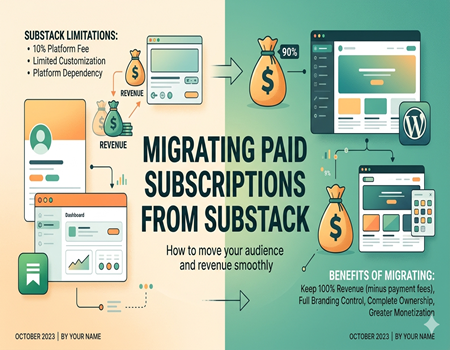
Substack has become one of the most popular platforms for writers, journalists, and creators who want to build a paid newsletter business. It allows creators to publish content, grow an email list, and charge readers for premium posts. Because of its simple setup and built-in payment system, many creators start their subscription journey on Substack.
Paid subscriptions on Substack give writers a reliable way to earn recurring income from their audience. Readers can subscribe on a monthly or yearly basis to access exclusive newsletters, premium articles, and special content. This model has helped thousands of creators build sustainable online businesses without relying only on ads or sponsorships.
However, as a newsletter grows, many creators start facing certain limitations on the platform. Substack offers limited customization, fewer monetization options, and less control over branding and website design. Creators who want more flexibility often begin exploring other platforms that give them full ownership of their content and audience.
This is why many writers and publishers eventually decide to move their paid subscriptions away from Substack. Platforms like WordPress provide greater control, better SEO opportunities, and the ability to expand beyond just newsletters. Migrating may sound complicated at first, but with the right approach, creators can move their subscribers and content smoothly without disrupting their revenue stream.
What Are Paid Subscriptions on Substack?
Paid subscriptions on Substack allow creators to earn money directly from their readers by offering premium newsletter content. Instead of relying only on ads or sponsorships, writers can charge their audience a monthly or yearly fee to access exclusive posts, deeper insights, and members-only newsletters. This model helps creators build a steady and predictable income.
When a reader subscribes to a paid newsletter, they usually receive special content that free subscribers cannot access. This may include detailed articles, research-based newsletters, private updates, or community discussions. For many writers, this approach turns their newsletter into a small digital business where loyal readers support the creator’s work.
Substack handles most of the technical work behind paid subscriptions. The platform integrates with Stripe to process payments securely. Creators can easily set pricing for monthly or annual subscriptions and manage their paid audience from the Substack dashboard. This simplicity is one of the main reasons why many writers choose Substack when starting their newsletter journey.
However, while the system is simple, it also comes with certain limitations. Substack takes a percentage of the creator’s revenue, which reduces total earnings as the newsletter grows. The platform also offers limited flexibility for customizing the website experience, managing memberships, or expanding monetization options beyond newsletters.
Because of these limitations, many creators eventually start looking for platforms that provide more control over their content, branding, and subscription management as their paid audience continues to grow.
Why Creators Decide to Migrate Paid Subscriptions from Substack
Platform Fees Reduce Long-Term Revenue
One of the main reasons creators migrate from Substack is the platform fee. Substack takes around 10% of the revenue generated from paid subscriptions, in addition to payment processing charges. When a newsletter starts growing and gaining more paid subscribers, these fees can become significant and reduce the creator’s overall earnings over time.
For small newsletters this may not seem like a big issue, but for creators earning thousands of dollars each month, losing a percentage of revenue becomes noticeable. Many creators prefer moving to platforms where they have better control over their income and can reduce platform fees in the long run.
Limited Customization and Branding Control
Substack offers a simple and clean design, but it provides limited customization options. Creators cannot fully control the website layout, branding elements, or advanced design features. This can be frustrating for creators who want their newsletter to look like a complete professional website rather than just a newsletter page.
As a brand grows, creators often want more flexibility in design, landing pages, and content presentation. Platforms like WordPress allow full control over website design, making it easier to build a stronger brand identity and improve the overall user experience.
Lack of Full Platform Ownership
Another important reason creators migrate away from Substack is the lack of full ownership. When content is hosted on Substack, creators depend heavily on the platform’s policies, features, and long-term decisions. If the platform changes rules or pricing, creators have limited control over how their business operates.
Many creators prefer moving to platforms where they have complete ownership of their website, content, and subscriber experience. This reduces platform dependency and gives more freedom to grow their newsletter business.
Limited Growth and Monetization Options
Substack mainly focuses on newsletter publishing, which can limit long-term growth opportunities. Creators who want to expand into courses, memberships, communities, or digital products often find the platform restrictive.
Moving to a flexible platform allows creators to explore multiple revenue streams, improve SEO visibility, and build a more scalable content business beyond just newsletters.
Challenges of Migrating Paid Subscribers from Substack
Migrating paid subscribers from Substack can be a valuable step for creators who want more control over their newsletter business. However, the process is not always simple. Moving subscribers, payments, and content to a new platform requires careful planning to avoid technical issues or disruptions for readers.
One of the biggest challenges is handling active paid subscriptions. Since Substack manages payments through Stripe, creators cannot simply transfer subscriptions directly to another platform. Paid subscribers may need to reconnect their payment details or confirm their subscription again after the migration process.
Another challenge is exporting and organizing subscriber data correctly. Substack allows creators to download their subscriber list as a CSV file, but the data must be imported carefully into the new platform. If the data is not managed properly, creators may lose subscriber information or create confusion for readers during the transition.
Maintaining subscriber trust is also extremely important during migration. Paid subscribers expect uninterrupted access to the content they paid for. If creators fail to communicate clearly about the migration process, readers may become confused and cancel their subscriptions.
Timing is another factor that requires attention. Creators need to plan the migration in a way that does not interrupt billing cycles or access to premium content. Poorly planned migrations can lead to missed payments, duplicate charges, or temporary access issues for subscribers.
Because of these challenges, it is important to prepare the migration carefully before making the move. With proper planning, clear communication, and the right tools, creators can move their paid subscribers smoothly while protecting both their revenue and audience relationships.
Preparing for Substack Migration (Important Pre-Migration Steps)
Export Your Subscriber List
Before starting the migration process, the first step is exporting your subscriber data from Substack. The platform allows creators to download their entire email list as a CSV file. This file usually includes both free and paid subscribers along with important details such as email addresses, subscription status, and signup dates.
Having a complete backup of your subscriber list is essential. It ensures that you do not lose valuable audience data during the migration process. This exported list will later be imported into your new platform so that you can reconnect with your existing subscribers without starting from scratch.
Check Your Stripe Payment Setup
Substack processes paid subscriptions through Stripe, so it is important to review your Stripe account before migrating. You should check active subscriptions, payment history, and billing cycles to understand how many paid subscribers are currently active.
Understanding your Stripe data helps you plan how the payment transition will work on the new platform. Since subscriptions usually cannot be transferred directly, creators often need to guide subscribers through reconnecting their payments after the move.
Inform Your Subscribers About the Migration
Communication plays a key role in a successful migration. Before moving your newsletter, you should inform your audience about the upcoming change. Sending a clear email explaining why the move is happening helps maintain trust with both free and paid subscribers.
Creators should explain the benefits of the new platform and reassure subscribers that their access to premium content will continue. Transparency during this stage helps reduce confusion and prevents unnecessary cancellations.
Set Up Your New Platform in Advance
Before shutting down or redirecting your Substack newsletter, it is important to fully prepare the new platform. This includes setting up your website, configuring membership features, and ensuring payment systems are ready for paid subscriptions.
Testing everything in advance helps avoid technical problems after migration. A well-prepared platform ensures that when subscribers move to the new system, they can easily access content and continue their subscriptions without interruptions.
Best Platform to Move Paid Subscriptions After Substack
When creators decide to move their paid newsletter away from Substack, choosing the right platform becomes very important. The new platform should offer better control, flexible monetization options, and the ability to grow beyond a simple newsletter. Several platforms support paid memberships, but each one offers different features and levels of control.
One popular option is Ghost, which is designed specifically for publishing and newsletters. Ghost provides built-in membership features and allows creators to charge readers for premium content. The platform offers a clean interface and more customization compared to Substack, making it suitable for creators who want a dedicated publishing environment.
Another platform some creators consider is Patreon. Patreon focuses on community-driven memberships where supporters pay creators for exclusive content, early access, or special perks. While it works well for creators building communities, it may not be ideal for those who want a complete content website with full control over design and search visibility.
WordPress is widely considered the most flexible option for migrating paid subscriptions. It allows creators to build a full website, manage memberships, publish newsletters, and optimize content for search engines. With the help of membership plugins, creators can easily create subscription plans and manage premium content for paying readers.
WordPress also provides complete ownership of content, audience data, and website design. Creators can customize their site, integrate different tools, and expand their business with additional features such as courses, digital products, or community memberships. This flexibility makes WordPress a strong long-term solution for creators who want to grow their subscription-based business beyond the limitations of a newsletter platform.
Step-by-Step Process to Migrate Paid Subscriptions from Substack
Export Subscriber Data from Substack
The first step in migrating paid subscriptions is exporting your subscriber data from Substack. The platform allows creators to download their email list as a CSV file. This file includes important information such as subscriber emails, subscription status, and signup details. Keeping this data safe ensures that you can reconnect with your audience after the migration.
Set Up Your WordPress Website
After exporting your subscriber data, the next step is setting up your new platform. WordPress is commonly used because it allows full control over website design, content management, and memberships. Creators can install themes, configure essential settings, and prepare the site to host both free and premium newsletter content.
Install a Membership Plugin
To manage paid subscriptions on WordPress, you will need a membership plugin. Popular options include MemberPress, Paid Memberships Pro, and WooCommerce Memberships. These tools allow creators to create subscription plans, restrict premium content, and manage member access without complex technical work.
Connect Stripe for Payments
Since Substack uses Stripe for payment processing, many creators continue using Stripe after migrating to WordPress. By connecting Stripe to the membership plugin, creators can securely accept subscription payments and manage billing. This setup allows the new platform to handle recurring payments smoothly.
Import Subscribers to the New Platform
Once the membership system is ready, the next step is importing your exported subscriber list into the new platform. Most membership or email marketing tools allow bulk importing through CSV files. During this step, it is important to correctly categorize free and paid subscribers so they receive the appropriate content access.
Inform Subscribers About the Migration
Clear communication with subscribers is extremely important during migration. Creators should send detailed emails explaining the platform change and guiding subscribers through any steps required to continue their subscription. Providing clear instructions helps avoid confusion and reassures subscribers that their access to premium content will continue.
Test Payments and Member Access
Before fully launching the new system, creators should test the payment process and membership access. This includes checking whether payments are processed correctly and verifying that paid subscribers can access premium content. Testing helps identify technical issues early and ensures a smooth experience for subscribers after migration.
How to Keep Paid Subscribers During Migration
Migrating from Substack to another platform can make some subscribers nervous, especially those who are paying for premium content. If the transition is not communicated properly, readers may feel uncertain about their subscription and cancel it. That is why maintaining clear communication during the migration process is extremely important.
One of the best ways to retain subscribers is by sending clear and timely emails explaining the migration. Creators should explain why the move is happening and how it will benefit the readers. When subscribers understand that the new platform will provide a better reading experience or more content features, they are more likely to continue supporting the newsletter.
Providing simple instructions also helps reduce confusion. If subscribers need to reconnect their payment method or activate their account on the new platform, the process should be explained step by step. Clear guidance makes the transition easier and prevents subscribers from abandoning their membership due to technical difficulties.
Offering a small incentive can also encourage subscribers to stay during the migration period. Some creators provide a limited-time discount, bonus content, or early access to new features as a way to thank subscribers for their continued support. This gesture helps strengthen the relationship between creators and their audience.
Most importantly, creators should ensure that access to premium content continues without major interruptions. Subscribers are paying for value, so maintaining consistent content delivery during the transition builds trust and helps retain long-term supporters of the newsletter.
SEO Benefits of Moving from Substack to WordPress
Search engine optimization plays an important role in growing a newsletter or content-based business. While Substack is useful for publishing newsletters, it offers limited SEO flexibility. Creators have fewer options to optimize pages, control technical settings, or fully structure their content for search engines.
WordPress provides much stronger SEO capabilities compared to most newsletter platforms. Creators can customize URLs, optimize meta titles and descriptions, and structure their content with proper headings and internal links. These features help search engines better understand the content and improve the chances of ranking higher in search results.
Another advantage of WordPress is the availability of powerful SEO plugins. Tools like Yoast SEO or Rank Math allow creators to optimize every page and blog post easily. These plugins provide suggestions for keyword placement, readability improvements, and technical SEO settings that help improve overall search performance.
WordPress also makes it easier to build a complete content website rather than just a newsletter archive. Creators can publish blog posts, guides, resources, and landing pages that attract organic traffic from search engines. Over time, this helps creators grow their audience beyond their email list.
Internal linking is another important SEO benefit that WordPress supports very well. Creators can naturally connect related articles, guides, and service pages within their content. For example, a creator discussing migration options can internally link to a Substack To WordPress Migration Service, helping readers find additional support while also strengthening the site’s SEO structure.
When You Should Use a Professional Migration Service
Migrating paid subscriptions from Substack may look simple at first, but it can become complex depending on the size of your newsletter. Creators with a small subscriber base may manage the process themselves, but larger newsletters often require careful technical planning to avoid errors during the transition.
If your newsletter has hundreds or thousands of paid subscribers, handling the migration manually can be risky. Issues like payment reconnection, subscriber data management, and membership access need to be handled properly. Even small mistakes during the process can lead to subscriber confusion or temporary loss of premium access.
Professional migration experts help simplify this process. They manage the technical setup, subscriber import, payment integration, and membership configuration on the new platform. This ensures that subscribers move smoothly without experiencing disruptions in their access or billing cycles.
Another advantage of using experts is that they can structure the new platform for long-term growth. A properly configured WordPress website allows creators to expand their content strategy, improve SEO, and manage subscriptions more efficiently.
For creators who want a safe and smooth transition, using a Substack To WordPress Migration Service can be a practical option. Professional migration services help reduce technical risks and ensure that both subscriber data and revenue streams remain protected during the move.
Common Mistakes to Avoid When Migrating Paid Subscriptions
Migrating paid subscriptions from Substack requires careful planning, but many creators rush the process and make avoidable mistakes. One of the most common errors is starting the migration without creating a proper backup of subscriber data. If the exported subscriber list is incomplete or misplaced, it can lead to losing valuable audience information.
Another mistake is failing to inform subscribers about the upcoming platform change. Paid subscribers expect transparency, especially when their payments are involved. If creators suddenly move their newsletter without clear communication, readers may feel confused about where to access their content or how their subscription will continue.
Payment setup issues are also a frequent problem during migration. Creators sometimes forget to properly test their payment system before launching the new platform. If billing or membership access is not configured correctly, paid subscribers might face difficulties accessing premium content after the migration.
Some creators also overlook testing the new website before inviting subscribers to join. Technical errors such as broken login systems, restricted content problems, or payment failures can damage subscriber trust and create frustration among readers.
To avoid these problems, creators should plan the migration carefully and test every step before announcing the move. Proper preparation ensures that subscribers experience a smooth transition without interruptions to their access or subscription benefits.
Conclusion: Successfully Moving Your Paid Newsletter Beyond Substack
Migrating paid subscriptions from Substack may seem challenging at first, but it can be a valuable step for creators who want more control over their content business. With the right planning and preparation, creators can move their subscribers, content, and payment systems without disrupting their revenue or audience experience.
Platforms like WordPress provide greater flexibility for managing memberships, improving website design, and optimizing content for search engines. This allows creators to expand beyond a simple newsletter and build a full content platform that supports long-term growth.
Clear communication with subscribers is the key to a smooth transition. When readers understand the benefits of the new platform and receive clear instructions during the migration process, they are more likely to continue supporting the newsletter.
By carefully managing the migration process, creators can maintain their paid subscriber base while gaining better control, stronger SEO opportunities, and more ways to grow their subscription-based business.