Redesign vs CMS Migration – What’s the Difference?
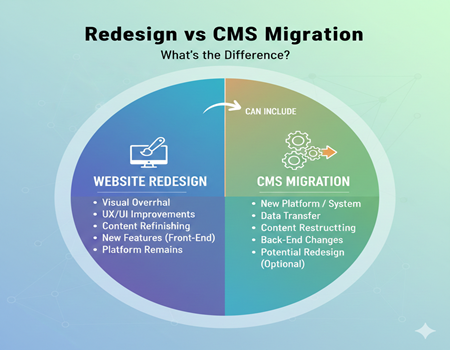
Many businesses assume that a website redesign and a CMS migration mean the same thing, but in reality, they serve very different purposes. This confusion usually arises because both involve noticeable website changes and are often discussed together during digital upgrades. When a website looks outdated or underperforms, business owners naturally think a redesign will fix everything, without realizing the underlying CMS might be the real problem.
A website redesign focuses mainly on visual appearance, user experience, and branding elements. On the other hand, CMS migration deals with the backend system that manages content, performance, and scalability. Choosing the wrong approach can lead to wasted budgets, SEO losses, broken functionality, or future limitations that slow business growth.
Understanding the difference between redesign and CMS migration is crucial before starting any website project. Some businesses only need a visual refresh, while others require a complete system change to support long-term goals. In some cases, both may be necessary—but only with proper planning.
In this blog, we will clearly explain the difference between redesign and CMS migration, explore when each option makes sense, and help you choose the right path based on your business needs, budget, and growth strategy.
What Is a Website Redesign?
A website redesign refers to improving the look, feel, and user experience of an existing website without changing its core content management system. It mainly focuses on visual elements such as layout, color schemes, typography, navigation structure, and overall branding. The goal is to make the website more attractive, modern, and easier for users to interact with.
From a business perspective, a redesign is often driven by poor user engagement, low conversion rates, or an outdated interface that no longer reflects the brand’s identity. For example, a company may redesign its website to improve mobile responsiveness, simplify navigation, or highlight key services more effectively. While content may be rewritten or rearranged during a redesign, the underlying CMS usually remains the same.
A website redesign does not typically involve moving data to a new platform or changing how content is stored and managed. Instead, it works within the existing system to enhance usability and presentation. This makes redesign projects less complex and lower risk compared to CMS migrations.
In short, a redesign is ideal when your website’s structure and CMS are functioning well, but the visual experience or user journey needs improvement to better support your business goals.
What Is CMS Migration? (Explained for Non-Technical Users)
CMS migration is the process of moving a website from one content management system to another. Unlike a redesign, which focuses on appearance, CMS migration deals with the backend structure that controls how content is created, stored, managed, and delivered to users. This includes transferring pages, blog posts, media files, databases, URLs, and sometimes custom functionalities to a new platform.
Businesses usually consider CMS migration when their existing system becomes limiting. Common reasons include poor performance, security concerns, lack of scalability, outdated technology, or difficulty managing content. For example, a business may migrate from Joomla or a custom-built CMS to WordPress or Webflow to gain better flexibility, easier content management, and stronger SEO capabilities.
CMS migration is a technically sensitive process because even small mistakes can impact website rankings, user experience, and data integrity. URLs may change, redirects must be set up correctly, and metadata needs to be preserved to avoid SEO losses. That’s why many businesses rely on professional CMS Migration Services to ensure a smooth transition without downtime or traffic drops.
Unlike a redesign, CMS migration focuses on long-term growth rather than immediate visual changes. While the design may remain the same initially, the real benefit lies in improved performance, better security, easier updates, and the ability to scale the website as business needs evolve.
Redesign vs CMS Migration: Core Differences at a Glance
The main difference between a website redesign and a CMS migration lies in their purpose and scope. A redesign focuses on improving how your website looks and feels to users, while CMS migration focuses on changing the system that powers the website behind the scenes. Although both can improve performance, they solve very different problems.
In a redesign project, the existing CMS remains the same. Changes are usually limited to layout, navigation, visual elements, and user experience. The goal is to make the website more engaging, modern, and conversion-friendly without altering its technical foundation. SEO impact is usually minimal if URLs and content structure remain unchanged.
CMS migration, on the other hand, involves moving your website’s content and functionality to a new platform. This process affects URLs, databases, page structure, and backend workflows. Because of this, CMS migration carries a higher level of technical complexity and SEO risk if not executed correctly. However, it also offers greater long-term benefits such as better scalability, improved security, and enhanced performance.
In terms of timeline and cost, redesigns are typically faster and more budget-friendly, while CMS migrations require more planning, testing, and investment. Understanding these core differences helps businesses choose the right approach based on their immediate needs and long-term digital strategy.
When a Website Redesign Is the Right Choice
A website redesign is the right choice when your current CMS is working well, but the website no longer meets user expectations or business goals. If your site looks outdated, lacks visual consistency, or does not reflect your brand identity properly, a redesign can help refresh its appearance and improve credibility.
Redesigns are also effective when user experience issues are affecting engagement or conversions. Problems such as confusing navigation, poor mobile responsiveness, slow page layouts, or unclear call-to-action placement often require design and layout improvements rather than a complete system change. In these cases, redesigning the interface can significantly enhance usability and lead to better results.
Another common reason for redesigning a website is rebranding. When a business updates its logo, messaging, or brand positioning, the website must visually align with the new identity. A redesign ensures consistency across all digital touchpoints without disrupting the backend system.
In short, a website redesign is ideal when the foundation of your website is stable, but the presentation, user journey, or branding needs improvement to better support your marketing and conversion objectives.
When CMS Migration Is the Better Decision
CMS migration is the better decision when your existing content management system is limiting your website’s growth, performance, or security. If your website feels slow, difficult to update, or prone to technical issues, the problem often lies in the CMS rather than the design. Outdated platforms may struggle with modern SEO requirements, mobile optimization, or advanced integrations.
Businesses should also consider CMS migration when scalability becomes a challenge. As your website grows with more pages, content, or traffic, an inefficient CMS can cause performance drops and management difficulties. In such cases, moving to a more flexible and future-ready platform allows smoother expansion without constant technical fixes.
Security is another major reason to migrate. Older or unsupported CMS platforms are more vulnerable to cyber threats and data breaches. Migrating to a modern CMS provides better security features, regular updates, and stronger protection for both business and user data.
CMS migration is also ideal when you need better integrations with marketing tools, CRMs, eCommerce systems, or analytics platforms. While migration requires careful planning and execution, it offers long-term benefits such as improved performance, easier content management, stronger SEO foundations, and the flexibility to adapt as your business evolves.
Can Redesign and CMS Migration Happen Together?
Yes, a website redesign and CMS migration can happen together, and in many cases, businesses choose to combine both into a single project. This approach allows companies to upgrade the website’s visual experience while also moving to a more powerful and scalable CMS. When planned correctly, doing both simultaneously can save time and reduce long-term costs.
Combining redesign with CMS migration is especially useful when a website looks outdated and the existing CMS is no longer meeting business requirements. Instead of redesigning on an old platform and migrating later, businesses can create a fresh design directly on the new CMS. This ensures better performance, improved usability, and a future-ready foundation from day one.
However, this combined approach also increases project complexity. There are higher risks related to SEO, data transfer, and functionality if proper planning is not done. Detailed audits, content mapping, and testing become critical to avoid traffic loss or broken pages.
For this reason, businesses should only combine redesign and CMS migration when they have clear goals, sufficient budget, and professional expertise to manage both technical and design challenges effectively.
SEO Impact: Redesign vs CMS Migration
SEO impact is one of the most important factors to consider when choosing between a website redesign and a CMS migration. While both can influence search performance, the level of risk and impact differs significantly.
In a website redesign, SEO impact is usually moderate if handled correctly. Since the CMS and URL structure typically remain the same, search engines can continue indexing pages without major disruption. However, issues can arise if important elements such as internal linking, page hierarchy, or on-page content are changed without SEO planning. Poor redesign decisions may affect page load speed, mobile usability, and user engagement, which indirectly influence rankings.
CMS migration has a much deeper SEO impact because it often involves changes to URLs, page templates, metadata, and backend structure. If redirects are not implemented properly, existing rankings and traffic can drop significantly. Content duplication, missing metadata, or broken links can also harm search visibility.
To protect SEO during CMS migration, careful planning is essential. This includes creating a redirect map, preserving meta titles and descriptions, maintaining URL structure where possible, and conducting post-migration SEO audits. When managed professionally, CMS migration can actually improve SEO by offering better performance, cleaner code, and enhanced technical optimization capabilities in the long run.
Cost Comparison: Redesign vs CMS Migration
When comparing costs, a website redesign is generally more affordable than a CMS migration. Redesign projects mainly focus on visual improvements, layout changes, and user experience upgrades. Since the website’s core structure and CMS remain unchanged, the process requires less technical work and fewer resources. Businesses typically spend money on design, content updates, and basic testing. The cost is mostly determined by the complexity of the design, number of pages, and customization needs.
CMS migration, on the other hand, is more complex and usually costs more because it involves transferring content, data, and functionality to a new platform. The migration process requires technical expertise, careful planning, and extensive testing to ensure data integrity and SEO preservation. Additional costs may include setting up new hosting, integrating tools and plugins, and redesigning templates to fit the new CMS structure.
To estimate your migration expenses accurately, businesses often use a CMS Migration Cost Calculator. This tool helps predict costs based on factors such as website size, complexity, data volume, and required integrations. While a CMS migration may require higher investment upfront, it often provides long-term value through better performance, easier management, improved security, and scalable growth.
Timeline & Project Complexity Comparison
A website redesign is usually faster and less complex than a CMS migration. Since redesigns focus on visuals, layout, and user experience, they typically involve fewer technical steps. Most redesign projects can be completed within a few weeks to a couple of months, depending on the number of pages, custom design requirements, and content updates. Testing is mainly focused on responsiveness, navigation, and user flow.
CMS migration projects, however, require more time and planning because they involve moving content, data, and functionality to a new platform. This process includes content mapping, URL migration, redirects, plugin or integration setup, and extensive testing to ensure everything works correctly after the switch. The timeline can range from several weeks to several months based on website size and complexity.
The complexity also increases because CMS migration impacts the website’s backend structure, which can affect SEO, performance, and user experience if not handled carefully. Due to these factors, businesses should plan CMS migration projects with clear milestones, professional support, and thorough testing to avoid downtime or traffic loss.
Common Business Mistakes When Choosing Between the Two
Many businesses make the mistake of choosing a redesign when their real issue is a weak or outdated CMS. This can lead to temporary improvements in appearance but continued problems in performance, security, or scalability. A redesign alone may not solve slow loading speeds, frequent technical issues, or limited functionality.
Another common mistake is underestimating the SEO impact of CMS migration. Businesses often migrate without planning redirects, preserving metadata, or maintaining URL structure, which can lead to traffic loss and ranking drops. Ignoring SEO during migration is one of the biggest risks for long-term website performance.
Some businesses also overlook the importance of proper testing. Whether redesign or migration, skipping QA can result in broken links, layout issues, and poor user experience. Additionally, choosing the cheapest option without considering expertise can cause costly errors and delays.
Finally, businesses sometimes ignore future needs and focus only on immediate appearance. A website should be scalable and flexible to support growth. Choosing the wrong approach can lead to repeated redesigns or migrations, increasing costs and downtime over time.
How to Decide: Redesign or CMS Migration?
Deciding between a website redesign and CMS migration begins with identifying your core problem. If your website looks outdated or user experience is poor, a redesign is usually the right solution. However, if your CMS is limiting your growth, causing technical issues, or affecting performance, migration becomes necessary.
Start by asking key questions: Is your website slow or difficult to manage? Are you facing security issues or frequent technical errors? Do you need advanced integrations with CRM, eCommerce, or marketing tools? If the answer is yes, CMS migration may be the better choice. On the other hand, if your website functions well but lacks modern design and usability, a redesign is more suitable.
Also consider your long-term business goals. If you plan to scale quickly, add new features, or improve SEO performance, a CMS migration can provide a stronger foundation. If your goal is to refresh your brand identity or improve conversions through better design, a redesign is more appropriate.
Finally, evaluate your budget and timeline. Redesign projects are usually faster and less expensive, while CMS migration requires more planning and investment. Choosing the right approach depends on aligning your website’s technical needs with your business growth strategy.
Role of Professional Experts in Redesign & Migration
Professional experts play a crucial role in both website redesign and CMS migration projects. While redesign focuses on visual and user experience improvements, experts ensure the design is modern, user-friendly, and aligned with your brand. They also handle responsive layouts, navigation improvements, and performance optimization to boost conversions.
In CMS migration, professional support becomes even more important because the process involves technical risks such as data loss, broken links, and SEO issues. Experts help plan the migration, map content accurately, set up redirects, and perform testing to ensure a smooth transition. They also ensure that the new CMS is properly configured for performance, security, and scalability.
Hiring professionals reduces the risk of errors and saves time. It also ensures the project is completed with a clear strategy and measurable results. For businesses, this means fewer disruptions, better long-term performance, and a stronger foundation for future growth.
Final Verdict: Redesign vs CMS Migration – Which One Do You Need?
Choosing between a website redesign and CMS migration depends on your goals and current website issues. If your site functions well but looks outdated, has poor user experience, or needs a brand refresh, a redesign is the right solution. It improves visuals and usability without changing the backend system.
However, if your website faces performance issues, security risks, limited functionality, or difficulty managing content, a CMS migration is the better choice. Migration is more complex but provides long-term benefits such as improved scalability, stronger security, and better SEO capabilities.
Sometimes, businesses need both. In that case, combining redesign and migration can deliver a modern, high-performing website that supports future growth. The key is to choose based on your business needs, not just trends. With proper planning and expert support, you can make the best decision and avoid costly mistakes.