Website Migration Checklist for Large Sites (1000+ Pages)
Website migration is a crucial process for any business with an online presence, especially for large websites with over 1000 pages. Whether you’re migrating from one CMS to another, switching hosting providers, or redesigning your website, the migration process can be complex and time-consuming. However, when done correctly, it can significantly improve your site’s performance, user experience, and SEO.
The importance of a seamless migration cannot be overstated, as even small errors can lead to loss of traffic, broken links, and a decline in rankings. For large websites, these risks are amplified, which is why a carefully planned migration strategy is essential.
In this blog, we’ll provide you with a Website Migration Checklist for Large Sites to ensure your migration process goes smoothly. Whether you’re moving your website to a new platform or undergoing a redesign, following the right steps will help you retain your hard-earned SEO rankings and deliver an enhanced user experience. We’ll cover everything from planning your migration to post-migration testing, with insights on how to keep your website optimized throughout the process.
By the end of this blog, you’ll be equipped with the knowledge to handle a successful migration, without any hiccups. So, let’s dive into the world of website migration for large sites and ensure a smooth transition for your business.
Understanding Website Migration
Website migration refers to the process of moving a website from one platform or hosting environment to another. This may include switching Content Management Systems (CMS), moving from HTTP to HTTPS, changing domains, or redesigning the site’s structure and content. For businesses with large websites (1000+ pages), migration can be an involved and intricate process requiring careful planning, expert execution, and thorough testing to minimize the risk of losing traffic and rankings.
There are several types of website migrations, each with its own set of challenges and considerations:
- CMS Migration: This is one of the most common types of website migration. It involves moving the content of a website from one CMS to another, such as from WordPress to Shopify or from Wix to WordPress. The challenge here is ensuring that all content, functionality, and SEO value are transferred seamlessly.
- Domain Migration: Sometimes, businesses may need to move their website to a new domain. This could be due to branding changes or the need for a more search-engine-friendly domain. The key challenge with domain migration is ensuring that all existing backlinks and SEO rankings are maintained.
- Website Redesign: A redesign often requires changes to the site’s structure, layout, and URL structure. This can cause issues with broken links, redirects, and SEO rankings if not handled properly.
- Platform Migration: In some cases, businesses need to move their website to a completely different platform, such as from a custom-built solution to a CMS. This migration type often involves moving both content and functionalities while ensuring a smooth user experience.
Understanding these migration types and their specific challenges is essential for large websites to avoid costly mistakes and to preserve their online presence effectively.
Key Benefits of a Successful Website Migration
A successful website migration is more than just a technical process; it offers a range of benefits that can significantly enhance your website’s performance, user experience, and SEO ranking. Here are some key advantages of a well-executed migration:
1. Improved Website Performance
One of the most important reasons for migrating your website is to improve its overall performance. A site migration offers the opportunity to optimize your site’s speed, responsiveness, and reliability. For large websites, migrating to a faster, more efficient platform can lead to quicker load times, which is crucial for retaining visitors and reducing bounce rates. A well-performing site also boosts the user experience, leading to higher engagement and satisfaction.
2. Better SEO Rankings
SEO is one of the most significant factors impacted by website migration. If done incorrectly, migration can result in broken links, lost backlinks, and a decrease in organic search rankings. However, a successful migration preserves and even enhances SEO performance. By maintaining 301 redirects, optimizing on-page SEO elements, and ensuring a smooth URL structure, a website migration can actually help improve keyword rankings. It’s also an opportunity to refresh and optimize old content, improve site architecture, and implement technical SEO best practices that may have been overlooked before.
3. Scalability and Future Growth
Migrating to a more flexible CMS or platform allows businesses to scale their websites as they grow. This could mean the ability to handle more traffic, integrate additional features, or add content more easily. For large sites, scalability is a critical factor. A migration provides the chance to select a platform that can grow alongside your business, avoiding future bottlenecks and ensuring long-term success.
4. Enhanced User Experience
User experience (UX) is at the heart of any successful website. During a migration, you can redesign the site’s user interface (UI) to improve navigation, layout, and accessibility. Migrating to a more user-friendly platform also allows for better mobile optimization, ensuring that users across devices enjoy a seamless experience. A well-designed, easy-to-navigate site increases the likelihood of conversions and user retention.
By focusing on these benefits, businesses can ensure that their migration not only preserves but enhances their website’s performance, SEO, and user experience. A smooth migration also reduces the risk of post-launch problems that could disrupt traffic and brand reputation.
CMS Migration Considerations for Large Websites
When migrating a large website (1000+ pages) to a new CMS, there are several important factors to consider. Unlike smaller sites, large websites have more content, a more complex structure, and higher traffic volumes, which can make the migration process more challenging. To ensure a smooth transition, it’s crucial to address key aspects specific to CMS migration for large sites.
1. Choosing the Right CMS Platform
The first step in a successful CMS migration is choosing the right platform for your website. For large websites, the CMS must be robust, scalable, and capable of handling high traffic without compromising performance. Consider platforms like WordPress, Drupal, or Joomla, which are known for their flexibility and ability to manage large-scale websites. You should also ensure that the CMS offers features that align with your business goals, such as SEO optimization tools, easy content management, and integration with third-party services like eCommerce platforms or CRMs.
2. Working with a CMS Migration Agency
Migrating a large website to a new CMS can be a complicated process. It requires not only technical expertise but also a deep understanding of the intricacies involved in large-scale migrations. Hiring a CMS migration agency can be a game-changer in this process. A professional agency will have the experience and tools to handle content migration, design integration, and SEO preservation effectively. Their expertise ensures minimal downtime, retention of SEO value, and proper mapping of URLs and redirects to avoid traffic loss.
3. Data Migration and Content Structuring
One of the most important aspects of CMS migration is transferring your website’s content. This includes text, images, videos, and all other media. For large websites, it’s essential to map out the existing content structure and ensure it aligns with the new CMS’s structure. This may involve categorizing content into appropriate sections, maintaining proper metadata, and ensuring that internal links are correctly mapped. Migrating large volumes of data can be time-consuming, but it’s crucial to ensure all content is preserved and correctly displayed on the new platform.
4. SEO Considerations During CMS Migration
Maintaining SEO rankings during a CMS migration is a top priority. Large websites often have valuable SEO assets like backlinks, keyword rankings, and page authority that must be carefully preserved. This involves implementing 301 redirects, ensuring proper canonical tags, and updating internal links to avoid broken pages. A CMS migration calculator can be helpful in analyzing the SEO impact of the migration and identifying potential areas of improvement.
By addressing these key considerations, businesses can ensure that their CMS migration is smooth, efficient, and beneficial for long-term success.
Website Migration Checklist
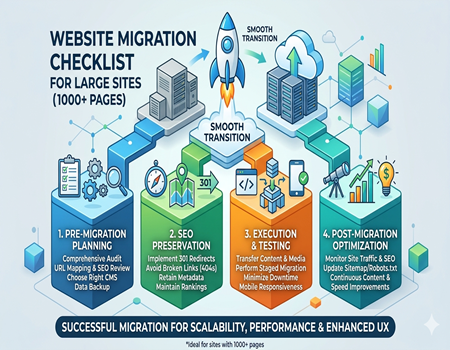
Migrating a large website (1000+ pages) is no easy task. It involves meticulous planning, execution, and testing to ensure everything runs smoothly. For businesses, the stakes are high—one mistake could lead to downtime, loss of traffic, and SEO ranking drops. To make the process as seamless as possible, here’s a detailed Website Migration Checklist for large sites, broken down into the three critical phases: Pre-Migration, Migration, and Post-Migration.
Pre-Migration Phase
The pre-migration phase is where you do all the groundwork to prepare for the move. This is the most crucial part of the process, as any oversight here can lead to major issues during and after migration.
1. Research and Planning
Before jumping into the technical aspects, thorough research and planning are essential. Assess the current state of your website and document every detail. This includes understanding the existing CMS, hosting environment, and functionality. Analyze the strengths and weaknesses of your current site to ensure the new platform will address these issues.
- Assess your CMS: If you’re migrating to a new CMS, ensure that it offers the features you need to support your current and future business goals. Consider scalability, ease of use, security, and integration with third-party applications.
- Identify potential issues: Larger websites often face unique challenges like content migration, redirects, and maintaining SEO integrity. Document any potential roadblocks so you can address them ahead of time.
2. Choosing the Right CMS Platform
Choosing the right CMS is a critical decision. You need a platform that can handle the size, scale, and complexity of your website. Whether it’s WordPress, Joomla, Drupal, or a custom-built solution, the platform you choose must align with your business’s needs and long-term goals. Factors to consider include:
- Scalability: Ensure that the new CMS can scale with your business as it grows. Your CMS should handle future content expansion and traffic spikes seamlessly.
- SEO Capabilities: Choose a CMS that offers built-in SEO tools, such as the ability to optimize metadata, implement redirects, and manage URL structures.
- Customization: Ensure the platform offers the flexibility you need in terms of design and functionality. Customizable themes and plugins can add value to your site in the long run.
3. Backup and Data Migration Preparation
Before migrating any content, always back up your website. For large websites, it’s essential to back up the entire website—files, database, and content—to ensure you have a safety net in case anything goes wrong.
- Full Backup: Ensure you take a complete backup, including databases, images, text, and other content. This will be your fallback plan if you need to revert to the original setup.
- Content Audit: Conduct an audit of your website’s content to determine what needs to be moved. Identify old, outdated, or irrelevant content that can be removed, and plan to transfer only what’s necessary to the new CMS.
4. SEO Audit and Ensuring No SEO Value is Lost
The most critical aspect of any website migration is preserving SEO rankings. Losing SEO value during migration is one of the most common issues businesses face, especially for large websites. To avoid this, conduct a thorough SEO audit of your existing website:
- Perform a Site Crawl: Use SEO tools like Screaming Frog or Ahrefs to crawl your site and gather a list of all URLs, internal links, metadata, and other SEO factors.
- Mapping URLs: Ensure that all URLs are mapped correctly to the new CMS. Broken links or changes in URL structures can harm your SEO.
- 301 Redirects: Set up 301 redirects from the old URLs to the new URLs. This ensures that visitors and search engines are directed to the new page, preserving your SEO rankings.
- Use a CMS Migration Calculator: A CMS migration calculator can help you estimate the SEO impact of the migration, track ranking drops, and identify high-risk areas to address during the migration.
Migration Phase
The migration phase is where the actual work takes place. This involves transferring content, implementing redirects, and ensuring that the site functions as expected on the new CMS. Given the size of your site, it’s critical to take the following steps:
1. Mapping URLs, 301 Redirects, and Internal Links
URL mapping is one of the most important tasks during migration. Ensure that every URL from the old website corresponds to a new one on the new CMS. This is where 301 redirects come into play.
- 301 Redirects: For every old URL, set up a 301 redirect to the new one. This tells search engines and browsers that the page has permanently moved, and all SEO value (e.g., backlinks, rankings) is transferred to the new URL.
- Internal Linking: Ensure that all internal links are updated to reflect the new URL structure. Failing to do so can lead to broken links, negatively affecting the user experience and SEO.
2. Migrating Content and Ensuring Formatting Transfer
When migrating content, it’s crucial to ensure that all your text, images, and videos transfer correctly. Large sites often contain thousands of pieces of content, so organizing the migration process is key.
- Content Formatting: Ensure that the content is properly formatted in the new CMS, especially for large websites with many pages. This includes checking for missing images, broken links, and layout issues.
- Media Transfer: Large sites typically contain a lot of media (images, videos, documents, etc.). Make sure that all media files are migrated and properly linked to their respective pages.
3. Testing Migration in Stages
A full-site migration for a large website can be overwhelming, and testing everything all at once may lead to missed errors. It’s best to perform a staged migration, where you test small sections of the site before moving everything.
- Test a Sample Section: Migrate a portion of the site first, such as a few pages or sections, and thoroughly test it. This will help identify any potential issues before migrating the entire site.
- Check Functionality: During testing, make sure all interactive elements—such as forms, contact details, and payment systems—are working correctly. This helps ensure that users have a smooth experience once the migration is complete.
4. Minimizing Downtime During Migration
For large websites, minimizing downtime is essential to maintaining user engagement and preserving SEO rankings. Ideally, the migration should be done during off-peak hours, and users should be notified in advance if any downtime is expected.
- Notify Users: If downtime is unavoidable, make sure your users are informed through a message on your website. Include estimated downtime and explain the reason for the migration.
- Test During Migration: During the migration process, continuously monitor the site’s performance to ensure everything is functioning as expected. Test key pages and functionalities to minimize disruptions for users.
Post-Migration Phase
Once the website migration is complete, the next step is to ensure everything is working correctly and that your SEO rankings are intact. This phase involves testing, monitoring, and optimization.
1. Site Testing and Troubleshooting
Once the site is live on the new CMS, it’s time to conduct thorough testing. This step ensures that all aspects of your site are functioning as expected.
- Test Functionality: Check for any broken links, images, forms, or other issues that may have occurred during migration.
- Mobile Responsiveness: Ensure that the new site is fully responsive and works seamlessly on all devices, including smartphones and tablets.
- Site Speed: Test the site’s loading speed. A slow website can lead to a high bounce rate and affect SEO rankings.
2. Updating SEO Settings (XML Sitemap, Robots.txt, etc.)
Ensure that all your SEO settings are properly configured on the new CMS. This includes updating the XML sitemap, robots.txt file, and meta tags.
- XML Sitemap: Update the XML sitemap to reflect the new site structure and submit it to search engines like Google and Bing.
- Robots.txt: Review and update your robots.txt file to ensure search engine bots can crawl the right pages on your site.
- Meta Tags and Headings: Double-check your meta tags and headings to ensure they are properly optimized for search engines.
3. Monitoring Website Traffic and SEO Performance
After the migration, monitor your website traffic and SEO performance closely. Use Google Analytics and other SEO tools to track any changes in site traffic, rankings, and user behavior.
- Track Traffic: Keep an eye on traffic sources and user behavior. If you notice any significant drops, investigate potential issues such as broken links, missing content, or incorrect redirects.
- Check Search Engine Rankings: Track your keyword rankings to ensure that you haven’t lost SEO value during the migration. Use tools like Google Search Console to monitor your site’s health.
4. Continuous Optimization
After migration, continue optimizing the site based on user feedback and analytics. This includes improving content, adjusting the website design, and implementing any necessary SEO tweaks.
Common Website Migration Mistakes to Avoid
Website migration is a complex and delicate process, especially when dealing with large sites that have hundreds or thousands of pages. Even a small mistake during migration can lead to significant consequences, such as traffic loss, broken links, and a decline in SEO rankings. Below are some of the most common website migration mistakes businesses make, and how to avoid them.
1. Failing to Set Up 301 Redirects Properly
One of the most critical mistakes during website migration is neglecting to properly set up 301 redirects. A 301 redirect tells search engines and users that a page has permanently moved to a new URL. Without it, visitors and search engines will encounter 404 errors, which can hurt user experience and SEO.
- Solution: Always ensure that every old URL is correctly redirected to the corresponding new URL. This will preserve SEO value, traffic, and user experience. Regularly test the redirects during and after migration to avoid any issues.
2. Overlooking SEO Preservation
When migrating a large website, maintaining your SEO rankings is a top priority. Many businesses make the mistake of focusing solely on the technical aspects of migration, while overlooking important SEO elements. This can result in the loss of valuable organic traffic and search engine rankings.
- Solution: Perform a detailed SEO audit before and after migration to ensure that all crucial SEO elements are intact. Keep track of important factors like meta tags, image alt text, keyword optimization, and internal linking. Using a CMS migration calculator can help analyze the SEO impact and identify any risk areas to address.
3. Ignoring Mobile Optimization
With mobile traffic accounting for a significant portion of web visits, ignoring mobile optimization during a website migration can be a critical mistake. If your new website is not mobile-friendly, you risk losing a large chunk of your audience, which can negatively impact your conversion rates and SEO performance.
- Solution: Ensure that the new CMS or platform is optimized for mobile devices. Test the site across various screen sizes to ensure it provides a seamless mobile experience.
4. Not Testing the Website Before Going Live
Rushing the migration process without thorough testing can lead to significant issues once the site goes live. Whether it’s broken links, missing images, or functionality errors, launching a website that hasn’t been properly tested can be detrimental.
- Solution: Perform extensive testing on the migrated site, including checking for broken links, testing forms, ensuring correct page load speeds, and verifying that all content is properly displayed. Also, ensure the new site is working across different browsers and devices to avoid any issues post-launch.
5. Underestimating the Importance of a Clear Plan
Migration requires clear communication and well-defined roles among the teams involved. A lack of coordination and a poorly laid-out plan can lead to errors, confusion, and delays.
- Solution: Develop a comprehensive migration plan that includes timelines, responsibilities, and contingency plans. Having a CMS migration agency with experience handling large-scale projects can help manage the process efficiently.
Avoiding these common mistakes will help ensure that your website migration goes smoothly, preserving both your SEO rankings and user experience.
How a CMS Migration Agency Can Help with Large Site Migrations
Migrating a large website (1000+ pages) is a complex task that requires expertise in both technical and strategic aspects of website management. While some businesses may attempt to handle the migration in-house, working with a CMS migration agency can greatly reduce the risk of errors, downtime, and loss of SEO value. Here’s how a professional agency can help ensure a smooth and successful migration.
1. Expertise in CMS Migration
A CMS migration agency specializes in handling the intricacies of moving websites between different content management systems. Their expertise ensures that the migration is not only smooth but also efficient. They have the experience to handle large-scale projects, ensuring that all pages, images, media files, and content transfer seamlessly from the old system to the new one.
2. Minimizing SEO Risks
SEO preservation is one of the biggest concerns during migration. Losing valuable rankings or traffic can be detrimental to your business. A CMS migration agency uses industry best practices to protect your SEO value throughout the migration process. This includes setting up proper 301 redirects, preserving internal link structures, and ensuring that important metadata (titles, descriptions, and tags) is transferred correctly. They may even use tools like the CMS migration calculator to measure and minimize SEO impact.
3. Reducing Downtime
Large sites are often busy and depend on a high level of uptime. A migration agency ensures that downtime is minimized, or even eliminated, during the migration process. They have the technical skills to migrate sites in stages or during off-peak hours, allowing your site to remain operational while the migration is taking place.
4. Post-Migration Support
The work doesn’t stop once the migration is complete. A CMS migration agency provides post-migration support to ensure that any issues that arise are quickly addressed. This includes troubleshooting broken links, fixing any formatting issues, and ensuring that SEO and functionality are properly optimized.
Partnering with a CMS migration agency provides peace of mind and helps businesses with large websites navigate the complexities of migration, ensuring a seamless transition to the new CMS platform.
Conclusion
Website migration for large sites (1000+ pages) can seem daunting, but with the right planning and execution, it can lead to improved performance, enhanced user experience, and even better SEO rankings. By following the steps outlined in this checklist—planning, migrating, and post-migration testing—you can minimize risks and ensure a smooth transition to your new CMS.
Remember, the key to a successful migration lies in the details: setting up proper redirects, preserving SEO value, and ensuring that the new platform is optimized for speed, functionality, and mobile users. While the migration process may seem overwhelming, the benefits are immense—improved scalability, better performance, and a site that’s ready to support your business as it grows.
If you’re considering a website migration, partnering with a CMS migration agency can provide the expertise and experience needed to handle the complexities of large-scale projects. They will ensure your site’s migration is smooth, minimizing downtime and SEO losses, while also providing post-migration support to address any issues that arise.
For a hassle-free website migration and to ensure that your SEO value and user experience are preserved, don’t hesitate to contact a professional CMS migration agency today. With their help, your website can transition smoothly to the next stage of its growth.