Website Migration Testing Checklist (Before Launch)
Website migration means moving your website from one platform, domain, or hosting to another. It can improve performance, design, or functionality. But if not handled properly, it can damage your traffic and rankings. That’s why testing before launch becomes very important.
Many businesses rush the migration process and skip proper testing. This leads to broken pages, missing content, and SEO loss. Even small issues can create a bad user experience. A proper testing checklist helps you avoid these problems before your website goes live.
In this blog, you will get a complete website migration testing checklist. It will help you ensure everything works perfectly. From technical checks to SEO validation, you will understand what to test before launch. This guide is simple, practical, and easy to follow.
What is Website Migration Testing?
Website migration testing is the process of checking your new website before making it live. It ensures everything works properly after moving from one system to another. This includes checking design, functionality, SEO elements, and performance.
There are different types of migrations like CMS migration, domain change, hosting change, or complete redesign. Each type has its own risks. Testing helps you identify issues early so they can be fixed before users visit the new site.
Many people think development is enough, but testing is a separate and important step. A website may look perfect but still have hidden issues. Testing ensures that everything is working exactly as expected in real conditions.
For example, if redirects are missing or pages are not indexed, your traffic can drop quickly. Proper testing helps avoid such problems. It gives you confidence that your website is ready for launch.
Why Pre-Launch Testing is Important
Pre-launch testing is important because it protects your website from major risks. One of the biggest risks is losing SEO rankings. If URLs change without proper redirects, search engines may not understand your new structure.
User experience is another critical factor. Broken links, slow pages, or missing content can frustrate users. This can increase bounce rate and reduce conversions. Testing helps ensure a smooth and professional experience for visitors.
From a business point of view, mistakes during migration can lead to revenue loss. If your website is not working properly, users may leave and not return. This directly affects your sales and brand trust.
Technical issues like server errors, incorrect configurations, or tracking problems can also occur. These issues are not always visible immediately. Pre-launch testing helps you catch and fix them early.
For example, many websites lose traffic after migration due to poor testing. A simple mistake like blocking search engines in robots.txt can remove your site from search results. Testing helps you avoid such costly errors.
Complete Website Migration Testing Checklist Overview
Before launching your migrated website, it is important to follow a structured checklist. This ensures that no important area is missed. A proper checklist saves time and reduces the chances of errors.
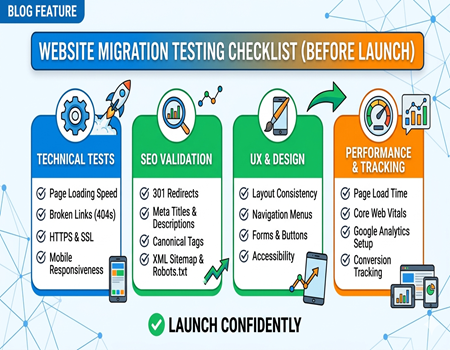
The testing process can be divided into key areas. These include technical testing, SEO validation, design and user experience, performance checks, and tracking verification. Each area plays a critical role in website success.
By following this checklist step by step, you can ensure your website is fully ready. It helps you launch with confidence and avoid unexpected issues after going live.
Technical Testing Checklist
Technical testing ensures that your website works properly from a functional point of view. Start by checking if all pages are loading correctly. Every page should open without errors and display properly across devices.
Next, check for broken links and fix any 404 errors. Redirects should be properly implemented using 301 redirects. This helps maintain SEO value and ensures users land on the correct pages after migration.
You should also verify that HTTPS and SSL certificates are working correctly. Security is important for both users and search engines. A secure website builds trust and improves rankings.
Test your website on different devices and browsers. Mobile responsiveness and cross-browser compatibility are essential. Users should have a consistent experience regardless of how they access your site.
Forms, buttons, and interactive elements should also be tested. Make sure everything is functioning as expected. If you are planning a migration, using professional CMS Migration Services can help reduce technical risks and ensure smooth execution.
SEO Testing Checklist
SEO testing is one of the most important parts of website migration. Start by checking your URL structure. Ensure that old URLs are properly mapped to new ones using redirects. This prevents loss of traffic and rankings.
Meta titles and descriptions should be properly set on all pages. These elements help search engines understand your content. Heading tags like H1 and H2 should also be structured correctly for better readability and SEO.
Canonical tags should be checked to avoid duplicate content issues. Your XML sitemap should be updated and submitted to search engines. Robots.txt should not block important pages from being indexed.
Image alt tags should be present for all images. This improves accessibility and helps with image SEO. Internal linking should also be verified to ensure proper navigation and SEO flow.
Understanding the Cost of CMS Migration is also important because proper SEO testing requires time and resources. Investing in SEO during migration helps protect your long-term traffic and visibility.
Design & User Experience Testing
Design and user experience testing ensures your website looks good and is easy to use. Start by checking layout consistency across all pages. Fonts, colors, and spacing should match your brand identity.
Navigation should be simple and user-friendly. Users should be able to find information easily. Menus, links, and buttons should work properly without confusion.
Call-to-action buttons should be clearly visible and functional. These elements are important for conversions. Make sure they are placed correctly and guide users effectively.
Mobile experience should be smooth and responsive. Most users access websites on mobile devices. A poor mobile experience can lead to high bounce rates.
Basic accessibility should also be considered. Your website should be usable for all users, including those with disabilities. This improves usability and expands your audience reach.
Performance & Speed Testing
Website speed plays a major role in user experience and SEO. Start by testing your page load speed. Slow websites can frustrate users and reduce engagement.
Core Web Vitals are important metrics to measure performance. They focus on loading speed, interactivity, and visual stability. Improving these metrics can boost your search rankings.
Images should be optimized to reduce size without losing quality. Large images can slow down your website. Proper compression helps improve loading time.
Caching should be enabled to speed up repeat visits. It helps store data and reduces server load. This improves overall performance.
You can use tools like Google PageSpeed Insights to test your website speed. Regular testing ensures your website performs well under different conditions.
Analytics & Tracking Testing
Analytics and tracking are important to measure website performance. Start by checking if Google Analytics is properly installed. It should track user behavior accurately.
Google Tag Manager should also be verified. It helps manage different tracking codes easily. Make sure all tags are firing correctly.
Conversion tracking is important for measuring goals like form submissions or purchases. Ensure that these events are properly set up and tested.
If you are using ad platforms, check pixel tracking as well. This helps in retargeting and campaign optimization. Missing tracking can lead to data loss.
Event tracking should also be tested. This includes clicks, scrolls, and other user actions. Accurate data helps you make better business decisions.
Content Verification Checklist
Content verification ensures that all your website content is correct and complete. Start by checking if any content is missing after migration. Every page should have the correct information.
Formatting should be consistent across pages. Text alignment, headings, and spacing should be proper. Poor formatting can affect readability and user experience.
Internal links should be working correctly. Broken internal links can confuse users and harm SEO. Make sure all links point to the correct pages.
Images and videos should load properly. Missing media can make your website look incomplete. Check all files carefully.
Duplicate content should also be avoided. Each page should have unique content. This helps improve SEO and provides better value to users.
Common Website Migration Mistakes to Avoid
One common mistake is not setting up proper redirects. This can lead to broken links and traffic loss. Always map old URLs to new ones carefully.
Another mistake is blocking search engines accidentally. Incorrect robots.txt settings can prevent indexing. This can remove your site from search results.
Skipping testing on a staging environment is also risky. Testing directly on a live site can cause issues. Always test before going live.
Ignoring mobile testing can also create problems. A website that works on desktop may not work on mobile. Always test on multiple devices.
Lack of planning is another major issue. Migration should be done with a clear strategy. Proper planning helps avoid unexpected errors.
Pre-Launch Final Checklist (Quick Summary)
Before launching your website, do a final review of all important elements. Check that all pages are loading correctly and no errors are present.
Ensure that redirects are properly implemented. Verify SEO elements like meta tags, sitemap, and indexing settings. These are critical for search visibility.
Test your website on different devices and browsers. Make sure everything is responsive and user-friendly. User experience should be smooth and consistent.
Check analytics and tracking tools. Data collection should be accurate from the start. This helps in performance monitoring.
Finally, review your content and functionality. Everything should be complete and working. A final checklist ensures a successful launch.
Post-Migration Monitoring
After launching your website, monitoring is very important. Start by tracking your website traffic. Any sudden drop should be investigated immediately.
Check your keyword rankings regularly. Migration can impact SEO, so tracking helps you identify issues early. Quick action can prevent long-term damage.
Monitor errors like 404 pages or server issues. These can affect user experience and SEO. Fix them as soon as possible.
Use tools like Google Search Console to track indexing and performance. It provides valuable insights about your website.
Continuous monitoring helps you improve your website over time. Migration is not the end, it is the beginning of optimization.
Conclusion
Website migration can be a complex process, but proper testing makes it manageable. A detailed testing checklist helps you avoid common mistakes and ensures a smooth transition.
From technical checks to SEO validation, every step is important. Ignoring even small details can lead to big problems. Testing gives you confidence before launch.
Always take time to plan and test your website properly. It helps protect your traffic, rankings, and user experience. A well-tested website performs better and builds trust.
Follow this checklist and make your website migration successful without unnecessary risks.