What Counts as a “Custom Website” Migration?
Website migration is a common process in the digital world. Businesses often migrate their websites when they want better performance, improved design, stronger security, or more flexibility. Migration may involve changing the website platform, moving to a new server, or restructuring the entire site. However, when a website is custom-built, the migration process becomes much more complex.
Many modern websites are built using ready-made platforms like WordPress or Shopify. These platforms provide templates and built-in features that make migration easier. In contrast, custom websites are created with unique code, custom databases, and specific functionalities designed only for that business. Because of this uniqueness, moving such websites requires careful planning and technical expertise.
A custom website migration is not simply copying files from one server to another. It often involves rebuilding parts of the website, transferring structured data, preserving SEO elements, and ensuring that every feature continues to work correctly after the move. If the migration is not handled properly, it can lead to broken pages, data loss, or even a drop in search engine rankings.
This is why businesses often rely on professional CMS Migration Services to handle complex migrations safely. Experts understand how to manage custom code, databases, and SEO structures during the process. With the right approach, a migration can improve performance while protecting existing traffic and user experience.
In this guide, we will clearly explain what actually counts as a “custom website” migration. You will also learn about common scenarios, challenges, and the best practices to ensure a smooth and successful migration.
What is a Custom Website?
A custom website is a website that is built specifically for a business using unique coding and customized functionality. Instead of using ready-made templates, developers design and develop the website from the ground up. This approach allows businesses to create a website that perfectly fits their brand, operations, and user experience requirements.
Many websites today are built using platforms like WordPress, Wix, or Shopify. These platforms provide pre-designed themes and plugins that make website creation easier. However, a custom website does not depend on pre-built tools. Developers write the code manually and design every feature based on the specific needs of the business.
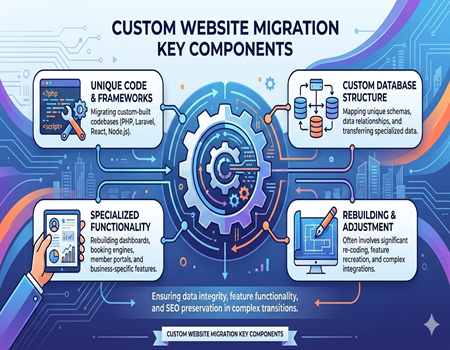
Custom websites are usually developed using technologies such as PHP, Laravel, Python, Node.js, React, or other frameworks. These technologies allow developers to build advanced features that standard CMS platforms may not support easily. For example, businesses may require custom dashboards, advanced filtering systems, booking engines, or unique user portals.
Another key characteristic of a custom website is its unique database structure. Unlike traditional CMS platforms that follow a fixed database format, custom websites often have specially designed databases. These databases are structured to handle specific data and workflows, which helps businesses manage information more efficiently but also increases technical complexity.
Because of this flexibility and complexity, custom websites provide more control over design, performance, and scalability. However, they also require deeper technical knowledge for maintenance and updates. When changes such as redesigns, platform shifts, or system upgrades are required, developers must carefully analyze the entire website architecture before making modifications.
What is Website Migration?
Website migration refers to the process of moving a website from one environment to another while keeping its content, functionality, and performance intact. Businesses usually migrate websites when they need better technology, improved performance, or a more scalable system. The process may involve changes to hosting, platform, design, or website structure.
A well-planned migration ensures that the website continues to function properly without losing important data or search engine visibility. If the process is not handled carefully, it can lead to broken pages, missing content, or sudden drops in website traffic. That is why proper planning and testing are critical during any migration process.
Types of Website Migration
There are several types of website migration depending on what changes are being made. One common type is platform migration, where a website moves from one CMS or framework to another. For example, a business may move from a custom-built system to WordPress or another modern platform.
Another type is server or hosting migration. In this case, the website remains the same but is moved to a new hosting provider for better performance, speed, or reliability. Businesses may also migrate their websites when changing domain names, redesigning the site, or restructuring the entire content architecture.
Why Businesses Migrate Websites
Businesses usually migrate websites to improve functionality, user experience, and long-term scalability. As companies grow, their existing website systems may become outdated or difficult to manage. Migration allows them to adopt modern technologies that support better performance and easier content management.
Website migration can also help improve security, website speed, and integration with other digital tools. However, every migration must be carefully executed to ensure that the website continues to operate smoothly while protecting important SEO elements like URLs, metadata, and search rankings.
What Counts as a “Custom Website” Migration?
A custom website migration happens when a website built with unique code, custom functionality, or a specialized database is moved to a new system, platform, or environment. Unlike simple CMS migrations, custom migrations require deeper technical work because every feature and structure may be different from standard platforms.
In many cases, custom websites are created using frameworks like Laravel, Node.js, or other development technologies. These websites do not follow the standard structures used by common CMS platforms. Because of this, migrating them often involves analyzing the entire codebase, database relationships, and functionality before any data is transferred.
Moving a Custom-Built Website to a CMS
One common example of custom website migration is moving a fully custom-coded website to a content management system such as WordPress or another modern CMS. Businesses often make this shift when they want easier content management and better scalability without relying heavily on developers for small updates.
However, this type of migration is rarely simple. Developers must carefully map the custom database fields, content structure, and website pages to the new CMS structure. Many features may need to be rebuilt or adjusted so they function properly within the new system.
Migrating Between Custom Frameworks
Another situation that counts as a custom website migration is when a website built on one framework is moved to another framework or technology stack. For example, a website built using older PHP code might be migrated to Laravel or another modern development framework.
In these cases, developers may need to restructure the entire codebase while keeping the existing content and functionality intact. The migration process often includes rewriting parts of the application, optimizing the database, and ensuring that user-facing features continue to work correctly.
Database and Functionality Reconstruction
Custom website migrations often require rebuilding important parts of the system rather than simply transferring files. Custom dashboards, user portals, booking systems, or product databases may need to be recreated within the new platform or framework.
Because of these complexities, a custom migration requires careful planning, testing, and technical expertise. Every element of the website must be evaluated to ensure that data, functionality, and SEO structure remain intact after the migration is completed.
Common Scenarios of Custom Website Migration
Custom website migrations happen in many real-world situations where businesses need better technology, easier management, or improved performance. These migrations usually involve moving complex systems, custom databases, or unique functionality to a more modern and scalable platform. Each scenario requires careful planning to ensure data and features remain intact.
Custom PHP Website to WordPress
Many older websites were built using custom PHP code without a content management system. While these websites may work well, managing content can become difficult over time. Businesses often migrate such websites to WordPress so their teams can easily update pages, blogs, and media without needing developer support.
During this migration, developers must carefully transfer content, images, and database information into the WordPress structure. Custom features such as forms, login systems, or dynamic content may also need to be rebuilt using plugins or custom development to maintain the same functionality.
Legacy CMS to Modern CMS
Some businesses still operate websites on outdated or proprietary CMS platforms. These systems may lack modern features, security updates, or integration capabilities. In such cases, companies often migrate their websites to modern CMS platforms that offer better performance and easier content management.
This process involves exporting content from the old system, restructuring the data, and importing it into the new CMS. Developers must also ensure that page URLs, metadata, and website structure remain consistent to prevent SEO issues after the migration.
Custom eCommerce Platform Migration
Another common scenario involves migrating a custom-built eCommerce website to platforms like Shopify or Magento. Many businesses initially build custom online stores but later realize that maintaining them becomes expensive and technically demanding.
Migrating to a dedicated eCommerce platform allows businesses to benefit from built-in payment systems, inventory management, and security features. However, developers must carefully migrate product data, customer accounts, order history, and other important information to avoid disrupting business operations.
Static Website to CMS Migration
Some older websites were built entirely using static HTML pages. While these websites may be simple and fast, updating them requires manual coding. Businesses often migrate these static websites to a CMS so they can manage content more efficiently and scale their website easily.
During this migration, developers convert static pages into dynamic CMS templates while preserving the original content and structure. This ensures that the website remains functional while becoming easier to manage and expand in the future.
Challenges in Custom Website Migration
Custom website migration can be much more complicated than migrating a standard CMS website. Because custom websites are built with unique code, databases, and functionality, every part of the system must be carefully analyzed before the migration begins. Even small mistakes during the process can cause serious issues with functionality, performance, or data integrity.
Complex Database Structures
One of the biggest challenges in custom website migration is handling complex database structures. Custom websites often use unique database tables and relationships designed specifically for that business. Unlike standard CMS platforms, there is no fixed format that can be easily transferred.
Developers must carefully study how data is stored and connected within the system. During migration, the data may need to be reorganized or mapped into a new database structure. If this process is not handled properly, it can lead to missing data, broken features, or incorrect information appearing on the website.
Custom Features and Integrations
Many custom websites include unique features such as booking systems, membership portals, advanced search filters, or custom dashboards. These features are usually built specifically for that website and may not exist in the new platform where the website is being migrated.
Because of this, developers often need to rebuild or modify these features to make them compatible with the new system. Third-party integrations such as payment gateways, APIs, or CRM tools must also be carefully reconnected and tested to ensure everything works smoothly after migration.
SEO and URL Structure Risks
Another major challenge during custom website migration is protecting the website’s SEO performance. Custom websites often have unique URL structures, metadata, and internal linking patterns that search engines have already indexed.
If URLs change during migration without proper redirects, search engines may not recognize the new pages. This can lead to broken links, lost rankings, and reduced organic traffic. Developers must carefully plan URL mapping and implement proper redirects to maintain search visibility.
Testing and Validation Requirements
After the migration process is completed, extensive testing is required to ensure the website works correctly. Every page, feature, form, and integration must be checked carefully. Developers also need to verify that data has been transferred accurately and that users can interact with the website without issues.
Without proper testing and validation, hidden problems may appear after the website goes live. Thorough quality assurance helps ensure that the migrated website performs smoothly and provides a consistent experience for users.
Why Professional CMS Migration Services Matter
Custom website migration is a complex process that requires careful planning, technical expertise, and a clear migration strategy. Unlike simple website transfers, custom migrations often involve unique databases, custom features, and large amounts of structured content. Without proper expertise, the migration process can lead to broken functionality, data loss, or serious SEO problems.
Professional teams that provide CMS Migration Services understand how to manage these complexities. They begin by analyzing the existing website structure, codebase, and database architecture. This helps them identify potential risks and create a migration plan that ensures the website continues to function properly after the transition.
Another important benefit of professional migration services is risk reduction. Experienced developers know how to safely transfer content, media files, and database records while preserving the relationships between different pieces of data. They also ensure that custom features, integrations, and user-facing elements continue working correctly after the migration.
SEO preservation is also a critical part of the migration process. A poorly handled migration can cause significant traffic loss if search engines cannot find the website pages after the move. Professionals carefully map old URLs to new ones, implement proper redirects, and maintain important SEO elements like metadata, internal links, and page hierarchy.
Testing and quality assurance are also essential steps handled by migration experts. Before launching the migrated website, developers thoroughly test every page, feature, and integration to ensure everything works as expected. This includes checking forms, login systems, navigation structures, and database connections.
By working with professionals, businesses can ensure a smoother transition with minimal disruption. Proper planning, data protection, and technical validation help ensure that the new website environment delivers improved performance while maintaining existing functionality and search engine visibility.
Key Steps in a Successful Custom Website Migration
A successful custom website migration requires a structured approach and careful execution. Because custom websites contain unique code, databases, and integrations, every step must be planned in advance. A well-organized migration strategy helps prevent data loss, functionality issues, and SEO problems while ensuring the website continues to perform smoothly.
Website Audit and Migration Planning
The first step in any custom website migration is a complete website audit. Developers analyze the existing website structure, database, content, and functionality. This process helps identify how pages, files, and data are currently organized and what needs to be migrated.
Based on this analysis, a detailed migration strategy is created. The plan outlines how content will be transferred, how the database will be mapped, and how custom features will be handled in the new system. Proper planning reduces risks and ensures that every important element is accounted for.
Data Backup and Content Transfer
Before the migration begins, developers create a full backup of the website files and database. This step is critical because it protects the website from unexpected errors during the migration process. If something goes wrong, the backup allows developers to restore the original website quickly.
After securing the backup, the data transfer process begins. Content such as pages, blog posts, images, and database records are carefully moved to the new platform or environment. Developers also verify that the transferred data remains accurate and properly structured.
Rebuilding Features and Testing
Custom websites often include unique functionality such as booking systems, dashboards, or custom forms. During migration, these features may need to be rebuilt or adjusted to work properly within the new platform or framework.
Once the migration is completed, thorough testing is performed. Developers check every page, feature, and integration to confirm that the website works correctly. This includes verifying links, forms, navigation, and database connections to ensure users experience a smooth and error-free website after launch.
SEO Considerations During Custom Website Migration
Search engine optimization plays a critical role during any custom website migration. If SEO elements are not handled properly, a website can lose rankings, traffic, and visibility in search results. That is why SEO planning must be included in the migration process from the very beginning.
One of the most important steps is preserving the existing URL structure. Search engines already recognize and index these URLs, and sudden changes can cause broken links and lost rankings. If URLs must change during migration, proper 301 redirects should be implemented to guide both users and search engines to the correct new pages.
Another key factor is maintaining important on-page SEO elements. Metadata such as page titles, meta descriptions, heading tags, and image alt text should be carefully transferred to the new system. These elements help search engines understand the content of each page and play an important role in maintaining search visibility.
Internal linking structure should also remain consistent after migration. Internal links help search engines crawl and understand website content while guiding users to relevant pages. During migration, developers must ensure that these links continue to function properly and point to the correct URLs.
Monitoring website performance after the migration is equally important. Tools such as search console and analytics platforms can help track traffic, indexing status, and potential crawl errors. By monitoring these metrics, businesses can quickly identify and fix any issues that might affect search rankings.
With careful SEO planning and proper technical execution, a custom website migration can be completed without losing valuable organic traffic. In many cases, the improved website structure and performance can even create opportunities for stronger search visibility in the future.
Conclusion: Is Your Website a Custom Migration Case?
Custom website migration is very different from a simple website transfer. When a website includes custom code, unique database structures, or specialized functionality, the migration process becomes more technical and requires careful planning. Businesses must evaluate how their website is built before deciding the best migration strategy.
Understanding whether your website qualifies as a custom migration helps you prepare for potential challenges. Elements such as custom frameworks, complex databases, or unique features often require deeper technical work during the migration process. Without proper preparation, businesses may face issues like broken functionality, lost data, or SEO problems.
This is why many organizations rely on professional CMS Migration Services to manage the process effectively. Experts can analyze the website structure, protect important SEO elements, and ensure that every feature continues to work correctly after migration.
With the right planning and technical support, a custom website migration can become an opportunity to improve performance, scalability, and overall user experience.