Why Organizations Leave Liferay Portals
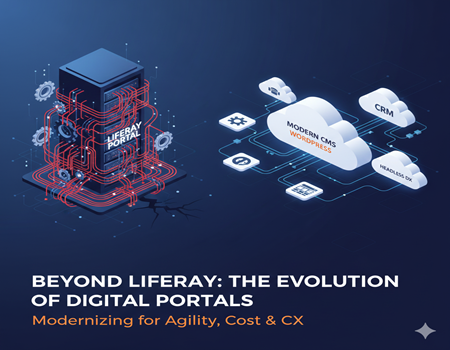
For many years, Liferay Portal has been a trusted enterprise platform for building intranets, customer portals, and digital experience solutions. Its flexibility, Java-based architecture, and customization capabilities made it a popular choice for large organizations needing secure and scalable systems. However, in recent years, a noticeable shift has emerged. More organizations are evaluating alternatives and, in many cases, deciding to move away from Liferay.
This trend raises an important question: why are organizations leaving Liferay portals?
The answer is not simple. Liferay is still a powerful platform, especially for complex enterprise environments. But as digital expectations evolve, so do business requirements. Companies now prioritize agility, faster deployment cycles, marketing flexibility, seamless integrations, and lower maintenance costs. What worked well a decade ago may no longer align with modern digital strategies.
Many organizations face challenges such as high development dependency, complex upgrades, integration overhead, and performance optimization issues. Marketing teams often struggle with limited flexibility, while IT teams deal with infrastructure and version management concerns. Over time, these challenges can slow innovation and increase operational costs.
This does not mean Liferay is a poor platform. It simply means that business needs change. Digital ecosystems are becoming more cloud-driven, API-focused, and marketing-oriented. As a result, companies are reassessing whether Liferay continues to support their long-term goals.
In this guide, we will explore the key reasons organizations leave Liferay portals and what businesses should consider before making a transition.
What Is Liferay Portal?
Liferay Portal is an enterprise-grade digital experience platform designed to build secure web portals for employees, customers, and partners. It is widely used for intranet systems, self-service customer portals, knowledge bases, and enterprise collaboration platforms. Built on a Java-based architecture, Liferay provides strong customization capabilities and is often chosen by organizations that require highly tailored solutions.
At its core, Liferay acts as a centralized platform where multiple services and information sources can be accessed in one place. Companies use it to connect internal tools, documents, workflows, and communication channels into a unified portal experience. Because of its role-based access system, different users can see different dashboards, content, and features based on permissions.
One of Liferay’s biggest strengths is its flexibility. Developers can build custom modules, integrate enterprise applications, and create complex workflows. Large organizations, government institutions, financial companies, and healthcare providers often prefer Liferay because it supports strict security requirements and structured data management.
However, this flexibility comes with technical depth. The platform relies heavily on Java development, configuration management, and structured deployment processes. Unlike lightweight content management systems, Liferay is not primarily designed for simple website publishing or quick marketing updates. Instead, it functions more like an enterprise application framework than a traditional CMS.
This distinction is important. Many companies originally adopted Liferay when they needed centralized portals and heavy customization. But as digital strategies shift toward faster content delivery, marketing agility, and cloud-native ecosystems, some organizations begin to question whether a portal-focused platform still aligns with their evolving goals.
Rising Maintenance & Development Costs
One of the most common reasons organizations consider moving away from Liferay is the long-term cost of maintaining and developing the platform. While Liferay itself offers enterprise capabilities, the resources required to manage it can become expensive over time.
Liferay is built on a Java-based architecture, which typically requires experienced backend developers. Unlike simpler CMS platforms where content and design changes can be handled by non-technical teams, many updates in Liferay depend on developers. Even small feature changes or UI adjustments may involve modifying modules, redeploying components, and performing structured testing. This increases both time and cost.
Another factor is the dependency on specialized expertise. Liferay developers are not as widely available as general web developers. Organizations often need dedicated teams or external agencies familiar with its framework, OSGi modules, and deployment pipelines. Hiring and retaining such expertise adds to operational expenses.
Custom module management also contributes to rising costs. Many companies build highly customized features over the years, such as workflows, integrations, and user dashboards. While these customizations initially solve business needs, they create a maintenance burden. Every update, security patch, or version change must be tested against custom code to ensure compatibility.
Infrastructure expenses further increase the total cost of ownership. Liferay environments often require managed hosting, application servers, database configurations, and monitoring systems. Performance tuning and security updates demand continuous technical oversight.
Over time, organizations begin comparing these ongoing investments with modern platforms that offer similar functionality using plugins, APIs, or cloud-based services. Instead of funding infrastructure and development overhead, businesses prefer investing in innovation, marketing, and customer experience improvements.
As a result, the financial conversation shifts from initial implementation cost to long-term sustainability. For many organizations, maintaining Liferay becomes less about capability and more about whether the operational cost still aligns with business value.
Complexity & Technical Overhead
Another major reason organizations move away from Liferay portals is the level of technical complexity involved in running and managing the platform. While Liferay offers flexibility and deep customization, it also introduces significant operational overhead that can slow down teams and projects.
The learning curve is often steep. Liferay is not just a content management system — it behaves more like an enterprise application framework. Developers must understand Java, OSGi modules, configuration files, deployment processes, and environment management. New team members usually require extensive onboarding before they can contribute effectively. This makes scaling teams difficult and delays development timelines.
Upgrades are particularly challenging. As the platform evolves, moving from one version to another may require code refactoring, dependency updates, and compatibility testing. Custom-built modules can break during upgrades, forcing organizations to spend weeks or even months preparing for migration between versions. Because of this, some companies postpone upgrades, which leads to outdated environments and increased security risks.
Infrastructure management also adds to the burden. Liferay deployments often include application servers, databases, caching layers, and search indexing services. Each component must be configured, monitored, and optimized for performance. Compared to cloud-native platforms with automated scaling, maintaining this setup requires continuous technical supervision.
Performance tuning is another ongoing responsibility. Slow page loading, heavy modules, and complex queries can affect user experience. Identifying performance bottlenecks typically involves deep technical investigation rather than simple configuration adjustments.
Over time, this complexity impacts both IT and business teams. Developers spend more time maintaining the system instead of building new features, while business teams wait longer for updates or improvements. As organizations aim for faster releases and more agile workflows, they begin favoring platforms that reduce operational overhead and allow teams to focus on innovation rather than maintenance.
Limited Marketing & Personalization Capabilities
As digital strategies become more marketing-driven, many organizations find that Liferay’s portal-focused architecture does not fully support modern marketing needs. While Liferay offers content management and some personalization features, it is not primarily designed as a marketing-first CMS.
One common challenge is content agility. Marketing teams today need the ability to quickly launch landing pages, run campaigns, test variations, and update messaging without heavy developer involvement. In Liferay, even simple design adjustments or dynamic content changes may require technical support. This dependency slows campaign execution and reduces flexibility.
Personalization capabilities can also feel limited compared to modern digital experience platforms. While Liferay provides role-based content and segmentation features, advanced behavioral personalization often requires custom development or third-party integrations. This makes real-time targeting, dynamic recommendations, and automated user journeys more complex to implement.
Another issue is the lack of seamless omnichannel marketing support. Businesses now engage customers across websites, mobile apps, email platforms, and social channels. Modern CMS solutions often integrate easily with marketing automation tools, CRM systems, and analytics platforms. In contrast, Liferay integrations may require additional configuration or development effort, especially for advanced marketing workflows.
A/B testing and experimentation can also be more complicated. Marketing teams want to test headlines, layouts, and calls-to-action quickly. In Liferay, testing frameworks are not always as intuitive or marketing-friendly as those available in dedicated CMS and optimization platforms.
Over time, these limitations affect business agility. When marketing teams cannot independently manage personalization and campaigns, growth initiatives slow down. Organizations that shift toward customer-centric digital strategies often prefer platforms where content creation, personalization, and automation are more accessible and streamlined.
As a result, the decision to leave Liferay is often driven not by IT dissatisfaction alone, but by the need for stronger marketing flexibility and customer engagement capabilities.
Integration & Scalability Challenges
Modern digital ecosystems depend heavily on integrations. Websites no longer operate as standalone platforms — they must connect seamlessly with CRMs, marketing automation tools, analytics systems, eCommerce platforms, and cloud services. Many organizations discover that maintaining these integrations within Liferay can become complex over time.
Liferay does support integrations through APIs and custom connectors, but the process often requires significant development effort. Unlike plug-and-play ecosystems found in newer platforms, integrations in Liferay typically involve configuration, custom coding, and testing. This increases both implementation time and maintenance effort whenever connected systems are updated.
Third-party marketing and SaaS tools present another challenge. Businesses frequently adopt new tools for email marketing, customer support, personalization, and analytics. Each additional integration must be carefully configured to work with Liferay’s architecture. If APIs change or authentication methods update, integrations may break and require redevelopment.
Scalability can also become complicated. As traffic grows or services expand, organizations must scale infrastructure components such as application servers, databases, and caching layers. Unlike modern cloud-native platforms that offer automatic scaling, Liferay environments often require manual configuration and performance planning. This can slow expansion and increase operational workload.
Microservices adoption further highlights limitations. Many companies now move toward composable architectures where individual services communicate through lightweight APIs. Integrating these services into a traditional portal framework may introduce additional complexity, especially when real-time data synchronization is required.
Cloud migration initiatives also influence decisions. Organizations transitioning to cloud-first strategies prefer platforms optimized for flexible deployment and easier environment management. Migrating and maintaining Liferay in such environments may demand additional setup and ongoing oversight.
Over time, businesses seek systems where integrations are easier to implement and scale alongside growth. When integration overhead starts affecting agility and innovation, organizations begin evaluating alternatives better aligned with modern, connected digital ecosystems.
Performance & User Experience Concerns
User expectations for speed and usability have increased significantly. Modern websites must load quickly, adapt to different devices, and provide intuitive navigation. Many organizations using Liferay portals begin noticing performance and user experience limitations as their digital needs evolve.
Page load speed is one of the most common concerns. Liferay portals often contain multiple portlets, scripts, and backend processes running simultaneously. While this architecture supports complex functionality, it can also increase page weight and response time. Without careful optimization, users may experience slower loading pages, especially on mobile networks.
Front-end flexibility can also be restricted. Designing modern, highly interactive interfaces sometimes requires additional development effort. Compared to lightweight CMS platforms that support rapid theme customization and front-end frameworks, Liferay projects often involve structured deployment cycles. This slows down the ability to quickly refresh UI components or experiment with new layouts.
Mobile responsiveness is another challenge. Although Liferay supports responsive design, older implementations or heavily customized portals may not adapt smoothly across devices. Businesses aiming for mobile-first experiences may need extensive adjustments to achieve modern usability standards.
User experience consistency across channels can also be difficult. Customers now expect seamless interaction between web portals, apps, and support systems. If performance varies across sections of the portal, it impacts engagement and satisfaction.
Over time, performance issues affect more than just user convenience. They influence SEO rankings, conversion rates, and overall brand perception. Slow interfaces can discourage users from completing forms, accessing resources, or returning to the platform.
As organizations prioritize fast, accessible, and user-friendly digital experiences, they begin exploring platforms that simplify front-end optimization and deliver faster performance with less technical overhead.
Upgrade & Version Migration Difficulties
One of the most challenging aspects of maintaining a Liferay portal is handling upgrades and version migrations. Unlike lightweight platforms where updates are relatively straightforward, Liferay upgrades can become large technical projects that require careful planning, testing, and resources.
Each major version upgrade often introduces architectural changes, deprecated features, and updated dependencies. Organizations that have built custom modules or integrations over time may discover that their code no longer works after upgrading. This means developers must refactor or rewrite components to match the new framework requirements.
Because many Liferay portals are highly customized, the upgrade process rarely follows a simple installation path. Teams must review configurations, update APIs, and verify compatibility with connected systems such as CRMs, authentication services, and third-party tools. Even minor differences between versions can affect workflows or user permissions.
Testing overhead is another major concern. Before going live, organizations must thoroughly test every feature — dashboards, forms, role access, integrations, and data flows. This testing phase can take weeks, especially for portals used by employees or customers daily. The larger the portal, the more extensive the testing requirements.
Downtime risks also influence upgrade decisions. Businesses often delay upgrades because they cannot afford service interruptions. However, postponing updates leads to outdated environments, security vulnerabilities, and increasing technical debt. Over time, skipping multiple versions makes future upgrades even more complex.
These recurring upgrade challenges consume time and budget that could otherwise be invested in innovation. As a result, organizations begin looking for platforms where updates are smoother, backward compatibility is stronger, and version management does not disrupt business operations.
Open-Source CMS & Modern Alternatives
As organizations evaluate the challenges of maintaining Liferay, many begin exploring modern content management platforms that better support flexibility, speed, and marketing agility. The goal is not only to replace a portal but to adopt a system aligned with current digital expectations.
One of the most commonly considered options is WordPress. Originally known as a blogging platform, it has evolved into a powerful CMS capable of handling enterprise websites, customer portals, and complex integrations. Its large ecosystem of plugins and themes allows organizations to build features without extensive custom development. Marketing teams can manage content, launch landing pages, and run campaigns with minimal technical dependency, which significantly improves operational efficiency.
Headless CMS platforms are another alternative. These systems separate the content layer from the presentation layer, allowing content to be delivered across websites, mobile apps, and other digital channels through APIs. For businesses adopting omnichannel strategies, headless solutions provide flexibility and scalability while reducing platform lock-in.
Cost efficiency is also a major factor. Many modern platforms operate on open-source or subscription-based models that eliminate heavy licensing fees. Instead of investing in infrastructure and specialized development resources, companies can allocate budget toward customer experience and innovation.
Community support plays an important role as well. Platforms with active developer communities receive frequent updates, security improvements, and integration support. This reduces long-term dependency on a limited pool of specialists.
When organizations compare these options to traditional portal frameworks, they often find that newer systems better support rapid iteration, cloud deployment, and integration with marketing and analytics tools. The shift is less about abandoning enterprise capability and more about adopting a platform designed for today’s digital environment — faster updates, easier customization, and improved collaboration between technical and business teams.
When It Makes Sense to Leave Liferay
Deciding to leave Liferay is not only a technical choice — it is a business decision. For some organizations, Liferay continues to work well, especially when they rely heavily on structured internal workflows and stable enterprise portals. However, certain situations indicate that a transition may provide long-term benefits.
One clear sign is a shift toward a marketing-first strategy. If the business depends on frequent campaigns, landing pages, personalization, and content experimentation, heavy developer dependency can slow progress. When marketing teams cannot independently manage updates, growth initiatives often become delayed.
Rapid business growth is another factor. Expanding product lines, entering new markets, or launching digital services requires platforms that adapt quickly. If scaling the portal requires complex development cycles or infrastructure upgrades, the system may limit innovation rather than support it.
Budget optimization also influences the decision. Organizations often find that ongoing maintenance, specialized development, and upgrade costs gradually increase. At some point, leadership evaluates whether these expenses still provide proportional value compared to more flexible platforms.
Digital transformation initiatives commonly trigger migration as well. Companies moving toward cloud-based ecosystems, API-driven integrations, and omnichannel experiences need platforms designed for connectivity and agility. Traditional portal frameworks may struggle to support these evolving requirements without additional overhead.
Another indicator is user experience expectations. If improving performance, mobile responsiveness, or usability requires major technical effort, the platform may no longer align with customer expectations.
Ultimately, leaving Liferay makes sense when the platform begins to restrict speed, flexibility, or innovation. Migration becomes less about replacing software and more about enabling future growth, collaboration, and modern digital experience delivery.
Migration Considerations & Planning Strategy
Leaving Liferay requires careful preparation to avoid data loss, broken integrations, and SEO impact. A structured migration strategy ensures business continuity while transitioning to a new platform.
The first step is performing a complete portal audit. Identify all content types, user roles, workflows, custom modules, and integrations currently running in the system. This includes CRMs, authentication systems, analytics tools, APIs, and third-party services. Understanding how information flows through the portal helps determine what must be rebuilt or replaced.
Next, plan the data migration process. Export documents, user data, permissions, and structured content in an organized format. Some legacy components may not translate directly to the new platform, so data may need transformation before import. Mapping content structures early prevents confusion later.
Integration mapping is equally important. Each connected system should be reviewed to define how it will interact with the new CMS. Recreate form handling, API connections, and automation triggers in a staging environment before launch. Testing ensures workflows continue without interruption.
SEO continuity must also be protected. Maintain URL structures where possible and implement 301 redirects for changed pages. Transfer metadata, headings, and structured data to preserve search rankings. Analytics tracking codes and conversion events should be reconfigured and validated.
A phased rollout strategy reduces risk. Instead of switching everything at once, organizations can test the new environment with limited users before full deployment. Monitoring performance and user behavior during this stage helps identify issues early.
With proper auditing, mapping, and testing, migration becomes a controlled transition rather than a disruptive event. Planning transforms a complex move into a manageable and predictable process.
Conclusion
Liferay has served many organizations well as a secure and customizable enterprise portal. However, as digital priorities shift toward agility, faster updates, marketing independence, and cloud-based ecosystems, the platform may no longer align with evolving business goals. For many companies, the decision to move away from Liferay is not about platform failure — it is about adapting to modern digital expectations.
Rising maintenance costs, complex upgrades, integration overhead, and limited marketing flexibility gradually impact efficiency. Over time, teams spend more effort maintaining the system than improving customer experience. When this happens, organizations begin exploring platforms that enable faster deployment, easier integrations, and better collaboration between technical and business teams.
Migration should be approached as a strategic opportunity rather than a technical replacement. With proper auditing, data mapping, and testing, businesses can preserve critical functionality while improving performance and usability. The goal is to support long-term growth, not just solve short-term limitations.
During evaluation, many organizations also review broader platform transition strategies, including solutions like Liferay to WordPress Migration Services, to understand how different ecosystems handle scalability, personalization, and maintenance. Comparing approaches helps decision-makers choose a future-ready architecture.
Ultimately, leaving Liferay can empower teams to innovate faster, reduce operational overhead, and deliver better digital experiences. When aligned with clear objectives and planning, migration becomes a step forward — not a disruption — toward a more flexible and sustainable digital platform.