In-House vs Agency CMS Migration: What’s Safer?
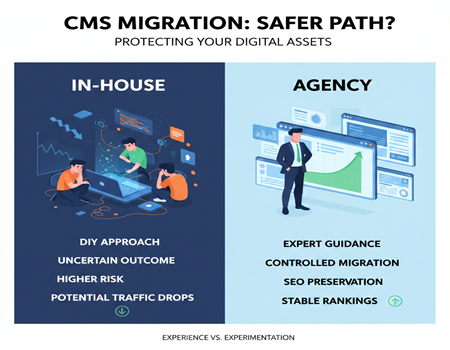
If you run a website, sooner or later you will hear the term CMS migration. It simply means moving your website from one platform to another, such as WordPress to Shopify, Magento to WooCommerce, or a custom-built system to a modern content management platform.
Businesses usually don’t migrate without a reason. A migration typically happens when the website becomes slow, difficult to manage, limited in features, or unable to support marketing and SEO growth. Sometimes companies redesign their site for branding, and sometimes they need a scalable platform for future expansion. From the outside, the process sounds simple — move the content, design the pages again, and launch the new website.
However, in reality, a CMS migration is one of the riskiest technical changes a website can go through. Even a small technical mistake can cause major damage. Websites can suddenly lose rankings, important pages may disappear from Google, links may break, and businesses can lose leads or online sales overnight.
Many companies only realize the seriousness of migration after launch, when traffic drops without warning. By that time, fixing the damage often takes months.
This leads to the most important question: who should handle the migration — your internal team or a professional agency?
Some companies prefer to keep control and do it in-house, while others hire specialists experienced in handling migrations. Both options look safe before launch, but the real difference appears after the website goes live.
In this guide, you will understand the risks, the differences, and which option is actually safer for your business and revenue.
What Actually Breaks During a CMS Migration (Hidden Dangers)
Many businesses think CMS migration is mostly a design and development task. They assume the new website will look better, load faster, and everything else will remain the same. The reality is very different. A website is not just pages and images — it is a structure that search engines have already understood over time. When you change that structure, even slightly, Google can get confused.
One of the most common problems is ranking loss. Every page on your website has built authority in search results. If URLs change without proper redirection, search engines treat the new pages as completely new content. The old authority disappears, and traffic drops almost immediately.
Redirect failures are another major issue. During migration, every old URL must point to its exact new version. Missing even a small percentage of redirects can create hundreds of “404 not found” errors. Users leave the site, and Google slowly removes those pages from its index.
Metadata is often damaged during migration. Title tags, meta descriptions, header structure, and schema markup sometimes don’t transfer correctly. The page still exists, but its SEO signals are weakened, which slowly pushes rankings down.
Content formatting also breaks more often than expected. Images may not load, internal links may still point to old URLs, and important sections like FAQs or tables may disappear. These small issues reduce both user experience and search visibility.
Another hidden risk is page speed. New themes, plugins, or scripts can make the site heavier than before. Even if the design looks modern, slower loading times affect rankings and conversions.
Analytics and tracking frequently stop working after launch. If Google Analytics, Search Console, or conversion tracking are not reconfigured properly, businesses lose valuable data. Without data, they cannot even understand what went wrong.
Finally, indexing problems occur. Search engines may struggle to crawl the new site because of incorrect robots settings, sitemap errors, or blocked pages. Sometimes the website looks perfect to humans but becomes invisible to Google.
This is why CMS migration is not just a technical switch. It is an SEO-sensitive operation where small mistakes can create long-term damage.
In-House CMS Migration — What It Really Means
When a company decides to handle a CMS migration internally, it usually means the existing team — developers, designers, or IT staff — will move the website to the new platform without external specialists. This approach is common in startups, small businesses, or tech-driven companies where developers already manage the website and want full control over the process.
At first, doing the migration in-house looks practical. Communication is faster because everyone works together daily. There is no onboarding time, no external coordination, and decisions can be made quickly. It also appears cheaper because the company does not have to pay an external service fee. Many teams believe that since they built the website, they understand it best and can move it safely.
There are real advantages to this approach. The internal team understands the business goals, product structure, and content priorities better than outsiders. They can make quick changes without waiting for approvals. For small websites, this flexibility can be helpful, especially when the project timeline is tight.
However, the main challenge with in-house migration is not development — it is experience. CMS migration is a rare event for most companies. A developer might build features daily but may only handle one migration every few years. Because of this, teams often miss important SEO and data-preservation steps. The website may launch successfully from a technical perspective, but problems start appearing after a few weeks.
For example, internal teams often underestimate redirect mapping. They may redirect main pages but miss hundreds of smaller URLs such as blog posts, filters, or parameter pages. These missing redirects slowly reduce traffic. Similarly, metadata and structured data are frequently not validated after migration, which weakens search performance.
Another issue is the lack of a rollback strategy. If rankings drop after launch, the company has limited recovery options. Since the team is learning during the process, troubleshooting takes longer and revenue loss continues in the meantime.
Resource drain is also significant. During migration, developers spend weeks on tasks unrelated to product development or business growth. Marketing teams must pause campaigns, and managers must coordinate testing instead of focusing on operations.
In-house migration works best when the website is small and does not depend heavily on organic traffic. But when search visibility or revenue is involved, the risk level becomes much higher because the team is handling a complex, high-impact change without specialized migration experience.
Agency CMS Migration — What Actually Happens
When a business hires a professional CMS migration agency, the process becomes structured rather than experimental. Instead of figuring things out during the move, specialists follow a tested framework designed to protect traffic, rankings, and data.
The first step is a complete website audit. The agency crawls the existing website and creates a record of every accessible URL, metadata element, internal link, image path, and indexable page. This becomes the backup blueprint of the site. The purpose is simple: nothing important should disappear after migration.
Next comes staging environment setup. The new website is built privately, away from search engines and users. This allows teams to test everything without damaging the live site. At this stage, agencies do not only copy content — they recreate structure. Navigation, internal linking, and page hierarchy are carefully matched so search engines can understand the new site easily.
One of the most critical steps is URL mapping. Every old URL is mapped to its closest new equivalent. Not just main pages, but blogs, categories, pagination, and parameter URLs as well. This mapping is converted into a redirect plan, ensuring that when someone visits an old link, they land on the correct new page without losing authority.
After mapping, technical validation begins. Agencies check metadata transfer, canonical tags, structured data, XML sitemaps, robots rules, and indexing settings. They also verify page speed and mobile usability because performance changes often happen after redesigns.
Before launch, extensive testing is done. Broken links, missing images, and tracking codes are fixed in advance. Analytics and Search Console are prepared so monitoring starts immediately after launch.
Because agencies perform migrations regularly, they rely on repeatable systems rather than assumptions. This reduces guesswork and prevents common mistakes that typically cause traffic loss.
The biggest difference is predictability. An experienced CMS Migration Agency does not just move a website — it manages risk, protects existing SEO value, and ensures the business continues operating without unexpected drops in visibility or revenue.
Safety Comparison — In-House vs Agency
Below is a practical comparison showing how both approaches behave in real situations, especially after launch when Google starts re-evaluating the website.
| Factor | In-House Migration | Agency Migration |
|---|---|---|
| Overall Risk | Depends on internal experience | Planned and controlled risk |
| SEO Protection | Often checked after launch | Protected before launch |
| Redirect Mapping | Usually partial | Fully mapped URL-to-URL |
| Testing | Limited due to time pressure | Structured multi-stage testing |
| Launch Process | Simple publish | Managed deployment |
| Monitoring | Reactive | Proactive tracking |
| Recovery Speed | Slow troubleshooting | Fast diagnosis and fixes |
| Internal Effort | High team involvement | Low business interruption |
| Predictability | Uncertain outcome | Stable outcome |
| Long-Term Impact | Possible gradual traffic drop | Preserved rankings and authority |
A CMS migration always works technically in both cases. Pages open, forms submit, and design looks new. The difference appears in search performance stability.
In an in-house migration, the focus is usually on building the new site and launching it successfully. Once the site goes live, the team watches analytics and reacts if something drops. This reactive approach is risky because search engines process changes quickly. By the time traffic loss is noticed, damage may already be indexed and recovery becomes slower.
An agency handles migration differently. The process starts by identifying what must not break. High-ranking pages, backlinks, and indexed URLs are protected before launch. Instead of reacting to problems, the team prevents them. This single difference changes the safety level of the entire project.
Testing also plays a major role. Internal teams test major pages like homepage, services, and contact forms. Agencies test edge cases — paginated URLs, filtered categories, canonical paths, schema markup, and crawl depth. These hidden technical elements are often what cause ranking losses, not visible page errors.
Monitoring after launch is another key factor. In-house teams usually review analytics once a day or after reports. Agencies monitor crawl activity and index coverage continuously during the early days of migration.
The business impact becomes clearer over time. An in-house migration can appear successful initially but slowly decline in rankings due to missed signals. An agency migration aims to keep performance stable from the beginning.
The safer option is the one that treats migration as a preservation process rather than a rebuild.
The Real Cost: Cheap vs Expensive Migration
When businesses compare in-house and agency migration, the first thing they look at is price. An internal migration appears cheaper because there is no direct service fee. The company already has developers, so moving the website feels like a normal technical task. On paper, the cost looks minimal.
But the real cost of migration is rarely the development effort. It is the business impact during and after the move.
During an in-house migration, developers spend weeks preparing data, fixing formatting issues, testing pages, and solving unexpected problems. This time is taken away from product development, feature releases, and improvements that could generate revenue. The business is paying salaries while growth work pauses. This hidden operational cost is usually ignored.
The larger cost appears after launch. If rankings drop, even temporarily, traffic decreases. For lead-generation websites this means fewer enquiries. For ecommerce websites this means fewer orders. A small percentage drop in search visibility can translate into significant revenue loss over weeks or months. Recovery is rarely immediate because search engines need time to trust the new structure again.
Many companies then invest additional time fixing redirects, restoring metadata, or re-submitting pages to search engines. Sometimes they even hire specialists after problems occur, effectively paying twice — once for the internal effort and again for recovery.
This is why migration pricing cannot be judged only by implementation expense. The Cost of CMS Migration includes potential traffic decline, lost leads, delayed campaigns, and recovery effort. A migration that looks inexpensive can become the most expensive if performance drops for several months.
Agency migration usually requires a higher upfront payment. However, the goal of that cost is prevention. By protecting rankings and minimizing downtime, the business avoids revenue loss and avoids long recovery periods. The website continues operating while improvements take effect gradually instead of rebuilding visibility from zero.
In simple terms, in-house migration reduces upfront expense but increases uncertainty, while agency migration increases upfront expense but reduces business risk. The real cost is not what you pay to move the website — it is what you lose if the move goes wrong.
When You Should Do It In-House (Decision Guide)
An in-house CMS migration is not always a bad decision. In some situations, it can be practical and efficient, especially when the website does not carry significant business risk. The key factor is dependency on organic traffic. If search visibility is not critical to revenue, the consequences of small mistakes remain manageable.
A simple brochure website is a good example. If the site mainly provides company information, contact details, and a few service pages, migration complexity stays low. Even if a few pages temporarily lose visibility, the business is unlikely to face major financial impact.
Websites with fewer than 40–50 pages are also suitable for internal migration. Smaller structures are easier to map, easier to test, and easier to fix after launch. The team can manually verify each page without needing advanced migration processes.
Another safe scenario is when the website does not rely on SEO traffic. If customers primarily come from referrals, social media, offline marketing, or paid ads, search engine fluctuations will not significantly affect business performance.
Temporary or experimental websites are also reasonable candidates. For example, a startup validating an idea or launching a short-term campaign may prioritize speed over long-term search stability. In such cases, learning during migration is acceptable.
In-house migration works best when risk tolerance is high and the website is not a primary revenue source. The team gains flexibility and saves upfront cost, and even if problems occur, recovery remains manageable without long-term business damage.
When You Should Hire an Agency (Decision Guide)
There are situations where CMS migration becomes a high-risk business decision rather than a simple technical update. In these cases, hiring specialists is usually the safer approach because the website directly affects revenue and growth.
If your website receives consistent organic traffic from Google, migration should be handled carefully. Search engines already trust your existing pages, and any structural mistake can remove that trust quickly. For businesses that depend on search visibility for leads or enquiries, even a short drop in rankings can reduce monthly revenue.
Ecommerce websites are especially sensitive. Product pages, category filters, and dynamic URLs create complex structures that must be mapped precisely. A small redirect mistake can make hundreds of products disappear from search results. Recovering those rankings can take months, which directly impacts sales.
Content-heavy websites such as blogs, media platforms, or resource centers also benefit from professional handling. Large numbers of indexed pages require structured redirect planning and crawl management. Manual verification becomes unrealistic for internal teams.
You should also consider an agency when redesign and platform change happen together. Changing design alone is manageable, and changing CMS alone is manageable, but doing both at the same time multiplies risk. Specialists reduce this combined uncertainty.
Finally, if the website generates steady business every month, migration is not just a development project — it is a revenue protection project. In such cases, the safer decision is to rely on experience rather than experimentation, ensuring continuity instead of recovery after launch.
Pre-Migration Safety Checklist (Practical Value Section)
Before starting a CMS migration, preparation matters more than the actual launch. Most traffic losses happen because important data was never recorded before the move. A proper checklist ensures the new website replaces the old one without losing search visibility.
Start by taking a complete backup of all URLs. Crawl the existing website and export every indexable page, including blogs, categories, images, and parameter URLs. This list becomes your master reference. Without it, you cannot verify whether pages disappeared after migration.
Next, create a redirect mapping document. Every old URL must point to the most relevant new URL, not just the homepage. Redirecting everything to one page confuses search engines and weakens rankings. Accurate page-to-page mapping preserves authority and user experience.
Save all SEO data before migration. Export title tags, meta descriptions, header structure, canonical tags, and schema markup. During platform changes, this information often resets. Having a backup allows you to restore it quickly instead of rewriting everything manually.
Set up a staging environment and test thoroughly. Check internal links, navigation paths, forms, images, and structured elements like FAQs. The website should be fully functional before search engines can access it. Launching a partially tested site creates avoidable problems.
Verify analytics and tracking codes. Ensure Google Analytics, conversion tracking, and Search Console are installed on the new website before launch. Without tracking, you cannot measure whether the migration succeeded.
Prepare technical files such as XML sitemaps and robots rules. Confirm that important pages are crawlable and blocked sections remain hidden. After launch, immediately submit the sitemap to search engines to guide reindexing.
Finally, monitor performance daily for the first few weeks. Watch indexing status, crawl errors, and ranking changes. Early detection allows quick correction, preventing small issues from turning into long-term traffic loss.
A migration succeeds not because of launch day, but because of preparation done before it.
Final Verdict — What’s Actually Safer?
Both in-house and agency CMS migrations can technically move a website from one platform to another. The difference is not the ability to launch the site, but the ability to protect its performance after launch.
An in-house migration is suitable when the website is small, does not depend on search traffic, and the business can tolerate temporary fluctuations. It offers control and lower upfront cost, but the risk remains higher because the team is learning during the process.
An agency migration is safer when the website generates leads, sales, or consistent organic traffic. Specialists focus on preserving rankings, mapping URLs accurately, and monitoring performance immediately after launch. The upfront investment is higher, but the business avoids long recovery periods and revenue loss.
In simple terms, if the website is important to growth, migration should prioritize stability over savings. Safety in CMS migration comes from experience, preparation, and prevention — not just successful deployment.