How to Replace DNN Workflows in WordPress
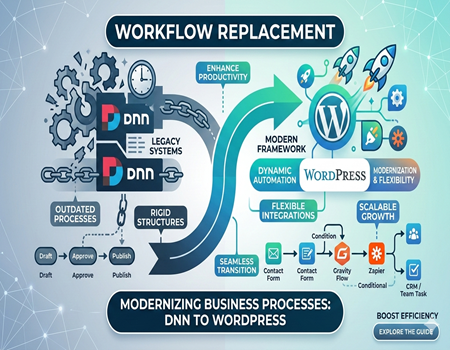
Many businesses are moving their websites from DotNetNuke, also known as DNN, to WordPress. This shift happens because companies need more modern, flexible platforms to manage their daily operations. If you are planning this move, you already know that leaving an outdated system behind brings exciting new opportunities for your team.
WordPress offers a much better experience for workflow management. It provides a simple interface, endless customization options, and a massive library of helpful plugins. Unlike older DNN setups, WordPress allows you to build processes that truly fit your unique business needs without requiring constant developer support or complicated coding skills.
However, switching platforms means you must carefully replace your existing DNN workflows. Doing this correctly is incredibly important to keep your business running smoothly. If you fail to map out and rebuild these internal processes, your team might face confusing delays, lost data, and frustrating disruptions during the transition period.
That is exactly why we created this comprehensive guide. We will walk you through the entire process of replacing your old systems step by step. By the end of this post, you will know exactly how to set up powerful, efficient, and user-friendly workflows in your brand new WordPress environment.
Replacing your old routines does not have to be a stressful experience. With the right tools and a clear strategy, your team will adapt quickly and enjoy a massive boost in daily productivity. Let us dive into everything you need to know to make this platform transition a complete success.
Understanding DNN Workflows
DNN workflows are automated, rule-based processes designed to manage content approval and publishing within the DotNetNuke platform. They function like a digital assembly line for your website’s content. For example, a writer could create a draft, which then automatically moves to an editor for review, and finally to a manager for final approval before going live.
Key Features and Common Limitations
These workflows were built to provide structure and control over content creation, ensuring multiple team members could collaborate according to a set hierarchy. Key features included version control, multi-stage approvals, and basic notification systems. They helped maintain order by preventing unauthorized changes from being published directly to the site, which was a significant benefit for larger organizations.
However, DNN’s workflow system often feels rigid and outdated. Customizing a process usually requires deep technical knowledge or a developer’s help, making small adjustments difficult and costly. The user interface is not as intuitive as modern alternatives, which can slow down team adoption and lead to frustration among non-technical users who expect simple, drag-and-drop solutions.
Challenges with Modern Business Needs
Many businesses now require dynamic, flexible processes that can integrate with various third-party tools like CRMs, marketing automation platforms, and project management software. DNN workflows struggle with these integrations, creating isolated systems that hinder productivity. This lack of connectivity is a major reason why the system fails to meet the demands of a fast-paced, interconnected business environment.
Furthermore, the system lacks the advanced features found in modern workflow tools. These include conditional logic, where the workflow can change based on specific data inputs, or detailed performance analytics to identify bottlenecks. As companies grow and their processes become more complex, the fundamental limitations of DNN’s workflow capabilities become a significant obstacle to efficiency and innovation.
Why WordPress is a Better Alternative
WordPress stands out as a leading content management system (CMS) for good reason. It powers a massive portion of the web, evolving from a simple blogging tool into a robust platform capable of handling complex business needs. Its open-source nature means a global community constantly works to improve its features, security, and overall performance.
Unmatched Flexibility and Customization
One of the biggest advantages WordPress offers is its incredible flexibility. Unlike the rigid structure of DNN, you can customize almost every aspect of your site without needing to write code. This freedom allows you to build workflows that perfectly match your team’s specific processes, rather than forcing your team to adapt to the software’s limitations.
The WordPress user interface is another significant upgrade. It is designed to be intuitive and user-friendly, making it easy for team members of all technical skill levels to manage content and execute tasks. This simplicity reduces training time and empowers your staff to work more efficiently, without the steep learning curve associated with older platforms.
The Power of the Plugin Ecosystem
At the heart of WordPress’s power is its vast plugin ecosystem. With over 60,000 plugins available, you can add nearly any functionality imaginable, including advanced workflow management systems. Tools like Gravity Flow or WP Project Manager let you create sophisticated, multi-step approval processes with just a few clicks, a task that would require extensive development in DNN.
This extensive plugin library also makes integration simple. You can easily connect your website to essential business tools, from email marketing services to advanced analytics platforms. This seamless connectivity ensures your workflows are not isolated but are part of a larger, more efficient operational ecosystem that supports your business goals and growth.
Finally, WordPress is both scalable and cost-effective. As your business grows, the platform can easily scale with you without incurring massive costs. Many powerful plugins are free or offer affordable premium versions. For businesses planning a move, a professional DotNetNuke To WordPress Migration Service can manage the transition smoothly, ensuring you capitalize on these long-term benefits from day one.
Preparing for the Migration
A successful transition from DNN to WordPress depends entirely on careful preparation. Before you even think about moving data, you need a solid plan. This initial phase involves auditing your current setup, making critical decisions about your new environment, and ensuring you have a safety net in place. Proper planning now will prevent major headaches later.
Audit and Back Up Your DNN Site
First, perform a complete backup of your entire DNN website, including all files and the database. This backup is your non-negotiable safety net. If anything goes wrong during the migration process, you can restore your old site without losing valuable data. Store the backup in a secure, separate location for easy access if needed.
Next, you must identify and document every workflow currently active on your DNN site. Analyze how each process works, who is involved, and what its purpose is. This audit will help you decide which workflows are essential to replicate, which can be improved, and which are obsolete and can be discarded, streamlining your new WordPress setup.
Choose the Right WordPress Workflow Plugins
With your workflow audit complete, you can start researching WordPress plugins to replicate that functionality. WordPress offers a variety of powerful tools. For instance, Gravity Forms with the Gravity Flow add-on is excellent for creating complex, multi-step approval processes tied to form submissions. It allows for conditional logic, user assignments, and detailed reporting.
Other popular options include WP Project Manager for task-based workflows or the built-in WordPress user roles for simple content approval chains. The key is to select plugins that best match the complexity and specific needs of your documented workflows. Read reviews, check for recent updates, and ensure the plugins are compatible with each other.
Gather Your Tools and Consider Expert Help
Beyond plugins, you may need data migration tools to move content, users, and other information from your DNN database to WordPress. While some tools can automate parts of this process, they often require technical expertise to configure correctly. A misstep here could lead to corrupted data or an incomplete transfer of information.
Given the complexity, this is a perfect time to consider professional assistance. A specialized DotNetNuke To WordPress Migration Service brings invaluable experience to the table. Experts can handle the technical details, ensure data integrity, and manage the entire transition efficiently, freeing up your team to focus on their core responsibilities without disruption.
Step-by-Step Guide to Replacing DNN Workflows in WordPress
Moving your daily operations to a completely new system might seem quite overwhelming at first glance. However, strictly following a structured process makes everything much easier to handle. This detailed guide will walk you through the essential phases of transitioning your complex business routines successfully into your brand new content management platform.
Step 1: Install and Set Up WordPress
The very first step requires securely installing the core software on your chosen hosting server. Most modern web hosts offer a simple one-click installation feature to save you valuable time. Once installed, log into your new dashboard and configure basic settings like site title, time zone, and your preferred permalink structure.
Proper initial setup ensures your website runs smoothly from the beginning. You should also delete any default sample pages or dummy posts that come with the fresh installation. Creating a clean environment right away prevents future confusion and keeps your workspace organized as you begin building your completely custom business processes.
Step 2: Choose a Suitable WordPress Theme
Selecting the perfect visual theme is crucial for creating an excellent user experience. Look for lightweight, fast-loading designs that offer seamless compatibility with popular workflow tools. Your chosen theme must be fully responsive so that your team members can easily manage daily tasks using their smartphones, tablets, or standard desktop computers.
Avoid themes packed with unnecessary features that might slow down your overall website performance. Instead, prioritize clean layouts focusing strictly on readability and straightforward navigation. A simple interface drastically reduces the learning curve for your staff, helping everyone adapt quickly to the new platform without feeling overwhelmed by cluttered menu options.
Step 3: Install Workflow Management Plugins
Unlike older systems, this powerful modern platform relies entirely on dedicated plugins to handle complex business rules. You must select the right extensions to match your specific operational needs. Popular choices like WP Project Manager or Gravity Flow provide incredible tools for designing multi-step approval chains and automated team task assignments.
Take ample time to install and activate only the most essential tools required for your operations. Adding too many overlapping extensions can cause software conflicts and slow down page loading speeds. Carefully read user reviews and verify developer update histories before committing to any premium extension for your daily administrative needs.
Step 4: Map DNN Workflows to WordPress
Now comes the critical task of translating your old procedures into the newly installed plugins. Start by visually sketching out your current approval chains on paper or digital whiteboards. Identify every single person involved, what exact actions they perform, and what precise conditions trigger the next step in your daily operations.
Recreate these mapped steps carefully within your newly chosen workflow extension settings. You might discover that certain old processes can actually be simplified using modern automation features. Take advantage of this unique opportunity to eliminate redundant approval stages, ultimately creating a much faster and significantly more efficient system for your organization.
Remember that replacing older routines is not just about copying them exactly. Look for ways to leverage conditional logic available in your new tools. For instance, you can automatically route high-priority documents directly to senior managers while standard blog posts follow the regular editorial path, saving everyone countless valuable working hours weekly.
Step 5: Import Data from DNN to WordPress
Moving your historical records requires extreme caution to prevent accidental data loss. You need to export all existing user profiles, published articles, and associated media files securely. Ensure that every single piece of content correctly matches the newly created database structure before initiating the final transfer into the live production environment.
Because this technical transition can become quite complicated, seeking professional help is highly recommended. Utilizing a specialized DotNetNuke To WordPress Migration Service guarantees that your highly valuable information transfers safely. These experienced experts will meticulously handle database complexities, ensuring zero downtime and absolute data integrity throughout the entire platform switch.
Step 6: Test and Optimize Your New System
Never launch your newly designed operational procedures without conducting rigorous preliminary testing. Create several test user accounts with different permission levels to simulate real daily activities. Run through every possible scenario, deliberately trying to break the system to identify hidden bottlenecks, missing notifications, or unexpected software bugs before going publicly live.
Based on your initial testing results, continuously tweak and refine the plugin settings. You may need to adjust automated email alerts or modify specific user access restrictions. Optimization is an ongoing journey, so regularly ask your participating staff for honest feedback regarding system speed, interface clarity, and overall daily task usability.
Pay special attention to mobile responsiveness during your quality assurance phase. Many employees prefer reviewing documents or approving urgent tasks directly from their smartphones while commuting. Ensuring your custom layouts function flawlessly on smaller screens significantly boosts overall team flexibility and keeps your entire business moving forward without unnecessary workflow delays.
Step 7: Train Your Team on the New System
Even the most wonderfully designed software fails if your employees do not understand how to use it properly. Schedule comprehensive training sessions tailored to different departmental roles. Provide clear, visually engaging instruction manuals detailing exact steps for submitting content, reviewing pending drafts, and granting final publication approvals within the centralized dashboard.
Change can be difficult, so remain incredibly patient as your staff learns the updated interface. Encourage them to ask questions and report any lingering confusion during the early adoption phase. Providing ongoing support ensures maximum productivity and helps everyone fully appreciate the massive benefits provided by your completely modernized operational system setup.
Finally, strongly consider recording short, helpful video tutorials demonstrating the most common daily tasks. Having accessible visual guides allows new hires to learn the ropes quickly without requiring extensive personal coaching. Empowering your team with excellent educational resources guarantees long-term success and maximizes the return on your comprehensive platform migration investment.
Common Challenges and How to Overcome Them
Preventing Data Loss or Corruption
Moving your valuable website information between completely different systems always carries a slight risk of accidental data loss. Files might get corrupted, or user profiles could fail to transfer properly during the transition. This happens frequently when teams attempt massive database shifts without using proper staging environments or adequate backups.
To avoid losing your hard work, you must create comprehensive backups before starting any major database changes. Always perform your initial transfer within a secure, isolated testing site rather than your live server. Carefully review every single imported record manually to verify that all text and attached media arrived perfectly.
Resolving Plugin Compatibility Problems
You will likely install several new workflow tools on your fresh platform, which sometimes causes unexpected software conflicts. Two different extensions might try to control the same user permissions, leading to broken approval chains or extremely slow page loading times. These technical clashes frustrate users and halt daily business operations.
Solve this by researching your chosen extensions thoroughly before clicking the install button. Only select highly rated tools from reputable developers who provide regular security updates. Activate your new workflow plugins one at a time, testing your site thoroughly after each activation to quickly identify and isolate any unexpected errors.
Fixing Workflow Misalignment
Sometimes your newly built automated processes simply do not match how your team actually works in reality. A rigid setup might force managers to approve minor edits unnecessarily, causing massive administrative bottlenecks. This misalignment slows down overall productivity and creates immense frustration among your staff during the critical learning phase.
Fix this by actively gathering honest feedback from your employees as they navigate the updated system. If you feel overwhelmed by these technical hurdles, seeking expert assistance makes sense. Hiring a professional DotNetNuke To WordPress Migration Service ensures your newly designed processes align perfectly with your actual daily business needs.
Benefits of Replacing DNN Workflows with WordPress
Boosting Efficiency and Productivity
Switching your daily operations to this modern platform instantly removes frustrating administrative bottlenecks. Your team can approve documents and publish updates much faster than before. Automated notifications keep everyone entirely on track without needing constant manual reminders. This massive boost in daily productivity helps your business accomplish more essential tasks quickly.
Enhancing the User Experience
The updated interface provides a significantly better experience for both administrators and regular users. Navigating through complex daily tasks becomes incredibly simple and visually appealing. Training new employees takes a fraction of the time compared to older systems. Everyone enjoys a smooth, intuitive dashboard that makes completing assignments genuinely enjoyable.
Connecting with Modern Tools
Older setups often trap your valuable data inside isolated silos. Moving to a newer environment allows seamless integration with countless modern business applications. You can easily connect your daily routines directly to popular marketing platforms, customer relationship managers, and advanced analytics tools using thousands of readily available software plugins.
Unlocking Long-Term Cost Savings
Maintaining outdated software architectures frequently requires expensive developer assistance for minor updates. Upgrading your systems significantly reduces these ongoing maintenance expenses over time. You gain access to affordable, powerful extensions that replace costly custom development work. These impressive financial savings allow you to reinvest directly back into your core business.
Scaling for Future Growth
As your successful company expands, your internal processes must grow alongside it without causing structural failures. This flexible ecosystem scales effortlessly to handle increased daily traffic and massive content libraries. You will never have to worry about outgrowing your software capabilities, ensuring your operational foundation remains completely solid and reliable.
Securing Professional Transition Support
Achieving these incredible benefits requires moving your existing data safely and correctly the first time. Utilizing a professional DotNetNuke To WordPress Migration Service ensures this entire technical transition happens flawlessly. Expert guidance guarantees your newly optimized environment launches perfectly, allowing your dedicated staff to start enjoying these amazing advantages immediately.
Conclusion and Next Steps
Replacing your outdated DNN workflows with a modern WordPress system is a powerful step forward for your business. As we have covered, this transition unlocks incredible boosts in efficiency, enhances your team’s daily user experience, and provides the flexibility needed to scale your operations for future growth and success.
You now have a clear roadmap to guide you through this important upgrade. By carefully planning, selecting the right tools, and thoroughly testing your new processes, you can avoid common pitfalls and ensure a seamless switch. This move will empower your team with modern tools that simplify their tasks and boost overall productivity.
The benefits of a more streamlined, automated, and integrated workflow environment are immense. From significant long-term cost savings to improved collaboration, the advantages will positively impact nearly every aspect of your daily business operations. You are now prepared to leave the rigid limitations of your old system far behind.
Do not let the technical details hold you back from making this essential business improvement. Taking the first step is often the hardest part, but the rewards are well worth the effort. A smoother, more efficient future for your team is within reach, and now is the perfect time to begin your journey.
If you want to ensure a smooth and successful transition without the stress, consider getting expert help. A professional DotNetNuke To WordPress Migration Service can handle all the technical complexities for you, allowing you to focus on what you do best—running your business and enjoying your new, powerful platform.