What Happens to Analytics During a Website Migration?
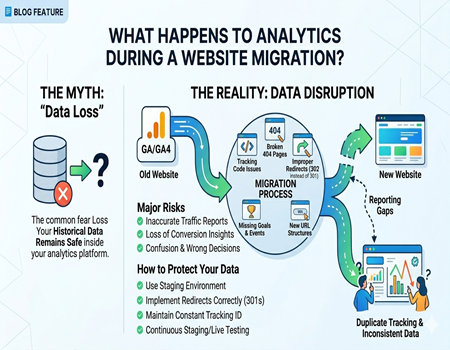
Website migration sounds exciting, but it often comes with one big concern—what happens to your analytics data? Many businesses worry that they will lose valuable insights about their traffic, users, and conversions. This fear is valid because analytics plays a crucial role in decision-making and growth tracking.
When you migrate a website, whether it’s a redesign, CMS change, or domain shift, your data tracking setup can get affected. If not handled properly, it may lead to missing data, incorrect reports, or sudden drops in traffic visibility, which can create confusion and wrong decisions.
In this blog, you will clearly understand what happens to analytics during a website migration, what risks are involved, and how to protect your data. The goal is to help you manage migration smoothly without losing valuable insights that your business depends on.
What is Website Migration in Simple Terms?
Website migration simply means making major changes to your website that affect its structure, design, platform, or location. This could include moving to a new CMS, changing your domain name, switching hosting providers, or redesigning your entire website layout.
There are different types of migrations, such as CMS migration, domain migration, HTTPS upgrades, and structural changes. Each type impacts your website differently, especially when it comes to tracking performance and user behavior through analytics tools.
Many businesses choose to work with a CMS Migration Agency because migration involves technical steps that can affect SEO and analytics tracking. A professional team ensures that your data remains intact and tracking continues without disruption.
Why Analytics Matters Before, During, and After Migration
Analytics is the backbone of your website performance tracking. It helps you understand how many users visit your site, where they come from, what pages they visit, and how they convert. Without proper analytics, you are making decisions blindly.
Before migration, analytics provides a benchmark of your current performance. You can track traffic, conversions, and engagement levels. This baseline helps you compare performance after migration and understand whether your changes improved or harmed your website.
During and after migration, analytics becomes even more important. It helps you identify issues quickly, such as traffic drops, broken tracking, or missing data. Monitoring analytics closely ensures you can fix problems early and maintain business performance.
What Happens to Analytics During a Website Migration?
Temporary Traffic Drops
During migration, it is common to see a temporary drop in traffic. This happens because search engines take time to re-index your new pages, and users may face broken links or redirects. These changes can affect how traffic is recorded in your analytics reports.
Tracking Code Issues
One of the biggest risks is missing or incorrectly implemented tracking codes. If your Google Analytics or GA4 code is not properly added to the new website, your data collection may stop completely or become inaccurate. This can lead to major reporting gaps.
Data Discrepancies
After migration, you may notice sudden spikes or drops in traffic and user behavior. These inconsistencies often happen due to incorrect tracking setup, duplicate codes, or changes in URL structure. It can make your reports confusing and unreliable if not fixed quickly.
Loss of Historical Data (Myth vs Reality)
Many people believe that migration deletes their analytics data, but this is not true. Your historical data remains safe inside your analytics platform. However, if tracking breaks, you will lose new incoming data, which creates gaps in your reporting timeline.
Changes in URL Structure
If your URLs change during migration, it can impact how data is tracked at the page level. Old URLs may no longer exist, and new ones need proper tracking setup. Without correct mapping and redirects, your analytics reports may lose continuity.
Common Analytics Problems During Migration
One common issue is broken tracking codes. When a new website goes live, sometimes the analytics script is not added correctly or is missing from certain pages. This leads to incomplete or zero data tracking, which affects your ability to monitor performance accurately.
Another problem is missing events and conversions. If your previous setup included goals, events, or eCommerce tracking, they may not automatically transfer to the new site. This results in lost conversion data, making it difficult to measure business success properly.
Improper redirects also cause major analytics issues. If you use incorrect redirect types or fail to redirect old URLs, users may land on error pages. This affects both user experience and analytics tracking, leading to traffic loss and inaccurate reporting.
Duplicate tracking is another hidden problem. Sometimes developers accidentally add multiple tracking codes, which results in double counting of users and sessions. This inflates your data and makes it unreliable for analysis and decision-making.
Pre-Migration Analytics Checklist
Before starting migration, it is important to back up your analytics data. Export key reports such as traffic, conversions, and user behavior. This ensures you have a reference point if anything goes wrong during the migration process.
You should also benchmark your current performance. Note down important metrics like monthly traffic, top-performing pages, and conversion rates. This helps you compare results after migration and identify any negative impact quickly.
Another important step is auditing your tracking setup. Check if your analytics code, tags, and events are working properly. This ensures you can replicate the same setup on the new website without missing any important tracking elements.
Many businesses ignore planning and later face issues with the Cost of CMS Migration. Proper analytics setup should be included in your migration budget to avoid future losses caused by missing or incorrect data tracking.
During Migration: How to Protect Your Analytics
During migration, the most important step is ensuring that your tracking code is correctly implemented on the new website. Every page should have the proper analytics script installed so that data collection continues without interruption.
You should test your tracking using real-time reports. Visit your website and check if your actions are being recorded in analytics. This simple step helps you confirm that everything is working correctly before fully launching the site.
Using tools like Google Tag Manager can make tracking easier and more flexible. It allows you to manage all your tracking codes in one place and reduces the risk of errors during migration. Proper implementation ensures consistent data collection.
Post-Migration Analytics Monitoring
After migration, it is important to compare your new data with your old benchmarks. Look at traffic trends, user behavior, and conversions to see if there are any significant changes. This helps you identify problems early and take corrective action.
Keep a close eye on key metrics like bounce rate, session duration, and conversion rate. Sudden changes in these metrics may indicate tracking issues or user experience problems that need immediate attention.
You should also use Google Search Console along with analytics to monitor indexing and search performance. This combination gives you a complete view of how your website is performing after migration and helps you fix issues faster.
Best Practices to Avoid Data Loss
One of the best practices is using a staging environment before going live. This allows you to test your analytics setup in a safe environment and fix issues before they affect your live website and real users.
Always use the same tracking ID when migrating your website. Changing it can break data continuity and make it difficult to compare performance before and after migration. Consistency is key for accurate reporting.
Proper redirects are also very important. Make sure all old URLs are redirected to the correct new ones. This not only helps SEO but also ensures that your analytics data flows correctly without losing user tracking.
Working with a CMS Migration Agency can reduce risks significantly. Experts handle technical details, ensuring your analytics setup remains intact and your data is not compromised during the migration process.
Real-Life Example
Imagine a business that migrated its website to a new CMS without properly checking analytics tracking. After launch, they noticed a sudden drop in traffic and conversions. At first, they thought it was an SEO issue, but the real problem was missing tracking code.
Once they identified the issue, they reinstalled the analytics code and fixed event tracking. Within a few days, their data started appearing correctly again. This example shows how small mistakes during migration can create big confusion.
It also highlights the importance of monitoring analytics closely. If they had checked their setup immediately after migration, they could have avoided unnecessary panic and made faster corrections.
Conclusion
Website migration does not delete your analytics data, but it can disrupt how new data is collected. Most issues happen due to tracking errors, missing codes, or poor planning. With the right approach, you can avoid these problems completely.
The key is to plan ahead, monitor your analytics closely, and test everything before and after migration. This ensures that your data remains accurate and your business decisions stay reliable.
If handled properly, migration can be a smooth process without losing valuable insights. Focus on preparation, execution, and monitoring, and your analytics will continue to support your growth without interruption.