Content Audit Before CMS Migration: Why It Matters
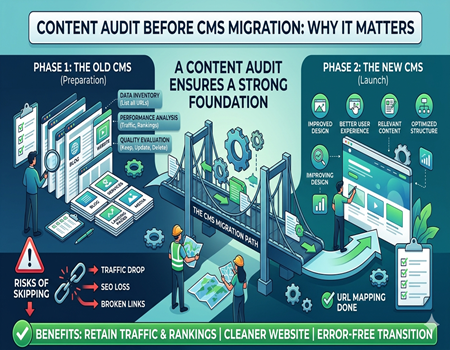
When businesses decide to upgrade their website, one of the most common steps is CMS migration. It means moving your website from one platform to another, like from WordPress to Shopify or any custom system. This process helps improve performance, design, and functionality of the website for better user experience.
However, many businesses make a big mistake during this process. They focus only on design and technical setup but ignore their existing content. This is where problems start. Without checking your content properly, you can lose valuable pages, traffic, and search engine rankings.
A content audit is a process where you review all your website content before migration. It helps you understand what content is useful, what needs improvement, and what should be removed. This step ensures your website remains strong even after migration.
Skipping this step can lead to serious issues like traffic drop, broken pages, and SEO loss. That’s why content audit before CMS migration is not optional—it is essential for success.
What Is a Content Audit?
A content audit is a detailed review of all the content present on your website. It includes checking blog posts, service pages, landing pages, and even media files. The main goal is to understand how your content is performing and whether it is still useful for your audience.
During a content audit, you analyze different factors like traffic, keyword rankings, engagement, and relevance. This helps you identify which pages are performing well and which ones need improvement. It also helps you find duplicate or outdated content that may harm your SEO performance.
Many people confuse content audit with content inventory, but both are different. Content inventory is just a list of all pages, while a content audit goes deeper and evaluates performance and quality. This makes it more valuable for decision-making.
Before CMS migration, a content audit becomes even more important. It helps you decide what content should be moved, updated, or removed. This ensures your new website starts strong without carrying unnecessary issues from the old one.
What Is CMS Migration?
CMS migration is the process of moving your website from one content management system to another. This can include shifting from an old platform to a new one or upgrading your existing system for better performance and flexibility. It is usually done to improve speed, design, and overall functionality.
Businesses choose CMS migration for many reasons. Some want better features, some need improved SEO capabilities, and others want a more user-friendly backend. Whatever the reason, migration is a complex process that needs proper planning and execution.
One important thing to understand is that CMS migration comes with risks. If not handled properly, it can affect your website traffic, rankings, and user experience. This is why many companies prefer working with a professional CMS Migration Agency to handle the process smoothly.
Without proper preparation, even a small mistake during migration can cause major issues. That’s why combining CMS migration with a strong content audit strategy is the best approach for long-term success.
Why Content Audit Before CMS Migration Matters
A content audit before CMS migration is one of the most important steps for protecting your website performance. It ensures that your valuable content is not lost during the transition and that your SEO rankings remain stable. Without this step, your migration can do more harm than good.
One major benefit of content audit is that it helps you identify your best-performing pages. These pages bring traffic, leads, and conversions. By identifying them early, you can make sure they are properly migrated without any errors or changes that could affect their performance.
Another important reason is to remove low-quality or outdated content. Many websites have pages that no longer serve any purpose. Migrating such content only increases clutter and can negatively impact your SEO. A content audit helps you clean up your website before moving it.
It also helps in improving your website structure. When you analyze your content, you get a clear idea of how pages are connected. This allows you to create a better structure on the new CMS, improving user experience and navigation.
Content audit also reduces the chances of errors during migration. When you know what needs to be moved, updated, or deleted, the migration process becomes more organized. This saves time and prevents confusion during execution.
Risks of Skipping Content Audit
Skipping content audit before CMS migration can lead to serious problems. One of the biggest risks is loss of organic traffic. If important pages are not migrated properly or URLs are changed without planning, your rankings can drop significantly, affecting your business visibility.
Another common issue is broken internal links. When pages are moved without proper mapping, links inside your website may stop working. This creates a bad user experience and also affects SEO performance. Search engines may find it difficult to crawl your website effectively.
You may also end up migrating duplicate or outdated content. This not only wastes resources but can also harm your website’s credibility. Users may find irrelevant information, and search engines may lower your rankings due to poor content quality.
Missing important pages is another big risk. Without a proper audit, you might forget to migrate key pages that generate traffic or leads. Recovering these pages later can be difficult and may result in permanent loss of data.
Overall, skipping content audit can turn a simple migration into a costly mistake. It can damage your SEO, reduce user trust, and affect your business growth.
Key Steps in Content Audit Before CMS Migration
Content Inventory
The first step in content audit is creating a complete list of all your website pages. This includes blogs, service pages, landing pages, and other important URLs. You can use tools like Google Search Console or crawling tools to collect this data efficiently.
Once you have the list, you get a clear picture of your website structure. This helps you understand how many pages you have and what type of content exists. It becomes easier to plan which content should be migrated and which should be removed.
Performance Analysis
After listing all pages, the next step is analyzing their performance. You need to check which pages are bringing traffic, ranking on search engines, and generating conversions. This data helps you identify your most valuable content.
By focusing on high-performing pages, you can ensure they are given priority during migration. This reduces the risk of losing important traffic and helps maintain your website’s SEO strength after moving to a new CMS.
Content Evaluation
In this step, you evaluate each page based on its quality and relevance. You decide whether to keep, update, or delete the content. Pages with outdated information should be improved, while low-quality pages can be removed completely.
This step helps you improve overall content quality. Instead of migrating everything, you only move content that adds value. This results in a cleaner, more effective website that performs better after migration.
SEO Elements Check
You also need to review SEO elements like meta titles, descriptions, headings, and keywords. These elements play a crucial role in search engine rankings. Any missing or incorrect data should be fixed before migration.
Optimizing SEO elements ensures that your content remains search-friendly even after moving to a new CMS. It also gives you an opportunity to improve existing content for better performance.
URL Mapping
URL mapping is one of the most important steps in content audit. It involves matching old URLs with new ones to avoid broken links. Proper mapping ensures that users and search engines can still access your content without issues.
Using a CMS Migration Calculator can help you estimate the effort required for URL mapping and overall migration. This makes planning easier and ensures a smoother transition process without unexpected problems.
Best Practices for a Smooth Content Migration
For a successful CMS migration, it is important to follow some best practices. One of the key practices is maintaining your URL structure as much as possible. This helps preserve your SEO rankings and avoids confusion for users and search engines.
Another important step is using proper 301 redirects. If any URL changes are necessary, redirects ensure that users are automatically sent to the correct page. This helps maintain traffic and prevents broken links on your website.
Testing your website before launch is also crucial. You should check all pages, links, and functionalities to ensure everything is working properly. This reduces the chances of errors after the website goes live.
You should also maintain internal linking throughout the migration process. Internal links help users navigate your website easily and improve SEO. Ensuring they work correctly is essential for a smooth user experience.
Finally, always monitor your website after migration. Track traffic, rankings, and user behavior to identify any issues early. This helps you fix problems quickly and ensures your website performs well in the long run.
Tools to Use for Content Audit
There are many tools available that can help you perform a content audit easily. One of the most useful tools is Google Search Console. It provides data about your website performance, including clicks, impressions, and keyword rankings.
Google Analytics is another important tool. It helps you understand user behavior, traffic sources, and page performance. This data is valuable for identifying which pages are important and should be prioritized during migration.
Crawling tools like Screaming Frog can help you collect a complete list of URLs. These tools also provide information about meta tags, broken links, and other technical issues that need attention before migration.
SEO tools like Ahrefs or SEMrush can also be helpful. They provide insights into backlinks, keyword rankings, and competitor analysis. Using these tools together can make your content audit more accurate and effective.
When Should You Hire Experts?
In some cases, handling CMS migration on your own can be difficult. If your website has a large number of pages, managing content audit and migration manually can become overwhelming. This is where experts can help you handle the process efficiently.
If your website depends heavily on SEO traffic, taking risks is not a good idea. Even a small mistake can cause major losses. Hiring a professional CMS Migration Agency ensures that your migration is handled carefully and strategically.
Experts also have the right tools and experience to perform detailed audits and migrations. They can identify issues that you might miss and provide solutions quickly. This saves time and reduces the chances of errors.
Overall, hiring experts is a smart choice when you want a smooth, risk-free migration process. It allows you to focus on your business while professionals handle the technical work.
Conclusion
Content audit before CMS migration is not just a step—it is a necessity. It helps you protect your website’s performance, improve content quality, and ensure a smooth transition to a new platform. Without it, you risk losing valuable traffic and rankings.
By reviewing your content carefully, you can make better decisions about what to keep, update, or remove. This results in a cleaner and more effective website that performs well after migration. It also improves user experience and SEO performance.
CMS migration can bring many benefits, but only when done correctly. Combining it with a proper content audit ensures that your website grows stronger instead of facing setbacks. It is a smart investment for long-term success.
If you are planning a migration, take the time to audit your content properly. It will save you from future problems and help you achieve better results with your new CMS platform.