Migrating ExpressionEngine Member Data to WordPress
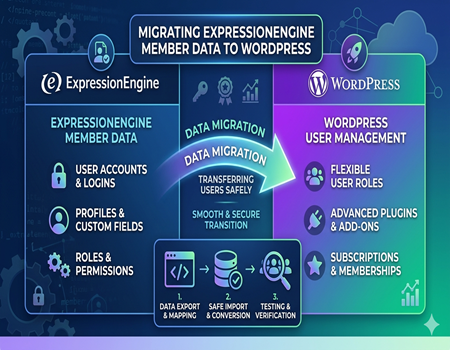
Migrating a website from one platform to another is not just about moving pages and design. One of the most important parts of this process is transferring member data safely and accurately. Member data includes user accounts, login details, profiles, and permissions, which are critical for maintaining user experience and business operations.
ExpressionEngine has been widely used for managing structured content and user data, but many businesses now prefer WordPress due to its flexibility and ease of use. During this transition, ensuring that member data is properly migrated becomes essential. Any mistake in this process can lead to data loss, login issues, or a poor user experience.
WordPress offers advanced user management features along with a wide range of plugins that make handling memberships, subscriptions, and user roles much easier. This is one of the main reasons why businesses choose to migrate their member data when switching platforms.
In this guide, we will walk you through everything you need to know about migrating ExpressionEngine member data to WordPress. From understanding the data structure to handling common challenges, you will learn the right approach to ensure a smooth and secure migration process.
What is ExpressionEngine Member Data?
ExpressionEngine member data refers to all the information related to users who are registered on a website. This includes basic details like usernames, email addresses, and passwords, along with additional profile information such as contact details, preferences, and activity history. This data plays a key role in managing user access and personalization.
In ExpressionEngine, member data is stored in a structured database system. It includes not only user profiles but also roles, permissions, and custom fields defined by developers. These custom fields allow businesses to store extra information specific to their needs, such as subscription details, user types, or custom preferences.
Another important aspect of member data is access control. ExpressionEngine allows developers to assign different roles and permissions to users, which helps in controlling what content or features each user can access. This is especially useful for membership sites, portals, or platforms with restricted content.
Member data is critical for business continuity and user experience. It ensures that users can log in, access their accounts, and interact with the website without issues. During migration, preserving this data accurately is essential to avoid disruptions, maintain trust, and ensure a smooth transition to the new platform.
Why Migrate Member Data to WordPress?
Many businesses decide to migrate their member data to WordPress because of its flexibility and ease of management. WordPress provides a user-friendly dashboard where administrators can easily manage users, roles, and permissions without needing deep technical knowledge. This makes everyday tasks like updating profiles, managing access, or adding new members much simpler.
Another major reason for migration is the powerful plugin ecosystem available in WordPress. There are many membership and user management plugins that allow businesses to add advanced features such as subscription management, user dashboards, and email automation. These tools help improve the overall user experience and make website management more efficient.
WordPress also offers better scalability for growing websites. As businesses expand and their user base increases, WordPress can easily handle larger amounts of member data. With proper optimization and hosting, it supports high traffic and large communities without affecting performance or usability.
In addition to functionality, WordPress also supports stronger SEO and marketing integrations. Businesses can connect their websites with email marketing tools, analytics platforms, and CRM systems. This allows them to better understand user behavior, build stronger relationships with members, and improve long-term growth strategies.
Key Challenges in Migrating Member Data
Data Structure Differences
One of the biggest challenges in migration is the difference in how ExpressionEngine and WordPress store member data. ExpressionEngine uses a custom structure with flexible fields, while WordPress follows a standardized user and metadata system. Because of this, data cannot be transferred directly and requires proper mapping to fit the new format.
If this mapping is not done correctly, important user details may not appear properly after migration. Fields like user roles, profile information, and custom data need to be carefully aligned with WordPress structures to ensure everything works as expected without breaking functionality.
Password Encryption Issues
Password handling is another critical challenge during migration. ExpressionEngine and WordPress use different encryption methods to store user passwords. This means passwords cannot simply be copied from one system to another and still work correctly.
As a result, users may not be able to log in after migration if this issue is not handled properly. Businesses often need to implement password reset processes or use special solutions to maintain login access without affecting user experience.
Custom Fields Mapping
Many ExpressionEngine websites use custom fields to store additional member information. These fields may include subscription details, preferences, or other unique data. Migrating these fields to WordPress requires careful planning and proper mapping to custom user meta fields.
If custom fields are ignored or incorrectly mapped, valuable data can be lost or become unusable. This can impact business operations, especially for websites that rely on detailed user information for services or personalization.
Data Loss Risks
Data loss is a common concern during any migration process. Without proper backups and validation, there is a risk of losing important member information such as user profiles, permissions, or activity data. Even small errors in the process can lead to missing or corrupted records.
To avoid this, it is important to follow a structured migration process and test everything thoroughly. Proper planning, backups, and verification steps help ensure that all member data is transferred safely and accurately without affecting users.
Pre-Migration Checklist You Must Follow
Before starting the migration process, it is important to create a complete backup of your existing ExpressionEngine website. This includes the database, member data, and all related files. A proper backup ensures that you can restore your website if anything goes wrong during migration, reducing the risk of permanent data loss.
Next, you should audit your member database carefully. Review all user records, identify inactive or duplicate accounts, and clean unnecessary data. This step helps improve data quality and ensures that only relevant and accurate information is migrated to WordPress, making the new system more efficient and organized.
It is also important to identify all custom fields used in your ExpressionEngine setup. These fields often store critical user information that must be transferred correctly. Planning how these fields will map to WordPress user meta fields will help avoid confusion and ensure a smooth data transition.
Another key step is defining user roles and permissions. ExpressionEngine and WordPress have different role structures, so you need to plan how existing roles will be assigned in the new system. Proper role mapping ensures that users maintain the correct access levels after migration.
Finally, decide on the migration method that best suits your needs. Whether you choose manual migration, tools, or professional help, having a clear plan will make the entire process more organized, efficient, and less prone to errors.
Methods to Migrate ExpressionEngine Member Data
Manual Migration
Manual migration is one of the basic methods used to transfer member data from ExpressionEngine to WordPress. In this approach, you export member data from the database, usually in CSV format, and then prepare it according to WordPress requirements. After formatting, the data is imported into WordPress using built-in tools or simple import plugins.
This method gives you full control over the migration process, which can be helpful for small websites with limited users. However, it requires technical knowledge to handle databases, map fields correctly, and ensure data accuracy. Even small mistakes in formatting or mapping can lead to errors or missing information.
Using Migration Tools
Another method is using migration tools or plugins that automate the process. These tools are designed to transfer data between platforms with minimal manual effort. They can help in exporting, transforming, and importing member data while maintaining structure and relationships between different data fields.
While migration tools save time and reduce manual work, they may have limitations depending on the complexity of your data. Some tools may not fully support custom fields or advanced configurations used in ExpressionEngine. It is important to test the tool properly before performing a full migration to avoid unexpected issues.
Hiring Experts (Recommended)
For most businesses, hiring experts is the safest and most efficient option. Professional migration services handle the entire process, including data extraction, mapping, import, and testing. This ensures that all member data is transferred accurately without affecting website performance or user experience.
Experts also help manage complex challenges such as password compatibility, custom field mapping, and role assignment. They follow best practices to minimize downtime and reduce the risk of data loss. This is especially important for websites with a large user base or critical business data.
If you want a smooth and hassle-free transition, using a professional solution like ExpressionEngine To WordPress Migration Service can be highly beneficial. It ensures that your member data is migrated securely while preserving functionality, allowing you to focus on growing your business instead of handling technical complexities.
Step-by-Step Process to Migrate Member Data
Export Member Data from ExpressionEngine
The first step in the migration process is exporting member data from ExpressionEngine. This is usually done through the database, where all user information is stored. You can use database management tools to extract data into a structured format like CSV, which is easier to work with during migration.
It is important to ensure that all relevant data is included during export. This includes usernames, emails, passwords (encrypted), roles, and any custom fields. Missing any key data at this stage can create problems later, so double-checking the export is essential before moving forward.
Prepare Data for WordPress Format
Once the data is exported, the next step is preparing it for WordPress. Since both platforms use different data structures, you need to reformat the data according to WordPress requirements. This includes organizing fields like username, email, and password into the correct columns.
Custom fields also need to be mapped properly to WordPress user meta fields. This step requires careful attention because incorrect mapping can lead to broken or missing data. Cleaning and structuring the data properly ensures a smoother import process.
Import Users into WordPress
After preparing the data, you can import users into WordPress using import tools or plugins. These tools allow you to upload the formatted file and assign user roles during the import process. It is important to review the import settings carefully to ensure everything is aligned correctly.
For large datasets, it is recommended to perform the import in stages. This helps in identifying issues early and prevents system overload. Proper monitoring during import ensures that all users are added without errors.
Map Custom Fields and Roles
After importing users, the next step is mapping custom fields and assigning correct roles. WordPress uses predefined roles like subscriber, contributor, and administrator, so you need to match these with the roles from ExpressionEngine.
Custom fields should be verified to ensure they are correctly assigned to each user. If needed, additional plugins can be used to manage and display custom user data. This step is crucial for maintaining functionality and user experience after migration.
Test and Verify Data
The final step is testing and verification. Once the migration is complete, you should thoroughly check user accounts, login functionality, and data accuracy. This includes verifying profiles, permissions, and custom fields to ensure everything is working as expected.
It is also important to test the user experience from a real user’s perspective. Any issues found during testing should be fixed immediately before making the new system live. Proper verification ensures a smooth transition and helps maintain user trust.
How to Handle Passwords During Migration
Handling passwords during migration is one of the most sensitive parts of the process. ExpressionEngine and WordPress use different encryption methods to store passwords, which means you cannot directly transfer passwords and expect them to work. If not handled properly, users may face login issues after migration.
One common approach is to ask users to reset their passwords after migration. This is a simple and secure method, as it avoids compatibility issues between encryption systems. You can send automated password reset emails to all users, allowing them to create new passwords easily without confusion.
Another option is using plugins or custom solutions that support password compatibility. These tools allow users to log in with their existing passwords and automatically update them to WordPress encryption standards. This approach provides a smoother user experience, especially for websites with a large number of members.
No matter which method you choose, clear communication with users is essential. Inform them about the changes in advance and provide simple instructions to avoid frustration. Proper handling of passwords ensures security, maintains user trust, and prevents unnecessary login problems during the migration process.
Best Practices for Safe Migration
To ensure a safe and smooth migration, it is always recommended to perform the process in a staging environment instead of a live website. A staging setup allows you to test the migration without affecting real users. This helps identify issues early and gives you time to fix them before going live.
Data validation is another important step in the migration process. After transferring member data, you should carefully verify that all information has been imported correctly. This includes checking user profiles, roles, custom fields, and login functionality to ensure everything is working as expected.
Maintaining SEO value during migration is also essential. Even though member data is the main focus, you should ensure that URLs, metadata, and site structure are preserved. Proper planning helps prevent traffic loss and keeps your website performance stable in search engine rankings.
Communication with users plays a key role in a successful migration. Inform your members about the upcoming changes, especially if there will be updates to login processes or passwords. Clear instructions and timely updates help reduce confusion and improve user experience during the transition.
By following these best practices, you can minimize risks, protect your data, and ensure a seamless migration from ExpressionEngine to WordPress without major disruptions.
Common Mistakes to Avoid
One of the most common mistakes during migration is skipping a full backup of your ExpressionEngine website. Without a proper backup, any error during the process can lead to permanent data loss. Always ensure that both your database and files are securely backed up before starting the migration.
Another mistake is incorrect field mapping. Since ExpressionEngine and WordPress use different data structures, mapping fields without proper planning can result in missing or misplaced data. This can affect user profiles, permissions, and overall functionality, making the website difficult to manage after migration.
Many businesses also ignore proper testing after migration. Failing to test user accounts, login functionality, and custom fields can lead to issues going unnoticed until users start facing problems. Thorough testing helps identify and fix errors before the website goes live.
Lastly, not planning redirects or user communication can create confusion. Users may face login issues or broken access if changes are not clearly communicated. Avoiding these mistakes ensures a smoother and more reliable migration process.
Final Thoughts on Member Data Migration
Migrating member data from ExpressionEngine to WordPress is a critical step that requires careful planning and execution. Since user data is directly linked to experience and business operations, even small mistakes can create major issues. That is why following a structured approach is essential for a smooth transition.
WordPress offers a more flexible and scalable environment for managing users, making it a better long-term solution for most businesses. With its user-friendly interface and powerful plugins, it simplifies member management and supports future growth without heavy technical dependency.
To ensure success, businesses should focus on data accuracy, proper testing, and user communication throughout the process. A well-planned migration not only protects valuable data but also improves overall website performance and usability in the long run.