Rebuilding ExpressionEngine Templates in WordPress
ExpressionEngine has been a reliable CMS for many businesses over the years, especially for developers who needed flexibility and control. However, as digital needs have evolved, many website owners are now looking for more user-friendly and scalable platforms. This is where WordPress comes in, offering a powerful ecosystem that is easier to manage and grow.
When moving from ExpressionEngine to WordPress, one of the most important steps is rebuilding templates. Unlike simple content migration, templates define how your website looks and functions. Rebuilding ensures your design, structure, and user experience are preserved while taking advantage of WordPress features.
This blog will guide you through the complete process of rebuilding ExpressionEngine templates in WordPress. You’ll learn how to approach the transition step by step, avoid common mistakes, and create a modern, SEO-friendly website that performs better and is easier to manage in the long run.
Understanding ExpressionEngine Templates
ExpressionEngine templates are the backbone of how a website’s front-end is structured and displayed. They are built using a combination of HTML, CSS, and ExpressionEngine’s own templating language. These templates are organized into groups and are responsible for rendering dynamic content pulled from channels and custom fields.
In ExpressionEngine, channels act like content containers, similar to posts or pages in other systems. Templates use tags and variables to fetch and display this content dynamically. While this setup provides flexibility for developers, it often becomes complex to manage, especially for non-technical users who want quick updates without dealing with code.
Another important aspect is the use of template embeds and reusable components. These allow developers to create modular layouts, but over time, managing these dependencies can become difficult. Even small design changes may require edits across multiple templates, increasing the chances of errors and inconsistencies.
Compared to modern CMS platforms, ExpressionEngine templates can feel outdated in terms of usability and scalability. They lack the intuitive interface and plugin ecosystem that platforms like WordPress offer. This is why simply copying templates is not practical, and rebuilding them properly becomes essential for better performance, flexibility, and long-term website growth.
Why Rebuild Templates in WordPress Instead of Copying
When moving from ExpressionEngine to WordPress, many people assume they can simply copy templates and reuse them. However, this approach doesn’t work because both platforms use completely different templating systems. ExpressionEngine relies on its own tag-based structure, while WordPress uses PHP-based themes, making direct copying impractical and ineffective.
Rebuilding templates allows you to take full advantage of WordPress features instead of forcing old structures into a new system. WordPress themes are designed to be flexible, customizable, and easy to manage. By rebuilding, you can create a cleaner code structure, improve maintainability, and make future updates much easier without depending heavily on developers.
Another major benefit of rebuilding is improved performance and responsiveness. Older ExpressionEngine templates may not follow modern design standards, especially for mobile devices. When you rebuild in WordPress, you can implement responsive layouts, optimize loading speed, and enhance overall user experience, which directly impacts engagement and conversions.
From an SEO perspective, rebuilding templates also gives you better control over on-page elements. You can optimize heading structures, internal linking, and schema markup more effectively. Instead of carrying forward outdated limitations, rebuilding ensures your website is aligned with current best practices, helping you achieve better rankings and long-term scalability.
Pre-Migration Planning: What You Need to Analyze
Before rebuilding ExpressionEngine templates in WordPress, proper planning is essential to avoid errors and confusion later. Start by auditing your current website to understand how templates, layouts, and content are structured. Identify all template groups, page layouts, and reusable components so you have a clear picture of what needs to be rebuilt.
Next, analyze how content is organized within channels and custom fields. This step helps you map your existing data into WordPress correctly. You should also review categories, tags, and relationships between different content types. A well-planned content structure ensures a smooth transition without losing important data or functionality.
It’s also important to check the features and functionalities currently in use. Look at forms, search functions, user roles, and any custom scripts. Some of these may require plugins or custom development in WordPress. This is where professional ExpressionEngine to WordPress Migration Services can help ensure nothing is missed during the transition.
Lastly, review your website’s design and user experience. Note down key design elements, navigation structure, and responsive behavior. Instead of copying everything exactly, think about improvements you can make during the rebuild. This planning phase sets the foundation for a successful migration, helping you create a faster, cleaner, and more scalable WordPress website.
Mapping ExpressionEngine Templates to WordPress Structure
Breaking Templates into Theme Structure
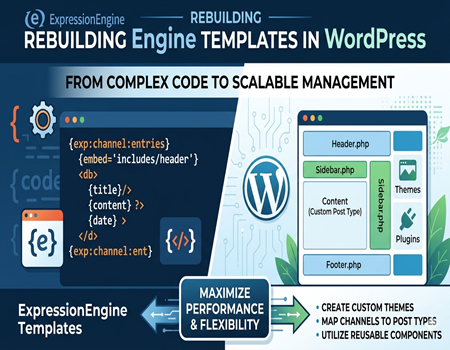
When rebuilding templates, the first step is to break down ExpressionEngine templates into smaller components. Instead of one large file, WordPress uses a theme structure with separate files like header, footer, sidebar, and content sections. This makes the website easier to manage, update, and scale over time.
Converting Channels into Content Types
ExpressionEngine channels act as content containers, and in WordPress, they are mapped into posts, pages, or custom post types. For example, blogs can be converted into posts, while services, portfolios, or case studies can be created as custom post types for better organization and flexibility.
Mapping Custom Fields Properly
Custom fields used in ExpressionEngine must be recreated in WordPress to maintain dynamic content. Tools like Advanced Custom Fields help you rebuild sections like testimonials, FAQs, and service blocks without hardcoding. This ensures your website remains flexible and easy to update without technical knowledge.
Rebuilding Navigation and Menus
Navigation in ExpressionEngine is often manually coded inside templates, but WordPress offers a built-in menu system. This allows you to manage menus directly from the dashboard. It improves usability, reduces dependency on developers, and makes future updates faster and more efficient.
Creating Reusable Components
WordPress encourages a modular approach, where layouts are divided into reusable components. You can create sections like banners, content blocks, and call-to-action areas that can be reused across multiple pages. This improves consistency, reduces repetition, and helps maintain a clean and scalable website structure.
Ensuring Flexibility and Scalability
This mapping process is not just about copying structure but improving it. By organizing templates into smaller parts and using WordPress features, you create a website that is more flexible, scalable, and easy to maintain. It also ensures better performance and a smoother user experience overall.
Step-by-Step Process to Rebuild Templates in WordPress
Setting Up the WordPress Environment
The first step is to set up a clean WordPress environment where you will rebuild your templates. Install WordPress on your server or a staging site to avoid affecting your live website. Configure basic settings like permalinks, themes, and essential plugins to create a strong foundation before starting the rebuild process.
Choosing or Creating a Theme
Next, decide whether to use a pre-built theme or create a custom one. If your existing design is unique, a custom theme is the best option. It allows you to match your current layout while improving performance and flexibility. A well-structured theme ensures easier maintenance and better scalability in the future.
Rebuilding Layout Structure
Start rebuilding the core layout by creating separate files for header, footer, and main content sections. Break your ExpressionEngine templates into smaller parts and recreate them using WordPress theme files. This approach helps maintain consistency across pages and allows you to update sections globally without repeating work.
Converting Dynamic Content
Dynamic content from ExpressionEngine, such as channels and custom fields, needs to be properly converted. Create custom post types and use plugins like Advanced Custom Fields to rebuild dynamic sections. This ensures that your content remains flexible and can be easily updated from the WordPress dashboard.
Adding Styling and Functionality
Once the structure is ready, apply styling using CSS and add interactivity with JavaScript if needed. Try to improve design elements by making them more modern and responsive. Ensure your website looks good on all devices, especially mobile, as this plays a major role in user experience and SEO performance.
Testing and Optimization
After rebuilding templates, thoroughly test your website on different devices and browsers. Check for broken layouts, missing content, and functionality issues. Optimize page speed, fix errors, and ensure everything works smoothly. This final step is important to deliver a stable, fast, and user-friendly WordPress website.
Common Challenges and How to Solve Them
Rebuilding ExpressionEngine templates in WordPress is not always straightforward, and one of the most common challenges is handling complex template logic. ExpressionEngine often uses custom tags and embeds that don’t have direct equivalents in WordPress. To solve this, you need to simplify logic and use WordPress functions or plugins to recreate similar functionality in a cleaner way.
Another issue is data mismatch during the transition. Content stored in channels and custom fields may not align perfectly with WordPress structures. Proper mapping and testing are important to avoid missing or incorrectly displayed data. Using tools like custom post types and field plugins helps maintain accuracy and ensures content appears correctly on the front end.
SEO-related problems can also arise if not handled carefully. Changes in URL structure, metadata, or internal linking can affect rankings. To avoid this, maintain consistent URLs where possible and set up proper redirects. Also, ensure meta tags, headings, and schema are correctly implemented during the rebuild process.
Lastly, design and performance issues may occur, especially if the original templates were outdated. Broken layouts or slow loading speeds can impact user experience. To fix this, follow modern design practices, optimize images and code, and test your website across devices to ensure everything works smoothly and efficiently.
SEO Considerations During Template Rebuild
When rebuilding templates in WordPress, maintaining your SEO performance should be a top priority. One of the most important steps is preserving your URL structure. If URLs change, it can impact rankings and traffic. Always set up proper 301 redirects to ensure users and search engines are directed to the correct pages.
Another key factor is optimizing on-page elements like meta titles, descriptions, and heading structure. WordPress makes it easier to manage these elements using SEO plugins. Make sure each page follows proper hierarchy with clear headings and relevant keywords to improve visibility in search results.
Internal linking should also be reviewed during the rebuild process. This is a good opportunity to improve your site structure by linking related pages naturally. You can also strategically include keywords like ExpressionEngine to WordPress Migration Services within content to enhance relevance and guide users toward important pages.
Lastly, focus on performance and mobile optimization. A fast-loading, responsive website is essential for both SEO and user experience. Optimize images, reduce unnecessary scripts, and test your site across devices to ensure smooth performance and better search engine rankings.
Tools & Plugins That Make Rebuilding Easier
Rebuilding ExpressionEngine templates in WordPress becomes much easier when you use the right tools and plugins. One of the most helpful tools is a page builder like Elementor or the native Gutenberg editor. These allow you to design pages visually without heavy coding, making the rebuild process faster and more flexible.
For handling custom fields and dynamic content, Advanced Custom Fields is widely used. It helps you recreate complex data structures from ExpressionEngine and manage them easily from the dashboard. This ensures your content remains organized and editable without touching the code.
To manage SEO during the rebuild, plugins like Yoast SEO or Rank Math are very useful. They help optimize meta tags, headings, and overall on-page SEO, ensuring your website remains search-friendly after migration.
Additionally, migration and backup tools like All-in-One WP Migration can help you move data safely and create backups during the process. Using the right combination of tools not only saves time but also reduces errors, making your template rebuilding process smoother and more efficient.
When to Hire Professionals vs DIY
Rebuilding ExpressionEngine templates in WordPress can be done on your own if the website is small and has a simple structure. If you have basic knowledge of WordPress, themes, and plugins, a DIY approach can save money. However, it may take more time, especially if you are not familiar with handling custom fields and complex layouts.
For larger or business-critical websites, hiring professionals is a better option. Complex template structures, dynamic content, and SEO considerations require expertise to avoid mistakes. Professional ExpressionEngine to WordPress Migration Services can ensure a smooth transition, better performance, and minimal risk of data loss or ranking drops.
Choosing between DIY and experts depends on your project size, timeline, and technical skills. If accuracy and efficiency are important, working with experienced developers can help you achieve a faster and more reliable migration.
Conclusion
Rebuilding ExpressionEngine templates in WordPress is not just a technical task, but an opportunity to improve your website’s performance, design, and usability. Instead of simply copying old structures, rebuilding allows you to create a modern, flexible, and scalable website that is easier to manage in the long run.
With proper planning, accurate mapping, and the right tools, you can successfully recreate your website while enhancing user experience and SEO performance. Each step, from analyzing templates to testing the final output, plays an important role in ensuring a smooth transition without losing important data or functionality.
By investing time in rebuilding templates the right way, you set a strong foundation for future growth. A well-optimized WordPress website will not only perform better but also give you more control, helping your business adapt to changing digital needs easily.