ExpressionEngine to WordPress Migration: Common Challenges and How to Solve Them
Many businesses that once relied on ExpressionEngine are now looking for a more flexible and future-ready content management system. As websites grow, managing content, adding new features, and improving SEO can become more challenging on older platforms. This is why WordPress has become a popular choice for companies that want greater control and easier website management.
Moving from one CMS to another is not just about transferring pages and images. It involves preserving content structure, maintaining search engine rankings, and ensuring that visitors experience a smooth transition. Without proper planning, businesses may face broken links, missing data, or unexpected downtime that can affect website performance.
This guide explains the most common challenges businesses face during an ExpressionEngine to WordPress migration and offers practical solutions to overcome them. Whether you are planning a simple website migration or moving a large content-driven platform, understanding these challenges in advance will help you create a smoother migration process while protecting your website’s SEO, functionality, and overall user experience.
Why Businesses Migrate from ExpressionEngine to WordPress
Many businesses are moving from ExpressionEngine to WordPress because they need a content management system that is easier to use and more adaptable. As websites grow, managing pages, blogs, and updates should not require complex technical skills. WordPress provides a simple interface that allows teams to handle content efficiently while reducing overall maintenance effort.
Another reason behind this migration is the extensive collection of plugins and themes available in WordPress. Businesses can easily add new features such as contact forms, SEO tools, eCommerce functionality, and marketing integrations without building everything from scratch. This flexibility helps websites evolve quickly as business needs change over time.
WordPress also benefits from a large global community that regularly releases updates, security improvements, and helpful resources. Finding developers, tutorials, or technical support is much easier compared to platforms with a smaller ecosystem. This ensures long-term stability and simplifies website management for businesses of all sizes.
In addition, WordPress offers strong SEO capabilities that help websites improve their search visibility. Clean URL structures, mobile-friendly designs, fast-loading themes, and advanced optimization plugins make it easier to attract organic traffic. These advantages make WordPress a preferred platform for businesses seeking better performance, scalability, and long-term digital growth.
Common Challenges During ExpressionEngine to WordPress Migration
Migrating from ExpressionEngine to WordPress involves much more than simply transferring website files. Every website has a unique content structure, database setup, custom fields, and functionality that must be carefully mapped to the new platform. Without proper planning, businesses may experience data loss, broken pages, or reduced website performance.
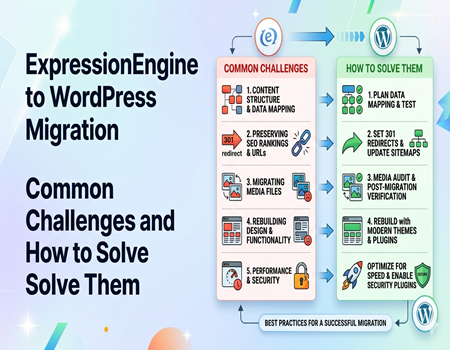
Challenges such as preserving SEO rankings, maintaining URL structures, migrating media files, and rebuilding custom features can make the process complex. Understanding these potential issues before starting the migration helps businesses prepare the right strategy, reduce downtime, and ensure a smooth transition without affecting user experience or search engine visibility.
Challenge #1: Content Structure and Data Mapping
One of the biggest challenges during an ExpressionEngine to WordPress migration is handling the content structure correctly. ExpressionEngine uses channels, custom fields, and unique database relationships that do not directly match the way WordPress organizes posts, pages, categories, and custom post types. Without proper mapping, valuable content can become disorganized or even disappear after migration.
A well-planned data mapping strategy is essential to ensure every article, image, category, and custom field is transferred to the correct location. Before starting the migration, businesses should review their existing website structure and identify how each content type will fit into WordPress. This reduces the risk of missing information and improves overall consistency.
Testing the migrated content on a staging website is equally important. It allows teams to verify that pages display correctly, internal links work properly, and custom fields have been imported as expected. Careful content mapping and thorough testing help create a seamless migration while preserving the website’s organization, usability, and overall user experience.
Challenge #2: Preserving SEO Rankings and URLs
One of the most important concerns during an ExpressionEngine to WordPress migration is protecting existing SEO performance. If URL structures change without proper planning, search engines may no longer find important pages, leading to broken links, lost rankings, and a decline in organic traffic. Recovering from these issues can take months and significantly impact website visibility.
To avoid SEO problems, every old URL should be redirected to its new WordPress version using proper 301 redirects. Meta titles, meta descriptions, image alt text, and canonical tags should also be migrated wherever possible. Updating XML sitemaps and submitting them to search engines helps crawlers discover the new website structure more quickly.
It is equally important to monitor the website after migration. Businesses should regularly check for crawl errors, broken links, and indexing issues using SEO tools and search engine reports. Careful planning and post-migration testing help preserve search rankings, maintain user trust, and ensure that the transition to WordPress does not negatively affect long-term organic traffic growth.
Challenge #3: Migrating Images and Media Files Correctly
Images and media files are an essential part of any website, but they can become a major challenge during an ExpressionEngine to WordPress migration. Incorrect file paths, missing folders, or unsupported configurations may cause images, videos, and downloadable documents to disappear after the migration. This can negatively affect both user experience and website credibility.
To prevent these issues, all media files should be transferred carefully while preserving their original structure and file names whenever possible. It is also important to verify that image links, featured images, and embedded files are working correctly on the new WordPress website. A complete media audit before and after migration helps identify missing assets quickly.
After the migration is complete, businesses should test every important page to ensure images load properly across different devices and browsers. Optimizing media files for faster loading speeds and updating broken references further improves website performance. A well-managed media migration ensures that visual content remains accessible while maintaining a professional appearance and supporting overall SEO efforts.
Challenge #4: Rebuilding Design and Functionality
Recreating the website’s design and functionality is another common challenge when migrating from ExpressionEngine to WordPress. Since both platforms use different themes, templates, and development frameworks, the existing website layout cannot simply be transferred. Businesses often need to rebuild page designs, navigation menus, and custom elements to achieve a similar or improved appearance.
Custom modules and advanced features used in ExpressionEngine may not have direct equivalents in WordPress. Contact forms, membership systems, search functions, and dynamic content sections often require suitable plugins or custom development. Careful planning helps ensure these features continue working smoothly without affecting the user experience.
Before launching the migrated website, every page and interactive feature should be tested thoroughly. This includes checking forms, buttons, menus, mobile responsiveness, and third-party integrations. Rebuilding the design with modern WordPress themes and reliable plugins not only preserves functionality but also improves website performance, accessibility, and long-term scalability for future business growth.
Challenge #5: Performance and Security After Migration
Website performance and security should never be overlooked after migrating from ExpressionEngine to WordPress. A newly migrated website may experience slower loading speeds due to unoptimized images, unnecessary plugins, or outdated database entries. If these issues are ignored, they can affect user experience, search engine rankings, and overall website performance.
Improving speed requires a combination of optimization techniques, including image compression, browser caching, database cleanup, and the use of a reliable caching plugin. Integrating a Content Delivery Network (CDN) can further enhance loading times by serving website files from servers located closer to visitors. These improvements help create a faster and more responsive website.
Security is equally important after the migration process is complete. Installing trusted security plugins, enabling regular backups, using strong login credentials, and keeping WordPress themes and plugins updated can significantly reduce security risks. Continuous monitoring and routine maintenance ensure that the migrated website remains secure, performs efficiently, and delivers a reliable experience for both users and search engines.
Best Practices for a Successful ExpressionEngine to WordPress Migration
Plan and Test Before the Migration
A successful migration starts with proper planning and a complete backup of your existing website. Before moving any data, review your content structure, custom fields, media files, and URLs to avoid unexpected issues. Testing the migration on a staging environment allows you to identify errors early and make necessary adjustments without affecting the live website.
Protect SEO and Website Functionality
After the migration, verify that all pages, images, forms, and internal links are working correctly. Set up 301 redirects for old URLs, update XML sitemaps, and monitor indexing status to preserve search engine rankings. Checking website performance across different devices and browsers also helps ensure a smooth experience for every visitor.
Consider Professional Migration Support
Large or complex websites often require expert planning to prevent data loss and downtime. Many businesses choose ExpressionEngine to WordPress migration services because professionals can handle content mapping, SEO preservation, media transfers, and custom functionality with greater accuracy. This approach minimizes technical risks and allows businesses to focus on daily operations while the migration is completed efficiently.
Monitor the Website After Launch
The migration process does not end once the new website goes live. Regularly monitor analytics, crawl reports, and website performance to identify broken links, missing content, or security issues. Continuous maintenance and timely updates help keep the WordPress website secure, optimized, and ready to support future business growth without unexpected technical problems.
Final Thoughts
Migrating from ExpressionEngine to WordPress can seem like a complex process, but with the right strategy, it becomes much more manageable. Careful planning, proper data mapping, SEO preservation, and thorough testing are essential steps that help ensure a smooth transition. Addressing potential challenges early can reduce downtime and prevent unnecessary technical issues after the migration.
Every website has unique requirements, so there is no one-size-fits-all migration approach. Businesses should evaluate their content structure, custom functionality, and long-term goals before starting the process. Taking the time to prepare properly helps maintain website performance, protect valuable search rankings, and deliver a consistent experience for visitors throughout the migration.
By following best practices and monitoring the new WordPress website after launch, businesses can take full advantage of its flexibility, scalability, and extensive ecosystem. A successful migration not only modernizes website management but also creates a strong foundation for future growth, improved SEO performance, and a better overall user experience in an increasingly competitive digital landscape.