Migrating Sitecore Content Trees to WordPress
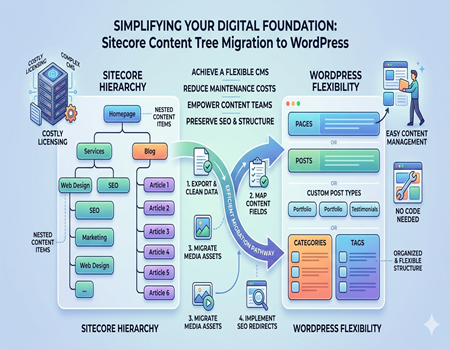
Migrating Sitecore content trees to WordPress is becoming a common need for businesses that want a simpler and more flexible content management system. Sitecore is powerful, but it often feels complex, expensive, and dependent on developers. WordPress, on the other hand, makes it easier to manage content without needing deep technical knowledge.
When we talk about migration, we are not just moving pages from one platform to another. We are moving a complete content structure that includes pages, subpages, media files, and relationships between them. If this is not handled properly, it can lead to broken links, missing content, and SEO issues.
Many businesses face problems during migration because Sitecore and WordPress follow different structures. Without proper planning, the process can become confusing and time-consuming. In this guide, you will learn how to migrate Sitecore content trees to WordPress in a simple and practical way without losing important data or SEO value.
What is a Sitecore Content Tree?
A Sitecore content tree is the way content is organized inside the Sitecore CMS. It works like a hierarchy where every piece of content is stored as an item. These items are arranged in a parent and child structure, similar to folders and subfolders on your computer. This makes it easier to manage large websites with many pages.
For example, the homepage sits at the top of the tree. Under it, there can be sections like services, blogs, or products. Each of these sections can have multiple subpages, creating a structured flow of content. This structure helps in organizing content logically and improves navigation.
Each item in the content tree contains different fields such as title, description, images, and other data. Sitecore uses templates to define what kind of data each item can store. This makes it powerful but also complex during migration because WordPress handles content differently.
Understanding this structure is important before migration. If you move content without proper mapping, you may lose relationships between pages. A clear understanding of the content tree helps ensure a smooth and organized transition to WordPress.
Why Migrate from Sitecore to WordPress?
Many businesses choose to move from Sitecore to WordPress because of cost and complexity. Sitecore requires licensing fees, ongoing maintenance, and technical expertise to manage. For many companies, this becomes difficult and expensive over time, especially when frequent updates are needed.
WordPress offers a much simpler and more user-friendly experience. It allows users to create, edit, and manage content easily without depending heavily on developers. This gives marketing teams more control and reduces the time required to make changes.
Another reason is flexibility. WordPress has a large ecosystem of plugins and themes that allow you to customize your website as needed. Whether you want better SEO tools, faster performance, or design changes, WordPress provides easy solutions without building everything from scratch.
If you are planning a smooth transition, using a Sitecore To WordPress Migration Service can help ensure that your content, structure, and SEO elements are transferred properly without errors. This reduces risk and saves time during migration.
Overall, WordPress provides a cost-effective, flexible, and easy-to-use platform, making it a preferred choice for many businesses moving away from Sitecore.
Key Challenges in Migrating Sitecore Content Trees
Migrating Sitecore content trees is not a simple process, especially when dealing with complex structures. One of the biggest challenges is handling the hierarchical content. Sitecore allows deep nesting of content, while WordPress has a simpler structure. This difference makes it difficult to maintain the same organization after migration.
Another major challenge is data mapping. Sitecore content includes multiple fields, templates, and components. When moving to WordPress, you need to decide how each field will be stored. If this mapping is not done correctly, important data can be lost or misplaced.
Media migration is also a common issue. Images, documents, and other assets need to be transferred and linked correctly. Missing media can break the design and reduce the overall user experience of the website.
SEO risks are another important concern. Changes in URL structure can affect search rankings. If redirects are not implemented properly, users may land on broken pages. Meta data and internal links also need to be preserved carefully during migration.
Handling large websites with thousands of pages adds another level of complexity. Manual migration becomes time-consuming and increases the chances of errors. Understanding these challenges helps you prepare better and ensures a smoother migration process.
Pre-Migration Planning Checklist
Before starting the migration, proper planning is very important. A well-defined checklist helps avoid mistakes and ensures that everything is handled smoothly. The first step is to perform a content audit. Identify important pages, remove outdated content, and decide what needs to be migrated.
Next, plan the structure of your WordPress website. Decide how pages, categories, and posts will be organized. This makes it easier to map content from Sitecore and maintain a logical structure after migration.
Taking a complete backup of your Sitecore data is essential. This ensures that you can recover your content if anything goes wrong during the migration process. Backup acts as a safety layer and should never be skipped.
You should also review templates and fields used in Sitecore. Understand how content is stored and how it will be transferred to WordPress. This helps in accurate data mapping and prevents data loss.
SEO planning is also important. Prepare a list of existing URLs and decide how they will be handled. Planning redirects in advance helps protect your rankings and traffic. A clear plan makes the entire migration process easier and more efficient.
Mapping Sitecore Content to WordPress Structure
Mapping content correctly is one of the most important steps in migration. It involves deciding how Sitecore content will be placed inside WordPress. Without proper mapping, your website can become disorganized and difficult to manage.
In Sitecore, content is stored as items in a tree structure. In WordPress, content is divided into pages, posts, and custom post types. You need to decide which content fits into each category to maintain clarity.
Categories and tags in WordPress can help organize content further. For example, blog-related content from Sitecore can be grouped under categories. This improves navigation and makes it easier for users to find information.
Nested content in Sitecore should be handled carefully. WordPress allows some level of hierarchy, but it is not as flexible. You may need to simplify the structure while keeping the user experience intact.
A clear mapping strategy ensures that content is placed correctly and maintains both usability and SEO value after migration.
Step-by-Step Process to Migrate Sitecore Content Trees
Export Content from Sitecore
The migration process begins with exporting content from Sitecore. This can be done using Sitecore packages, APIs, or database extraction methods. The goal is to collect all content, including text, fields, and structure, in a format that can be processed further.
Transform Data into Compatible Format
After exporting, the data needs to be converted into a format that WordPress can understand. Common formats include XML or CSV. During this step, data is cleaned and organized according to the mapping plan to ensure smooth import.
Set Up WordPress Structure
Before importing content, the WordPress environment should be prepared. Create necessary pages, categories, and custom post types. This ensures that imported content is placed correctly and maintains structure.
Import Content into WordPress
Content is then imported using plugins or custom scripts. It is important to check that all data fields are transferred correctly and that content appears as expected on the website.
Migrate Media Files
Media files such as images and documents should be moved to the WordPress media library. Links should be updated to ensure everything displays correctly and maintains design consistency.
Maintain URL Structure
Keeping URLs similar to the original structure helps maintain SEO value. If changes are needed, proper redirects should be implemented to avoid broken links.
Test and Validate Everything
Finally, the entire website should be tested thoroughly. Check content, links, images, and overall functionality. Fix any issues before making the website live.
SEO Considerations During Migration
SEO plays a critical role during migration. One of the most important steps is implementing proper redirects. This ensures that users and search engines are directed to the correct pages after migration.
Maintaining URL structure is also important. Sudden changes can affect rankings, so it is better to keep URLs similar or map them properly.
Meta titles and descriptions should be transferred carefully. These elements impact search visibility and click-through rates. Losing them can reduce traffic.
Internal linking should also be updated. All links should work correctly and guide users smoothly through the website. Broken links can harm both user experience and SEO.
Finally, update your sitemap and submit it to search engines. This helps your new website get indexed quickly and ensures better visibility.
Tools and Methods for Migration
There are different ways to migrate content from Sitecore to WordPress depending on the size and complexity of the website. Manual migration involves copying and recreating content, which is suitable for small websites but not practical for larger ones.
Automated methods use scripts or tools to transfer content efficiently. These methods save time and reduce the chances of errors during migration. APIs can also be used to fetch and move data programmatically.
There are also CMS migration tools available that are designed to handle complex migrations. These tools can automate multiple steps but may require technical expertise to set up properly.
Choosing the right method depends on your requirements. For large and complex websites, automation or professional support is usually the best option.
Common Mistakes to Avoid
One of the most common mistakes is skipping the content audit. Migrating unnecessary content makes your website cluttered and harder to manage.
Ignoring SEO is another major issue. Without proper redirects and metadata transfer, your rankings can drop quickly.
Poor URL mapping can lead to broken links, which affects both user experience and search performance. Planning URLs in advance helps avoid this problem.
Not testing the website properly can result in unnoticed errors. Always review your site before going live to ensure everything works correctly.
Forgetting to migrate media files can break your website design. Always ensure that all images and documents are transferred and linked properly.
When to Choose Professional Migration Services
If your website has a complex content structure, choosing professional help is a smart decision. Experts understand how to handle data mapping, structure, and SEO during migration.
Businesses with limited technical knowledge can benefit from professional services as it reduces errors and saves time.
If you have a tight deadline, professional services can speed up the process and ensure accuracy. They use tools and experience to manage migration efficiently.
Using a reliable Sitecore To WordPress Migration Service ensures that your content, media, and SEO elements are transferred correctly. It also gives you confidence that the migration is handled properly.
Conclusion
Migrating Sitecore content trees to WordPress may seem complex, but with proper planning and execution, it becomes manageable. Understanding the structure and following the right steps helps avoid common issues.
WordPress offers flexibility, ease of use, and better control over content, making it a popular choice for businesses.
If you approach the migration carefully, you can move your content without losing data or SEO value. Taking time to plan and test ensures a smooth and successful transition.