CMS Migration Project Plan: What a Real Migration Timeline Looks Like
A CMS migration means moving your website from one content management system to another. Many businesses do this to improve website speed, security, SEO performance, and overall user experience. But migration is not just about shifting content. Without a proper plan, it can lead to traffic loss, broken pages, and ranking drops.
Most website owners think migration is a simple technical task, but in reality, it involves multiple steps like planning, content handling, SEO management, and testing. If you skip planning, even a small mistake can affect your website performance. That’s why having a clear CMS migration project plan is very important.
A well-planned migration helps you avoid common risks such as data loss, SEO damage, and downtime. It also ensures that your new website performs better than the old one. Many businesses take help from professional CMS Migration Services to handle this process smoothly and reduce errors during migration.
In this blog, we will break down what a real CMS migration timeline looks like. You will understand each phase step by step, from planning to post-launch optimization. This will help you manage your migration project in a structured way and achieve better results without risking your website performance.
What is a CMS Migration Project Plan?
A CMS migration project plan is a step-by-step strategy that helps you move your website from one platform to another in a structured and safe way. It is not just about transferring content, but also about managing design, data, SEO, and technical elements properly. Without a clear plan, migration can become messy and risky.
This plan usually includes important details like timeline, tasks, responsibilities, tools, and expected outcomes. It helps teams understand what needs to be done at each stage of the migration process. From content audit to final testing, everything is planned in advance to avoid confusion and delays during execution.
Many people think migration is only a technical job, but it actually involves multiple teams like developers, designers, SEO experts, and content managers. A proper project plan ensures that all teams work together smoothly and follow a clear direction. This reduces errors and improves overall efficiency.
Most importantly, a CMS migration project plan protects your website’s SEO performance and user experience. It helps maintain your existing rankings, avoid broken links, and ensure a smooth transition for users. In short, a well-defined plan turns a complex migration process into a controlled and successful project.
Key Factors That Affect CMS Migration Timeline
The timeline of a CMS migration project depends on multiple factors, and every website is different. One of the biggest factors is the size of the website. A small website with a few pages can be migrated quickly, while a large website with hundreds or thousands of pages takes much more time and effort.
Another important factor is the complexity of the website. If your website has custom features, integrations, or advanced functionalities, the migration process becomes more complicated. These elements require proper testing and redevelopment, which increases the overall timeline and requires more technical resources.
SEO structure also plays a major role in deciding how long the migration will take. If your website has many indexed pages, backlinks, and rankings, you need to carefully manage URL mapping and redirects. This process takes time but is essential to avoid traffic loss and ranking drops after migration.
The availability of your team and tools can also impact the migration timeline. If you have an experienced team and the right tools, the process becomes faster and more efficient. On the other hand, limited resources or lack of expertise can delay the project and create unnecessary complications.
Content quality and cleanup requirements also affect the timeline. Before migration, you may need to review, update, or remove outdated content. This step is important for improving website performance but can add extra time to the process depending on how much content needs to be optimized.
All these factors also directly influence the overall Cost of CMS Migration, as more time and effort usually mean higher investment. Understanding these factors helps you set realistic expectations and plan your migration project more effectively.
Pre-Migration Phase (Planning Stage)
Website Audit and Analysis
The pre-migration phase starts with a complete audit of your existing website. This includes analyzing content, SEO performance, technical structure, and user experience. You need to identify what is working well and what needs improvement. This step helps you avoid transferring existing issues to the new CMS.
Backup and Risk Management
Before making any changes, it is important to create a full backup of your website. This includes content, database, and media files. Backup ensures that you can restore your website if anything goes wrong during migration. Risk analysis is also important to identify potential issues and prepare solutions in advance.
Choosing the Right CMS
Selecting the right CMS is a crucial part of the planning stage. You should choose a platform based on your business goals, scalability needs, and ease of use. Popular options include WordPress and headless CMS platforms. The right choice ensures better performance, flexibility, and long-term growth for your website.
Setting Goals and KPIs
Every migration project should have clear goals and measurable KPIs. These can include improving website speed, increasing traffic, or enhancing user experience. Setting goals helps you track the success of your migration and ensures that all efforts are aligned with business objectives.
Creating a Migration Roadmap
A detailed migration roadmap defines each step of the process, including timelines, responsibilities, and deliverables. It acts as a guide for the entire team and ensures that everything is executed in a structured way. A well-defined roadmap reduces confusion and keeps the project on track.
Many businesses prefer to work with professional CMS Migration Services during this phase to ensure proper planning and execution. Expert support can help identify risks early and create a smooth, error-free migration strategy.
Content Audit & Cleanup Process
The content audit process is an important step before starting the actual migration. It helps you understand what content exists on your website and how it is performing. You should review all pages, blogs, and media files to identify which content is useful, outdated, or no longer needed.
During this process, removing outdated and low-quality content is very important. Old pages that are no longer relevant can negatively impact your SEO performance. Cleaning such content helps improve website quality and ensures that only valuable information is moved to the new CMS.
Duplicate content is another major issue that needs to be addressed. Multiple pages with similar or repeated content can confuse search engines and affect rankings. By merging or removing duplicate pages, you can create a more structured and SEO-friendly website during migration.
Content optimization is also a key part of this stage. You should update important pages with better keywords, improved readability, and proper formatting. This ensures that your content performs better after migration and supports your overall SEO strategy.
Finally, you need to decide what content should be migrated, updated, merged, or deleted. This step helps reduce unnecessary workload and makes the migration process faster and more efficient. A clean and well-structured content base always leads to a smoother and more successful CMS migration.
Design & Development Phase
Website Structure and UX Planning
The design and development phase starts with planning the new website structure. This includes organizing pages, menus, and navigation in a user-friendly way. A clear structure helps visitors find information easily and improves overall experience. It also supports SEO by making the website more accessible for search engines.
UI Design and Templates
Once the structure is ready, the next step is designing the user interface. This involves creating layouts, templates, and visual elements that match your brand identity. Good design is not just about looks, but also about usability. Clean and simple designs help users stay longer on your website.
Mobile Responsiveness
Today, most users access websites through mobile devices, so responsive design is essential. Your website should work smoothly on all screen sizes, including smartphones and tablets. A mobile-friendly website improves user experience and also plays an important role in search engine rankings.
Speed Optimization
Website speed is a critical factor during development. Slow-loading pages can increase bounce rate and reduce conversions. Developers should optimize images, use clean code, and implement caching techniques to ensure fast loading speed. A faster website not only improves user experience but also boosts SEO performance.
Development of Custom Features
If your website requires custom functionalities, this is the stage where they are developed. Features like advanced search, filters, integrations, or custom forms need to be built carefully. These elements should be tested properly to ensure they work smoothly without affecting website performance.
Testing During Development
Testing should not be left for the final stage only. During development, regular testing helps identify and fix issues early. This includes checking design consistency, functionality, and performance. Continuous testing ensures that the final website is stable, efficient, and ready for migration.
Data Migration Process (Core Step)
Content and Database Transfer
The data migration process is the most critical part of the entire CMS migration. It involves transferring all website content, including pages, blogs, images, and databases, from the old system to the new one. This step must be done carefully to ensure that no important data is lost or misplaced during the transfer.
Handling Media and Files
Apart from text content, media files like images, videos, and documents also need to be migrated properly. These files should be organized correctly and linked to the right pages. If media handling is not done properly, it can result in broken images or missing files on the new website.
URL Structure and Redirects
Maintaining the URL structure is very important for SEO. If URLs change during migration, proper 301 redirects must be implemented. This ensures that users and search engines are redirected to the correct pages. Without redirects, you may lose traffic and search engine rankings.
Metadata Migration
Metadata such as title tags, meta descriptions, and alt text plays a key role in SEO. During migration, all metadata should be transferred accurately. Missing or incorrect metadata can affect your website visibility on search engines, so this step requires careful attention.
Avoiding Data Loss and Errors
One of the biggest risks during migration is data loss. To avoid this, you should perform the migration in stages and verify data at each step. Using reliable tools and having backups can help minimize risks. Proper validation ensures that all content is correctly transferred without errors.
Final Data Validation
After migration, it is important to verify that all data has been successfully transferred. This includes checking content accuracy, links, media, and database integrity. A thorough validation process ensures that your new website is complete, functional, and ready for the next stage of migration.
SEO Migration Checklist (Critical Section)
URL Mapping and 301 Redirects
One of the most important steps in SEO migration is proper URL mapping. You need to match old URLs with new ones to ensure a smooth transition. If URLs change, setting up 301 redirects is necessary. This helps pass link equity and prevents users from landing on broken pages after migration.
Preserving Search Rankings
Maintaining your existing rankings should be a top priority during migration. Any mistake in handling SEO elements can lead to traffic drops. You should ensure that important pages, keywords, and internal links are properly maintained. Careful planning helps protect your visibility in search engine results.
Fixing Broken Links
Broken links can negatively impact both user experience and SEO performance. During migration, you should check all internal and external links to ensure they are working correctly. Fixing these issues before launch helps maintain website credibility and prevents ranking loss.
XML Sitemap and Robots.txt
Updating your XML sitemap is essential after migration. It helps search engines understand your new website structure and index pages faster. You should also review the robots.txt file to ensure that important pages are not blocked from crawling. These technical steps are crucial for proper indexing.
Tracking and Analytics Setup
After migration, tracking tools should be properly configured. This includes setting up Google Analytics and Google Search Console to monitor website performance. These tools help you track traffic, identify issues, and measure the success of your migration.
Post-Migration SEO Checks
Before and after launch, you should perform final SEO checks to ensure everything is working correctly. This includes checking redirects, indexing status, and keyword rankings. Regular monitoring helps you quickly identify and fix any issues, ensuring a smooth and successful migration.
Testing Phase Before Launch
The testing phase is a crucial step before making your new website live. It helps ensure that everything is working properly and there are no major issues left. This stage allows you to identify errors and fix them before users and search engines access your website.
First, you should test the overall functionality of the website. This includes checking forms, navigation menus, buttons, and interactive elements. Every feature should work smoothly without any errors. Functional testing ensures that users can easily interact with your website without facing any problems.
Next, design and layout testing should be done across different devices and browsers. Your website should look consistent on desktops, tablets, and mobile devices. Cross-browser testing ensures that your website performs well on platforms like Chrome, Safari, and Edge without any display issues.
SEO validation is also an important part of this phase. You should check if all redirects are working correctly, metadata is properly implemented, and URLs are optimized. This step ensures that your website is ready for search engines and helps avoid ranking issues after launch.
Finally, performance testing should be done to check website speed and loading time. A fast-loading website improves user experience and reduces bounce rate. Completing all these tests before launch ensures a smooth transition and minimizes the risk of post-launch issues.
Website Launch Process
The website launch process is the stage where your new CMS website goes live for users. This step should be handled carefully to avoid downtime or unexpected issues. Before launching, make sure all final checks are completed and everything is ready for a smooth transition.
One of the key steps during launch is updating the DNS settings. This connects your domain to the new server where your migrated website is hosted. DNS changes may take some time to propagate, so temporary delays in accessibility are normal during this phase.
After the website goes live, it is important to monitor its performance closely. You should check if all pages are loading correctly, redirects are working, and there are no broken links. Immediate monitoring helps identify and fix issues quickly before they affect user experience or SEO.
It is also common to face small issues on launch day, such as minor design glitches or slow loading on certain pages. These should be resolved as soon as possible. A carefully managed launch ensures that your website remains stable, accessible, and ready for users without major disruptions.
Post-Migration Monitoring & Optimization
After the website launch, the work does not stop. Post-migration monitoring is essential to ensure that your website is performing as expected. This phase helps you identify any issues that may have been missed during testing and allows you to fix them quickly before they impact users or SEO performance.
One of the first things to monitor is website traffic and keyword rankings. You should track changes in organic traffic and see if there are any sudden drops. Monitoring tools can help you understand how your website is performing in search results and whether your migration has affected visibility.
Crawl errors and indexing issues should also be checked regularly. Search engines may face difficulties crawling your new website if there are broken links or incorrect redirects. Fixing these issues quickly ensures that your pages are properly indexed and accessible to users.
Website performance is another key area to focus on. You should continuously monitor page speed, mobile usability, and overall user experience. Any performance issues should be optimized to ensure that users can navigate your website smoothly without delays or frustration.
Many businesses rely on professional CMS Migration Services during this phase for ongoing support and optimization. Experts can help identify hidden issues, improve SEO performance, and ensure long-term success. Continuous monitoring and improvement are essential to get the best results from your CMS migration.
Real CMS Migration Timeline Example (Week-by-Week)
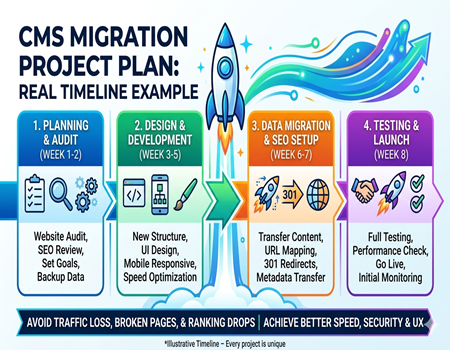
Week 1–2: Planning and Audit
The first two weeks are focused on planning and analysis. During this stage, a complete website audit is performed to understand content, SEO performance, and technical structure. Goals and KPIs are defined, and a clear migration strategy is created. This phase builds the foundation for a smooth and organized migration process.
Week 3–5: Design and Development
In the next phase, the new website structure and design are developed. This includes creating layouts, templates, and user-friendly navigation. Developers start building the website on the new CMS, ensuring mobile responsiveness and performance optimization. Custom features and integrations are also developed during this stage.
Week 6–7: Data Migration and SEO Setup
These weeks are focused on transferring content and implementing SEO elements. All pages, media files, and databases are migrated carefully. URL mapping and 301 redirects are set up to maintain search rankings. Metadata and internal links are also checked to ensure SEO consistency across the new website.
Week 8: Testing and Launch
The final week involves complete testing and preparation for launch. The website is tested for functionality, design, speed, and SEO performance. Any issues found are fixed before going live. Once everything is verified, the website is launched, and initial performance is monitored closely to ensure a smooth transition.
Common CMS Migration Mistakes to Avoid
One of the most common mistakes during CMS migration is ignoring SEO. Many businesses focus only on design and development while neglecting SEO elements like redirects, metadata, and URL structure. This can lead to a significant drop in rankings and traffic after migration, which can take months to recover.
Another major mistake is not setting up proper 301 redirects. When URLs change and redirects are not implemented correctly, users land on broken pages. This not only affects user experience but also harms search engine rankings. Proper URL mapping is essential to maintain website authority and traffic.
Poor planning is also a frequent issue in migration projects. Without a clear strategy, teams may face confusion, delays, and errors during execution. A lack of coordination between developers, designers, and SEO teams can create unnecessary complications and increase the risk of failure.
Skipping the testing phase is another serious mistake. If you launch your website without proper testing, issues like broken links, slow loading speed, or design errors can go unnoticed. These problems can negatively impact user experience and reduce website credibility.
Lastly, rushing the launch process can lead to avoidable errors. Migration requires patience and careful execution. Taking time to plan, test, and review ensures a smoother transition and better long-term results for your website.
How Much Time & Cost Does CMS Migration Take?
The time required for a CMS migration depends on the size and complexity of your website. A small website with limited pages can be migrated within a few weeks, while a large website with complex features may take several months. Proper planning and execution play a key role in determining the overall timeline.
Cost is also closely related to the scope of the project. Factors like website size, design requirements, custom development, and SEO handling directly affect the pricing. The more complex your website is, the higher the investment required for a smooth and successful migration process.
For example, a basic migration with minimal customization may cost less and take less time. On the other hand, a fully customized website with integrations, advanced features, and detailed SEO migration will require more resources, increasing both time and cost. Understanding these differences helps in setting a realistic budget.
If you want a detailed breakdown of pricing factors, you can explore the Cost of CMS Migration to understand what impacts the overall investment. This helps you plan your budget effectively and avoid unexpected expenses during the migration process.
In general, balancing time and cost is important. Investing in proper planning, tools, and expertise can save you from bigger losses in the future, especially when it comes to SEO and website performance.
Conclusion: Plan Smart for a Smooth CMS Migration
A CMS migration is not just a technical task but a complete strategic process that requires proper planning, execution, and monitoring. From initial audit to post-launch optimization, every step plays an important role in ensuring a smooth and successful transition without affecting your website performance or SEO.
Following a structured CMS migration project plan helps you avoid common mistakes like data loss, broken links, and ranking drops. It also ensures that your new website performs better in terms of speed, user experience, and search visibility. A well-planned approach always leads to long-term benefits.
If you want to make your migration process easier and more efficient, taking support from professional CMS Migration Services can be a smart decision. Experts can handle complex tasks, reduce risks, and ensure everything is done correctly from start to finish.
In the end, success in CMS migration depends on how well you plan and execute each step. With the right strategy and careful monitoring, you can achieve a smooth transition and build a stronger, more optimized website for the future.