Migrating MODX Multi-Language Sites to WordPress
In today’s digital world, having a multi-language website is essential for businesses that want to reach a global audience. It helps improve user experience, build trust, and increase conversions across different regions. However, managing content in multiple languages becomes challenging without the right content management system.
Many businesses use MODX for its flexibility, especially when building custom multilingual websites. While it offers strong control over content structure, managing multiple languages in MODX can become complex over time. This is especially true for content teams that need to update and scale content regularly.
WordPress, on the other hand, provides a more user-friendly approach to handling multi-language websites. With the help of plugins and built-in tools, it simplifies content management, SEO optimization, and overall workflow for teams. This makes it easier to manage multiple languages without technical complications.
In this guide, we will explore how to migrate MODX multi-language sites to WordPress step by step. You will learn about the challenges, benefits, and best practices to ensure a smooth and successful migration process.
Understanding Multi-Language Websites in MODX
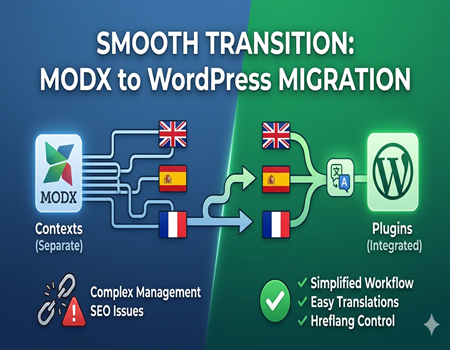
MODX handles multi-language websites in a flexible but technical way. It does not have a simple built-in multilingual system like some other CMS platforms. Instead, it uses something called “contexts,” where each language is treated as a separate section of the website. This approach gives developers full control but requires proper setup and management.
In MODX, each language version often has its own structure, templates, and resources. Developers need to manually create and link these versions, which can become complicated as the website grows. While this allows customization, it also increases the chances of errors, especially when handling large amounts of content.
Another challenge is maintaining consistency across different languages. Since content is managed separately, updating multiple versions of the same page can take more time and effort. Content teams may find it difficult to manage translations, URLs, and SEO settings without technical support.
Overall, MODX offers strong flexibility for multilingual websites, but it is not very user-friendly for non-technical users. For businesses that rely on frequent updates and scalable content strategies, managing multi-language websites in MODX can become time-consuming and complex.
Why Businesses Migrate Multi-Language Sites from MODX to WordPress
Complexity in Content Management
Managing multi-language content in MODX can quickly become complicated, especially as the website grows. Since each language is handled separately, content teams often struggle to keep everything updated and consistent. Even small changes may need to be repeated across multiple versions, which increases workload and slows down the publishing process.
For non-technical users, this complexity becomes a major challenge. Tasks like editing pages, managing translations, or updating layouts may require developer support. This creates delays and reduces the efficiency of content marketing efforts, especially when speed is important.
SEO Limitations in Multi-Language Setup
SEO management in MODX for multi-language websites is not very straightforward. Important elements like meta tags, hreflang attributes, and URL structures often require manual setup. This increases the chances of errors, which can negatively impact search rankings and visibility in different regions.
Content teams may find it difficult to implement SEO strategies without technical help. As a result, optimizing pages for multiple languages becomes time-consuming, and opportunities for organic growth may be missed.
Dependency on Developers
One of the biggest reasons businesses move away from MODX is the heavy reliance on developers. Most updates, whether related to content, design, or SEO, require technical intervention. This dependency not only increases costs but also slows down overall workflow.
For growing businesses, this can become a bottleneck. Marketing teams need independence to experiment, publish, and optimize content quickly, which is difficult to achieve in a developer-dependent environment.
Need for Scalable Marketing
As businesses expand, they need a CMS that supports scalable content marketing. WordPress provides tools and flexibility that allow teams to manage multiple languages more efficiently. This is why many businesses choose to migrate from MODX to WordPress for better growth, speed, and long-term scalability.
Benefits of Migrating to WordPress for Multi-Language Sites
Easy Multi-Language Plugins
One of the biggest advantages of WordPress is its support for multi-language plugins. Tools like WPML, Polylang, and TranslatePress make it easy to create and manage content in different languages from a single dashboard. These plugins simplify translation management and allow teams to handle multiple languages without technical complexity.
This reduces manual work and ensures consistency across all language versions. Content teams can easily switch between languages, update pages, and manage translations efficiently, which improves overall productivity.
Better SEO Control
WordPress provides strong SEO capabilities, especially for multi-language websites. With plugins and built-in features, teams can easily manage meta tags, URLs, and hreflang attributes. This helps search engines understand language targeting and improves visibility in different regions.
Unlike MODX, where many SEO tasks require manual setup, WordPress makes optimization simple and faster. This allows businesses to focus more on strategy and content quality rather than technical implementation.
User-Friendly Dashboard
The WordPress dashboard is designed for ease of use, making it ideal for content marketing teams. Users can create, edit, and publish content without needing coding knowledge. Managing multi-language content becomes much simpler with a clear and organized interface.
This user-friendly experience reduces dependency on developers and allows teams to work more independently. As a result, content updates and campaigns can be executed faster and more efficiently.
Faster Content Updates
With WordPress, updating multi-language content is quick and straightforward. Teams can make changes in real time and ensure that all language versions stay aligned. This speed is crucial for businesses that rely on regular content updates and global communication.
Pre-Migration Planning Checklist
Before starting the migration process, proper planning is essential to avoid errors and data loss. The first step is to perform a complete website audit. This includes reviewing all pages, languages, URLs, media files, and SEO elements. Understanding your current structure helps ensure that nothing important is missed during migration.
Next, it is important to create a full backup of your MODX website. This includes both database and files. Having a backup ensures that you can restore your website if anything goes wrong during the migration process. It is also recommended to set up a staging environment where you can test the migration safely without affecting your live website.
SEO planning is another critical part of the process. You need to analyze your current URL structure, meta data, and rankings. Planning proper redirects is important to avoid broken links and traffic loss. For multi-language sites, maintaining correct language URLs and hreflang structure is essential to preserve search visibility.
Finally, choosing the right WordPress setup is crucial. This includes selecting a reliable hosting provider, installing WordPress, and deciding which multi-language plugin you will use. A well-planned setup ensures a smoother migration and better performance after the transition. Proper preparation reduces risks and helps achieve a successful migration.
Step-by-Step Process to Migrate MODX Multi-Language Site to WordPress
Step 1: Backup Your MODX Website
Before starting the migration, it is important to take a complete backup of your MODX website. This includes all files, databases, and media content. A proper backup ensures that you can restore your data if anything goes wrong during the process.
You should store the backup in a secure location and verify that it is working correctly. This step is critical because it protects your website from unexpected errors or data loss during migration.
Step 2: Set Up WordPress Environment
The next step is to set up your WordPress environment. This includes choosing a reliable hosting provider, installing WordPress, and configuring basic settings. You should also select a suitable theme that matches your existing website design.
Setting up a staging site is highly recommended. It allows you to perform the migration without affecting your live website and gives you time to test everything properly before going live.
Step 3: Export Content from MODX
After setting up WordPress, you need to export content from your MODX website. This includes pages, blog posts, images, and other important data. Since MODX does not have a simple export tool like WordPress, this step may require manual extraction or developer support.
It is important to organize the content properly, especially for multi-language pages. Clear structure and labeling will make the import process easier and more accurate.
Step 4: Import Content into WordPress
Once the content is ready, you can import it into WordPress. Depending on the complexity, you may use import tools or manual methods. Content should be placed correctly into pages, posts, and categories.
During this step, ensure that formatting, images, and internal links are maintained. Proper content placement helps in maintaining consistency and user experience.
Step 5: Configure Multi-Language Plugin
After importing content, you need to set up a multi-language plugin such as WPML or Polylang. This will allow you to manage different language versions from a single dashboard.
You should link translated pages correctly and ensure that language switching works smoothly. Proper configuration is important for both user experience and SEO.
Step 6: Set Up Redirects & SEO
The final step is to handle SEO and redirects. You need to set up 301 redirects from old MODX URLs to new WordPress URLs. This helps preserve search rankings and avoids broken links.
Also, configure SEO elements such as meta tags, sitemaps, and hreflang attributes. This ensures that your multi-language website performs well in search engines after migration.
Handling Multi-Language SEO During Migration
Maintaining URL Structure
One of the most important parts of migration is maintaining your existing URL structure. If URLs change without proper planning, it can lead to broken links and loss of rankings. For multi-language sites, each language version should follow a consistent structure to avoid confusion for both users and search engines.
If changes are necessary, proper 301 redirects must be implemented. This ensures that users and search engines are redirected to the correct pages without affecting traffic or SEO performance.
Using hreflang Tags
Hreflang tags play a crucial role in multi-language SEO. They help search engines understand which language version of a page should be shown to users in different regions. During migration, it is important to correctly set up hreflang tags for all translated pages.
WordPress plugins make this process easier, but proper configuration is still required. Incorrect implementation can lead to indexing issues or wrong language pages appearing in search results.
Avoiding Duplicate Content
Duplicate content is a common issue in multi-language websites, especially during migration. If similar content is not properly differentiated by language, search engines may struggle to identify the correct version. This can negatively impact rankings and visibility.
To avoid this, each language page should be clearly defined with proper URLs, meta tags, and hreflang attributes. This helps search engines understand that each version targets a different audience.
Preserving Rankings
Maintaining existing rankings is a top priority during migration. This requires careful handling of SEO elements such as meta titles, descriptions, headings, and internal links. All important data should be transferred accurately to the new WordPress site.
Regular monitoring after migration is also important. Tracking performance helps identify issues early and ensures that your multi-language SEO remains strong and stable.
Common Challenges in MODX to WordPress Migration
Migrating a multi-language website from MODX to WordPress can come with several challenges, especially if the site has a complex structure. One common issue is data mismatch during the transfer process. Content may not align properly, and formatting can break, which requires manual adjustments to maintain consistency across all pages.
Another challenge is language mapping. Since MODX handles languages using separate contexts, mapping each language version correctly in WordPress can be tricky. If not done properly, pages may not link correctly, leading to confusion for users and search engines. Careful planning is needed to ensure accurate language connections.
Broken URLs are also a frequent problem during migration. If old URLs are not redirected properly, it can result in 404 errors and loss of traffic. Setting up correct 301 redirects is essential to maintain SEO performance and provide a smooth user experience after migration.
Design differences can also create complications. Themes and layouts in WordPress may not match the original MODX design exactly, requiring customization to achieve a similar look. Addressing these challenges with proper planning and testing helps ensure a smooth and successful migration process.
Tools & Plugins for Multi-Language WordPress Sites
WordPress offers several powerful tools and plugins that make managing multi-language websites much easier compared to MODX. These plugins are designed to simplify translation, improve workflow, and ensure proper SEO handling for different language versions, making them ideal for content marketing teams.
One of the most popular options is WPML (WordPress Multilingual Plugin). It allows users to manage multiple languages from a single dashboard and supports advanced features like translation management and multilingual SEO. It is widely used for large and complex websites that require detailed control.
Another useful plugin is Polylang, which is known for its simplicity and ease of use. It allows users to create and manage translations without adding unnecessary complexity. It is a good option for small to medium-sized websites that need basic multilingual functionality.
TranslatePress is also a strong choice, especially for users who prefer visual translation. It allows you to translate content directly from the front end of your website, making the process more intuitive. These tools make WordPress a powerful platform for managing multi-language websites efficiently.
Why You Should Use Professional Migration Services
Migrating a multi-language website from MODX to WordPress is not a simple task, especially when dealing with large content, multiple languages, and SEO elements. While it may seem possible to handle it manually, the risk of errors, data loss, and broken structures is quite high without proper experience.
One of the biggest risks of DIY migration is losing important SEO data such as meta tags, URL structures, and language targeting. Even small mistakes can lead to traffic drops and ranking loss. Multi-language setups add another layer of complexity, making the process more sensitive and time-consuming.
Using professional MODX to WordPress Migration Services ensures that your website is migrated safely and efficiently. Experts handle everything from data transfer and language mapping to SEO preservation and performance optimization. This reduces downtime and avoids costly mistakes.
In the long run, professional services save time and provide peace of mind. Your team can focus on content and marketing while experts handle the technical side of migration smoothly and effectively.
Final Checklist After Migration
After completing the migration, it is important to carefully review your website to ensure everything is working properly. Start by testing all language versions and checking if users can easily switch between them. Each translated page should load correctly and display the right content without any errors.
Next, verify all redirects and URLs. Make sure old MODX links are properly redirected to the new WordPress pages. This helps prevent broken links and ensures that your SEO performance remains stable after migration.
You should also review key SEO elements such as meta titles, descriptions, headings, and hreflang tags. Confirm that everything is correctly implemented for each language version. Additionally, check website speed and overall performance to ensure a smooth user experience. Proper testing after migration helps avoid long-term issues.
Conclusion
Migrating a multi-language website from MODX to WordPress can be a smart move for businesses looking to simplify content management and improve scalability. While MODX offers flexibility, it often becomes complex and difficult to manage as content and language requirements grow over time.
WordPress provides a more practical solution with its user-friendly interface, powerful plugins, and strong SEO capabilities. It allows content teams to manage multiple languages efficiently without heavy technical dependency, which improves productivity and overall performance.
With proper planning and execution, the migration process can be smooth and beneficial in the long run. By choosing the right tools and approach, businesses can maintain their SEO performance and enhance user experience. Overall, WordPress stands out as a better choice for managing multi-language websites effectively.