How DNN Custom Modules Translate to WordPress
Businesses that have been using DotNetNuke (DNN) for years often reach a point where they need more flexibility, easier management, and better scalability. That’s where WordPress comes in. As one of the most popular content management systems in the world, WordPress offers a user-friendly interface, a massive plugin ecosystem, and strong SEO capabilities.
However, one of the biggest concerns during migration is how DNN custom modules will translate into WordPress. These modules are often deeply integrated into business workflows, making migration more complex than simply moving content. Unlike basic pages or blogs, custom modules carry logic, data, and functionality that need careful handling.
This is where professional Dot Net Nuke (DNN) to WordPress Migration Services become important. Instead of directly copying modules, the goal is to recreate their functionality in a smarter and more efficient way within WordPress.
In this guide, you’ll learn how DNN modules work, why translating them is challenging, and how they can be successfully adapted into WordPress without losing functionality or performance.
Understanding DNN Custom Modules
DNN custom modules are the backbone of many websites built on the DotNetNuke platform. These modules are essentially components developed using ASP.NET and C#, designed to add specific features or functionality to a website. Unlike simple plugins, DNN modules can be highly customized based on business needs.
There are different types of DNN modules. Some are simple content modules used for displaying text or images, while others are complex functional modules that handle tasks like user management, forms, reporting dashboards, or third-party integrations. Many businesses rely on these modules to manage their daily operations online.
The flexibility of DNN allows developers to build modules that fit exact requirements. However, this customization is also what makes migration difficult. Each module is often unique, meaning there is no standard way to move it to another platform.
Another important factor is that these modules are tightly connected with the DNN database and architecture. This means you cannot simply export and import them into WordPress. Instead, you need to understand their logic, data structure, and purpose before recreating them in a new environment.
Why Translating DNN Modules is Challenging
Migrating DNN custom modules to WordPress is not a straightforward process. The biggest challenge comes from the fundamental difference between the two platforms. DNN is built on ASP.NET, while WordPress is based on PHP. This difference alone makes direct code transfer impossible.
Another challenge is the lack of one-to-one mapping. A DNN module does not always have a direct equivalent in WordPress. For example, a custom reporting module in DNN may need to be rebuilt using multiple plugins or custom code in WordPress.
Data structure is another critical issue. DNN modules often use custom database tables and relationships. Migrating this data requires careful mapping to ensure that no information is lost or corrupted during the transition.
Dependencies also play a major role. Some modules rely on other modules, APIs, or system-level functions. If these dependencies are not properly identified, the migrated functionality may break or behave incorrectly.
Because of these complexities, businesses often rely on expert Dot Net Nuke (DNN) to WordPress Migration Services to ensure a smooth and accurate transition.
WordPress Architecture: How It Handles Functionality
To understand how DNN modules translate, it’s important to first understand how WordPress works. Unlike DNN, WordPress uses a combination of plugins, themes, and custom development to manage functionality.
Plugins are the core of WordPress functionality. They allow you to add features such as forms, SEO tools, membership systems, and more without writing code. There are thousands of plugins available, making it easy to replicate many DNN module features.
Themes control the design and layout of the website. While they are mostly focused on appearance, they can also include some functional elements.
For more advanced needs, WordPress allows developers to create custom post types, taxonomies, and APIs. This makes it possible to build complex systems similar to DNN modules.
Another advantage is flexibility. WordPress does not force a rigid structure. Developers can choose whether to use existing plugins or build custom solutions based on the project requirements.
This modular and flexible approach is what makes WordPress ideal for translating DNN modules effectively.
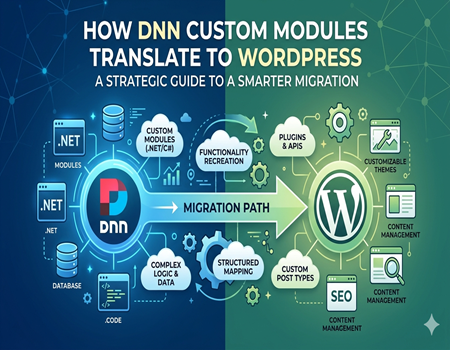
How DNN Custom Modules Translate to WordPress
This is the most important part of the migration process. Instead of directly converting modules, the goal is to recreate their functionality using WordPress tools and best practices.
Simple Modules → Plugins or Page Builders
Basic content modules in DNN, such as text blocks or image sections, can be easily recreated using WordPress page builders like Elementor or Gutenberg. These tools allow you to design pages visually without coding.
Data-Driven Modules → Custom Post Types + Fields
Modules that manage structured data, such as listings or directories, can be translated into custom post types in WordPress. Advanced Custom Fields (ACF) or similar tools can be used to manage additional data fields.
Complex Business Logic → Custom Plugin Development
Some DNN modules include complex workflows or business logic. In such cases, a custom WordPress plugin is the best solution. This allows developers to rebuild the functionality in a scalable and maintainable way.
Third-Party Integrations → WordPress APIs or Plugins
If a DNN module integrates with external systems, WordPress usually offers APIs or plugins that can achieve the same result. This often improves performance and simplifies maintenance.
At this stage, working with professional Dot Net Nuke (DNN) to WordPress Migration Services ensures that each module is handled correctly without breaking functionality.
Common Types of DNN Modules and Their WordPress Alternatives
Understanding common module types makes it easier to plan migration.
Blog or news modules in DNN can be directly replaced with WordPress posts, which are built specifically for content publishing and SEO.
Form modules can be replaced with tools like WPForms or Gravity Forms. These plugins offer drag-and-drop functionality and advanced features like conditional logic.
Membership modules can be recreated using plugins such as MemberPress or other user management solutions. These tools provide better scalability and ease of use.
E-commerce modules are typically replaced with WooCommerce, one of the most powerful e-commerce platforms in the WordPress ecosystem.
Custom dashboards or admin panels can be rebuilt using custom plugins or WordPress admin customization techniques.
In most cases, WordPress offers more flexibility and better user experience compared to traditional DNN modules.
Steps to Convert DNN Modules to WordPress
A structured approach is essential for successful migration.
The first step is to audit all existing DNN modules. This includes identifying their purpose, functionality, and dependencies. Without a clear understanding, migration can become chaotic.
Next, you need to map each module’s functionality to a WordPress solution. This could be a plugin, custom development, or a combination of both.
Data extraction comes next. This involves exporting data from DNN and preparing it for import into WordPress. Proper mapping ensures that relationships and structures are preserved.
Once the data is ready, development begins. This includes setting up plugins, creating custom post types, and building any required custom features.
Testing is a critical step. Each module must be tested thoroughly to ensure it works as expected in the new environment.
Finally, the migration is executed on the live website. Even after launch, continuous monitoring is important to fix any issues quickly.
Best Practices for Smooth Migration
A successful migration depends on following best practices.
Always start with a detailed audit. Skipping this step can lead to missing functionality or broken features.
Focus on functionality rather than structure. Instead of trying to replicate DNN exactly, aim to achieve the same results using WordPress tools.
SEO preservation is crucial. Make sure URLs, metadata, and content structure are maintained to avoid ranking drops.
Use a staging environment for testing. This allows you to identify issues without affecting the live website.
Documentation is also important. Keeping a record of module logic and migration steps helps in future maintenance.
Common Mistakes to Avoid
One common mistake is trying to copy DNN modules exactly as they are. This approach often leads to poor performance and unnecessary complexity.
Another mistake is ignoring performance optimization. WordPress offers many tools to improve speed, but they need to be used correctly.
Skipping testing is also risky. Even small errors can affect user experience and functionality.
Not understanding dependencies can cause modules to break after migration. Always identify and handle dependencies properly.
Avoiding these mistakes can save time, money, and effort during migration.
Benefits of Translating DNN Modules to WordPress
Migrating to WordPress offers several advantages.
It is more cost-effective in the long run due to lower development and maintenance costs.
The user-friendly interface makes it easy for non-technical users to manage content and features.
WordPress has a massive plugin ecosystem, allowing you to add new features without heavy development.
SEO capabilities are stronger, helping your website rank better on search engines.
Scalability is another key benefit. As your business grows, WordPress can easily adapt to new requirements.
Overall, translating DNN modules into WordPress creates a more flexible and future-ready website.
Conclusion
Translating DNN custom modules to WordPress is not about direct conversion. It is about understanding the purpose of each module and recreating it in a smarter way using WordPress tools.
While the process can be complex, a structured approach makes it manageable. From auditing modules to rebuilding functionality and testing thoroughly, every step plays a crucial role in successful migration.
For businesses with complex requirements, professional Dot Net Nuke (DNN) to WordPress Migration Services can ensure a smooth transition without losing critical functionality.
In the end, the move to WordPress opens up new opportunities for growth, flexibility, and better user experience—making it a smart choice for modern websites.