Migrating Corporate Portals from DNN
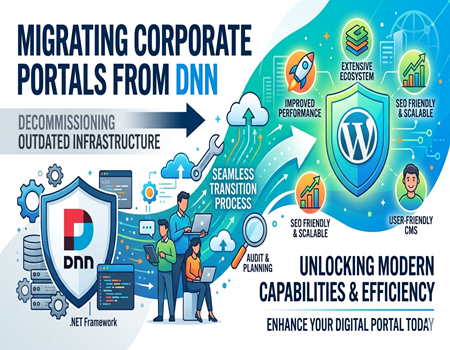
Corporate portals play a vital role in managing internal operations, communication, and customer engagement for modern businesses. Over time, many organizations adopted DNN (DotNetNuke) as their preferred CMS due to its flexibility and enterprise-level capabilities. However, as technology evolves, businesses are now looking for more scalable and user-friendly platforms.
Today, companies are actively exploring migration options to improve performance, reduce costs, and enhance user experience. This guide is designed to help you understand the complete process of migrating corporate portals from DNN, along with key benefits, challenges, and best practices for a smooth transition.
What is DNN (DotNetNuke)?
DNN, also known as DotNetNuke, is a web content management system built on the Microsoft .NET framework. It allows businesses to create and manage dynamic websites and corporate portals with ease. Its modular architecture enables developers to add features and customize functionality based on business requirements.
Earlier, DNN gained popularity among enterprises due to its security, flexibility, and ability to support large-scale portals. It was widely used for intranet systems, employee dashboards, and enterprise-level websites. However, with changing digital needs, many organizations now find it less adaptable compared to modern CMS platforms.
Why Businesses Are Moving Away from DNN
One of the primary reasons businesses are moving away from DNN is the high cost of maintenance and development. Since it requires specialized .NET developers, hiring and retaining talent can be expensive. Additionally, updates and customizations often take longer, which slows down business operations.
Another major concern is the limited ecosystem compared to modern platforms. DNN lacks the vast plugin and integration options that businesses need today. This makes it harder to implement new features quickly, affecting scalability and innovation in fast-paced digital environments.
User experience is also a significant factor. Many DNN-based portals feel outdated in terms of design and usability. As businesses focus more on customer experience and modern interfaces, they prefer platforms that offer better flexibility, responsiveness, and customization without heavy development efforts.
Why WordPress is the Preferred Alternative
WordPress has become the most popular CMS worldwide due to its simplicity and flexibility. It allows users to manage content without technical expertise, making it ideal for businesses that want control over their website without relying heavily on developers. Its intuitive dashboard simplifies daily operations.
Another key advantage is the extensive plugin ecosystem. Businesses can easily add features like SEO tools, security enhancements, analytics, and integrations without building everything from scratch. This not only saves time but also reduces development costs significantly.
WordPress is also highly SEO-friendly, which helps businesses improve their online visibility. With proper optimization, companies can achieve better rankings and drive more traffic. Combined with scalability and continuous updates, WordPress becomes a reliable long-term solution for corporate portals.
Key Challenges in Migrating Corporate Portals from DNN
Migrating from DNN to another platform is not always straightforward. One of the biggest challenges is data migration, as corporate portals often contain large volumes of structured and unstructured content. Ensuring that all data is transferred accurately without loss is critical for business continuity.
Another challenge is maintaining SEO performance. If URLs, metadata, and site structure are not handled properly, businesses may experience a drop in rankings and traffic. Careful planning is required to ensure that search engine visibility remains intact after migration.
Custom modules and features in DNN also create complexity. Many corporate portals rely on tailored functionalities that may not have direct equivalents in WordPress. Rebuilding or replacing these features requires proper technical expertise and strategic planning to avoid disruptions.
Step-by-Step Process for Migrating from DNN to WordPress
Website Audit and Planning
The migration process begins with a detailed audit of your existing DNN portal. This includes analyzing content, features, integrations, and overall site structure. Proper planning helps identify what needs to be migrated, improved, or removed, ensuring a smooth and efficient transition.
Data Backup and Security
Before making any changes, it is essential to create a complete backup of your existing website. This ensures that your data remains safe in case of unexpected issues. Security measures should also be implemented to protect sensitive information during the migration process.
Content and Database Migration
Transferring content from DNN to WordPress requires careful mapping of data structures. Pages, images, documents, and user data must be migrated accurately. Automated tools can help, but manual checks are necessary to ensure everything is correctly placed and formatted.
Design and Theme Development
Once content is migrated, the next step is designing your new WordPress portal. Businesses often take this opportunity to modernize their design, improve navigation, and enhance user experience. A responsive and user-friendly design ensures better engagement across devices.
Plugin and Feature Integration
WordPress plugins play a crucial role in replicating or improving DNN functionalities. From SEO tools to security and performance optimization, plugins help build a powerful and scalable portal without extensive development work.
SEO Migration and Redirects
Maintaining SEO during migration is critical. Proper 301 redirects must be implemented to ensure that old URLs point to new ones. Metadata, keywords, and sitemap should also be transferred to prevent ranking drops and maintain search visibility.
Testing and Final Launch
Before going live, thorough testing is required to identify and fix issues. This includes checking links, forms, performance, and compatibility. Once everything is verified, the new WordPress portal can be launched with confidence.
SEO Considerations During Migration
SEO is one of the most sensitive aspects of any website migration. Even small mistakes can lead to significant drops in rankings and traffic. That’s why it is important to carefully manage URL structures, metadata, and indexing during the transition process.
Implementing proper 301 redirects ensures that search engines understand the new structure of your website. This helps preserve link equity and prevents broken links. Additionally, updating sitemaps and submitting them to search engines ensures faster indexing of new pages.
Monitoring performance after migration is equally important. Businesses should track rankings, traffic, and crawl errors to identify potential issues early. With proper planning and execution, it is possible to maintain or even improve SEO performance after migrating from DNN.
Benefits After Migrating to WordPress
One of the biggest benefits of migrating to WordPress is improved performance. Modern themes and optimized plugins ensure faster loading times, which enhances user experience and reduces bounce rates. A faster website also contributes positively to search engine rankings.
Another advantage is ease of content management. Teams can update content, publish blogs, and make changes without technical knowledge. This empowers businesses to stay active online and respond quickly to market trends without relying on developers.
Cost efficiency is also a major benefit. WordPress reduces development and maintenance expenses significantly. With access to a large ecosystem and community support, businesses can scale their portals easily while keeping operational costs under control.
When Should You Consider Professional Help?
Migrating a corporate portal is a complex process, especially when dealing with large-scale websites and custom features. Businesses with advanced requirements should consider professional assistance to ensure a smooth and error-free migration experience.
If your portal includes custom modules, integrations, or sensitive data, handling the migration without expertise can lead to issues. In such cases, relying on experienced providers offering Dot Net Nuke (DNN) to WordPress Migration Services ensures better planning, execution, and long-term stability.
Conclusion
Migrating corporate portals from DNN to WordPress is a strategic move that can significantly improve performance, usability, and scalability. While the process involves challenges, proper planning and execution can ensure a smooth transition without affecting business operations.
By choosing the right approach and tools, businesses can unlock new opportunities for growth and digital transformation. Whether you handle the migration internally or seek professional help, making the shift to WordPress can be a valuable long-term investment.