Migrating Substack Archives to WordPress
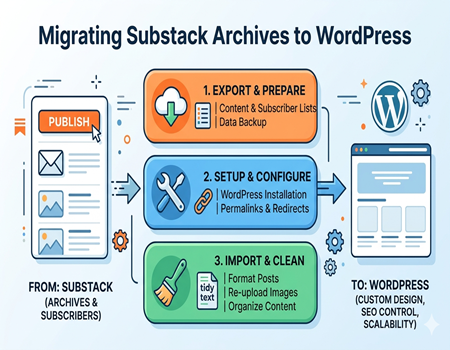
Substack has become a popular platform for writers, creators, and newsletter publishers who want a simple way to share content and build an audience. It offers an easy setup, built-in email distribution, and a clean writing interface. However, as your content grows, many creators start feeling limited in terms of customization, SEO control, and long-term scalability.
This is where WordPress comes in as a powerful alternative. WordPress gives you full control over your website, content, design, and monetization options. Whether you want better search engine visibility or a fully customized blog experience, migrating your Substack archives to WordPress can be a smart move for long-term growth.
In this guide, you will learn how to migrate your Substack content step by step without losing your valuable posts or audience. We will also cover common challenges and how to handle them properly. If you prefer a hassle-free process, you can also explore professional Substack to WordPress Migration Services to ensure everything is transferred smoothly and efficiently.
Why Migrate from Substack to WordPress?
Many creators start with Substack because it is simple and beginner-friendly. It allows you to publish content quickly and send it directly to subscribers without technical knowledge. However, as your blog or newsletter grows, you may start feeling restricted by the platform’s limited customization and control over your content.
One of the biggest reasons to move to WordPress is ownership. On Substack, your content and audience are still tied to the platform’s ecosystem. With WordPress, you fully own your website, data, and design. This gives you long-term stability and freedom to grow your brand without depending on third-party rules or limitations.
Another major advantage is SEO control. WordPress allows you to optimize every part of your content using plugins, custom URLs, meta tags, and structured data. This helps improve your visibility on search engines and brings organic traffic over time. Substack, on the other hand, offers limited SEO flexibility, which can restrict your growth potential.
Monetization is also more flexible on WordPress. You are not limited to subscriptions only. You can add ads, affiliate links, sell products, or create membership systems based on your needs. This opens multiple revenue streams compared to Substack’s simpler monetization model.
Additionally, WordPress gives you complete control over design and user experience. You can create a professional-looking website, improve navigation, and build a stronger brand identity. Overall, migrating to WordPress is a smart step if you want more control, better growth opportunities, and long-term success.
Challenges in Migrating Substack Archives
Migrating your content from Substack to WordPress is not always a simple one-click process. Unlike some platforms that offer direct export and import tools, Substack requires more manual effort. This can be time-consuming, especially if you have a large number of posts or newsletters that need to be transferred carefully.
One common challenge is formatting. Substack content is designed for email delivery, which means layouts, fonts, and spacing may not look the same when moved to WordPress. You may need to manually adjust headings, paragraphs, and embedded elements to make your content look clean and professional on a website.
Handling images and media files can also be tricky. Sometimes images do not transfer properly, or they remain linked to Substack instead of being hosted on your WordPress site. This can affect page speed, SEO, and overall user experience if not fixed correctly during migration.
Another important issue is URL structure and SEO risk. If your Substack URLs are not properly redirected, you may lose existing traffic and search rankings. Broken links can also harm user experience. This is why many creators consider using Substack to WordPress Migration Services to handle the technical aspects and avoid costly mistakes during the transition.
Pre-Migration Checklist
Before you start migrating your Substack archives to WordPress, it is important to prepare everything properly. A clear checklist will help you avoid mistakes and make the process smoother. The first step is to back up your Substack content. Make sure you have copies of all your posts, images, and data so nothing gets lost during the transition.
Next, export your email subscriber list from Substack. Your audience is one of your most valuable assets, so you need to keep it safe. Once exported, you can later import this list into an email marketing tool that integrates with WordPress, ensuring you stay connected with your readers after migration.
You should also choose a reliable hosting provider and set up your WordPress website. Install WordPress, pick a clean and responsive theme, and configure basic settings. This includes setting up permalinks, creating essential pages, and preparing your site structure before adding content.
Finally, install an SEO plugin like RankMath or Yoast SEO. These tools will help you optimize your content, manage meta tags, and improve search visibility. If you want to avoid technical setup and ensure everything is done correctly, Substack to WordPress Migration Services can help you prepare and execute the migration efficiently.
Step-by-Step Guide to Migrate Substack Content
Export Content from Substack
The first step in the migration process is exporting your content from Substack. You can request an export of your data directly from your Substack dashboard, which usually includes posts, subscriber lists, and basic information. This file acts as your backup and starting point for moving content to WordPress.
If the export does not fully meet your needs, you may have to manually copy your posts. This is especially true for formatting-heavy newsletters. Make sure you carefully collect all your published content so nothing important is missed during the migration process.
Format and Clean Content
Once you have your content, the next step is cleaning and formatting it for WordPress. Substack posts are often designed for email, so the layout may not look perfect on a website. You will need to adjust headings, paragraph spacing, and remove unnecessary elements like email-specific formatting.
This step is important for maintaining readability and user experience. Take time to check each post, correct alignment issues, and ensure the content looks professional. Clean formatting also helps with SEO, as search engines prefer well-structured and easy-to-read pages.
Import Content into WordPress
After formatting your content, you can begin adding it to your WordPress site. There is no direct import tool for Substack in most cases, so many users rely on manual copy-paste into the WordPress editor. While this takes time, it gives you better control over how your content appears.
Use the WordPress block editor to structure your posts properly. Add headings, images, and internal links where needed. This is also a good opportunity to optimize your content for SEO by adding keywords, meta descriptions, and proper URL slugs.
Upload Images and Media
Images and media files should be uploaded directly to your WordPress media library instead of linking from Substack. This ensures your website loads faster and avoids broken links in the future. Always check that images are properly aligned and optimized for web performance.
Organize Posts with Categories and Tags
Finally, organize your posts using categories and tags. This helps users navigate your website easily and improves SEO. A clear structure makes your content more discoverable and enhances the overall user experience on your WordPress site.
Migrating Subscribers and Email List
When moving from Substack to WordPress, transferring your subscriber list is just as important as migrating your content. Your audience is the core of your newsletter, so you need to ensure that their data is safely exported and properly imported into your new system without any loss.
Start by exporting your subscriber list from Substack. This usually comes in a CSV file that includes email addresses and basic user data. Once you have this file, you can import it into an email marketing platform like Mailchimp or ConvertKit, which can be easily integrated with your WordPress website.
It is also important to follow email compliance rules while handling subscriber data. Make sure your subscribers have given proper consent to receive emails from you, and avoid sending unsolicited messages after migration. Maintaining trust with your audience should always be a priority during this process.
After importing your list, test your email system to ensure everything is working correctly. Send a welcome or update email to inform your subscribers about the move. This helps maintain engagement and ensures a smooth transition from Substack to your new WordPress platform.
SEO Considerations During Migration
SEO is one of the most important parts of migrating your Substack archives to WordPress. If it is not handled properly, you can lose rankings, traffic, and visibility on search engines. That is why planning your SEO strategy before and during migration is essential for long-term success.
One of the first things to focus on is URL structure. WordPress allows you to create clean and SEO-friendly URLs, but you must make sure they match or properly redirect from your old Substack links. Without proper redirects, users may land on broken pages, which can hurt your rankings and user experience.
Setting up 301 redirects is very important. These redirects tell search engines that your old Substack URLs have permanently moved to new WordPress pages. This helps preserve your existing SEO value and ensures you do not lose organic traffic that you have already built over time.
Next, optimize your meta titles and descriptions for every post. WordPress SEO plugins like RankMath or Yoast SEO make this process simple. You should include your target keywords naturally while keeping the content readable and user-friendly.
Internal linking is another key factor. While migrating, you should rebuild your internal link structure to connect related posts. This improves navigation and helps search engines understand your site structure better. This is also where Substack to WordPress Migration Services can be useful, as they ensure proper SEO mapping during the migration process.
Finally, submit your updated sitemap to Google Search Console after migration. This helps search engines crawl and index your new WordPress site faster, ensuring your content stays visible and continues to grow in rankings.
Design & User Experience Improvements
One of the biggest advantages of moving from Substack to WordPress is the improvement in design and user experience. WordPress gives you complete freedom to create a website that matches your brand identity instead of being limited to Substack’s simple layout. You can choose from thousands of themes and customize colors, fonts, and layouts according to your audience and niche.
Navigation also becomes much better on WordPress. You can create clear menus, category pages, and featured sections that help users find content easily. This structured layout improves engagement and keeps visitors on your site for longer periods.
Another important improvement is mobile optimization. Most modern WordPress themes are fully responsive, ensuring your content looks clean and readable on all devices. Along with that, you can also improve page speed by using caching plugins and optimized images, which directly enhances user experience and SEO performance.
When You Should Use Professional Migration Services
While migrating Substack archives to WordPress can be done manually, it is not always the best option for everyone. If you have a large number of posts, complex formatting, or an active subscriber base, the process can quickly become technical and time-consuming. In such cases, using professional help can save both time and effort.
Professional migration experts handle everything from content transfer to SEO setup. They ensure that no posts are lost, images are properly migrated, and all URLs are correctly redirected. This reduces the risk of broken links and traffic loss during the transition.
If you are not comfortable with technical steps like redirects, SEO configuration, or email list integration, then expert support becomes even more valuable. Services like Substack to WordPress Migration Services are designed to manage the entire process smoothly while ensuring your website remains fully optimized and functional after migration.
Common Mistakes to Avoid
During the migration from Substack to WordPress, many creators make small mistakes that later lead to big issues. One of the most common mistakes is not setting up proper 301 redirects. Without redirects, your old Substack links will break, and you can lose valuable traffic and SEO rankings.
Another mistake is ignoring image migration. Some users forget to re-upload images to WordPress and keep them linked from Substack, which can cause broken images in the future. This negatively impacts user experience and site performance.
Poor formatting is also a common issue. Since Substack content is email-based, it often looks messy when pasted directly into WordPress without cleaning. Taking time to structure headings and paragraphs properly is very important.
Lastly, many users forget to configure SEO settings like meta titles, descriptions, and sitemaps. These elements are essential for visibility on search engines and should never be skipped during migration.
Final Thoughts
Migrating your Substack archives to WordPress is a powerful step toward building long-term control over your content, audience, and online growth. While Substack is great for starting out quickly, it becomes limited when you want more SEO power, customization, and monetization options. WordPress solves these limitations by giving you complete ownership and flexibility.
The migration process may feel technical at first, but with proper planning, it becomes manageable. From exporting content and subscribers to setting up SEO and redirects, every step plays an important role in protecting your traffic and improving performance.
Once your migration is complete, you can focus on scaling your blog with better design, stronger SEO, and diversified income streams. If you want a hassle-free experience, professional Substack to WordPress Migration Services can help you move everything safely while ensuring no data or rankings are lost during the transition.